8 CC-Link Data Table
21
■ Drive → PLC
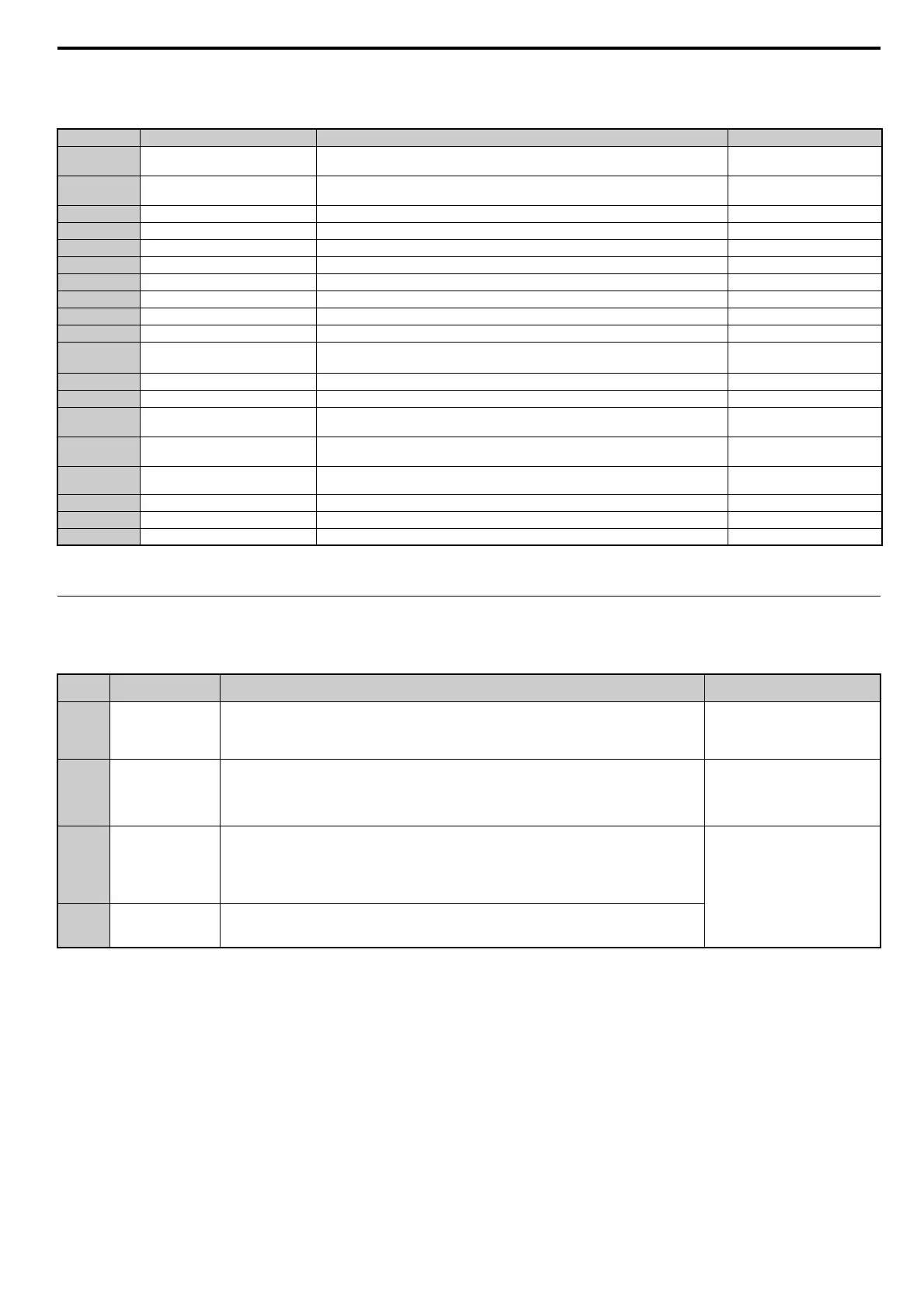
Table 10 Remote I/O Table (Drive → PLC)
Note: If making frequent setting changes, use RYD (Frequency Reference 1 flag) for setting the register. Using RYE (Frequency Reference 2 flag) too often can shorten the
performance life of the drive's internal memory.
◆ Remote Register
■ PLC → Drive
Table 11 Remote Register (PLC → Drive)
Device Signal Name Description Default
RX0 Forward Run
ON: Forward Run Command Present (includes DC Injection Braking)
OFF: No Forward Run Command
–
RX1 Reverse Run
ON: Reverse Run Command Present
OFF: No Reverse Run Command (includes DC Injection Braking)
–
RX2 Terminals MA, MB, MC Function Multi-function output: H2-01 (H2-01 = E: Fault)
RX3 Speed Agree ON: Output frequency is between frequency reference and the detection width set to L4-02. –
RX4 During Stall Prevention – –
RX5 During Undervoltage – –
RX6 Terminal P1 Function Multi-function output: H2-02 (H2-02 = 0: During Run)
RX7 Terminal P2 Function Multi-function output: H2-03 (H2-03 = 2: Speed Agree 1)
RX8, 9 Reserved – –
RXA CC-Link Option Fault Comm. error between drive and CC-Link device–
RXB Monitoring Motor Revolutions ON: Currently monitoring motor revolutions.
Data is stored in remote register
RW
R1
.
RXC Obtain Monitor Data ON: Monitor data has been updated. –
RXD Frequency Setting Ready 1 ON: Displays the main frequency reference that has been set. –
RXE Frequency Setting Ready 2
ON: Displays the data set to d1-01 (Frequency Reference 1).
Note: Also sets the main frequency reference at the same time.
–
RXF Command Code Execute Complete
ON: Displayed after the specified command code has been executed.
RXF signal switches off when the RYF command is no longer present.
–
RX10
to 19
Reserved – –
RX1A Error ON: Fault occurred on the drive side. –
RX1B Remote Station Ready ON: Drive is ready to operate. –
RX1C to 1F Reserved – –
Remote
Register
Name Description Request Flag
RW
W0
<1> Refrain from saving data to the EEPROM excessively because the EEPROM used in the drive can only be written to 100,000 times.
Monitor Code
• Sets the code number of the items to be displayed by the monitor. (Refer to Monitor Codes on page 29).
• Once the monitor code has been set, the monitor value is stored in register RW
R0
by enabling RYC (the
monitor execute request flag).
• While RW
R0
is updated, RXC (during monitor flag) remains on.
RYC (Monitor Execute Request)
RW
W1
Frequency Setting
• Specifies the source of the frequency reference. The value set to this register becomes the main frequency
reference whenever RYD (frequency setting reference 1) is enabled.
• When RYE (frequency setting reference 2 flag) is enabled, then the value for frequency reference 1 is
written and saved to EEPROM
<1>.
Note: Parameter o1-03 determines the setting units for the frequency reference.
• RYD (Frequency Reference 1)
• RYE (Frequency Reference 2)
RW
W2
Command Code
• Sets the command code to execute functions such as the fault reset, fault history, parameter read, and so on.
(Refer to Command Codes on page 27, Extended Command Codes on page 28.)
• When RYF (command code execution request flag) is enabled, the drive executes the specified command.
Once the command has been carried out, RXF switches on.
Note: The value set to RW
W3
(write data) should be adjusted accordingly to match changes to
any parameter settings.
RYF (Command Code Execute
Request)
RW
W3
Write Data
• Sets the value to be used along with RW
W2
(Command Code) as needed.
• RYF (command code execution request flag) needs to be enabled after the command code and write data
have been set.


 To Next Page
 Loading...


