- 18 -
Internet Explorer:
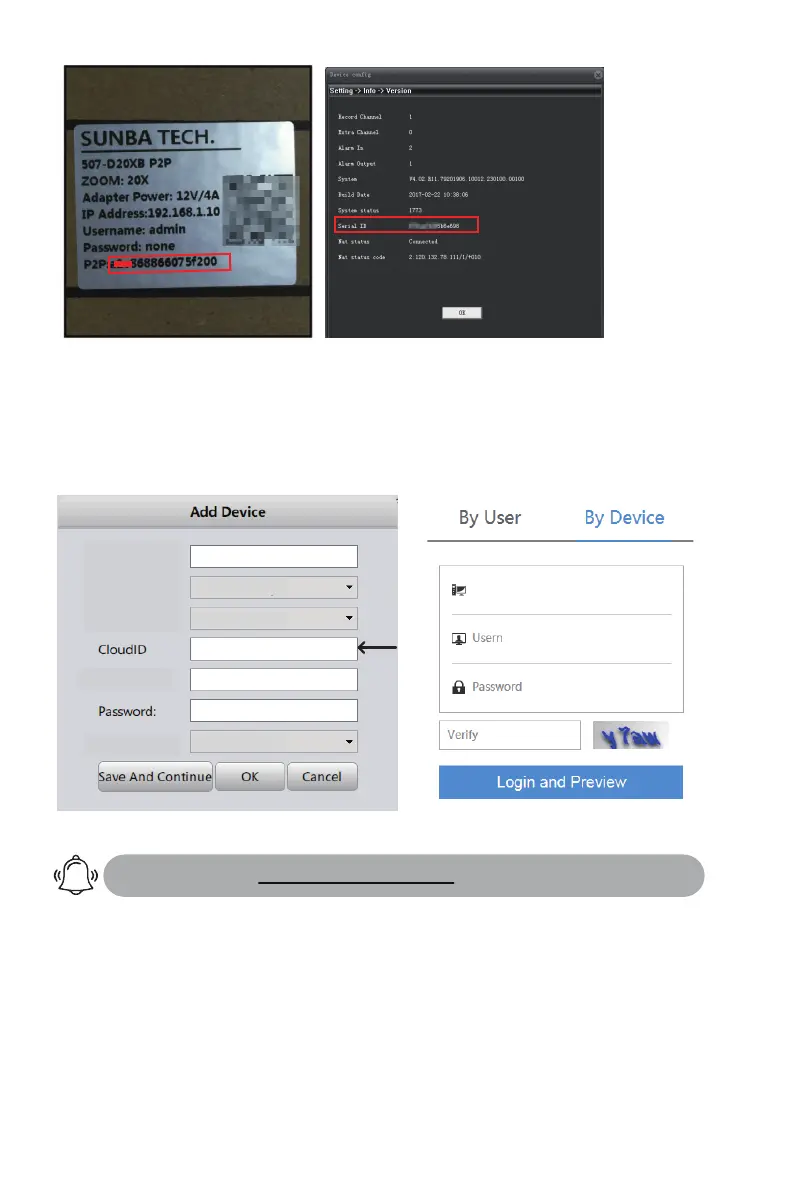
Please go to xmeye.net and use “Device Login”. Enter the cloud ID of
the camera and associated username and password.
VMS
Group:
Device Name:
Login Type:
Sunba
Default Group
CloudlD
adminUserName:
Vendor:
SUNBA
987dc021338*****
Please forward BOTH http port (80 by default) and TCP (media) port (34567
by default) and refer to the manual of your router for detailed steps of port
forward in order to remotely access using a WAN IP. Other apps such as Tiny
Cam or IP Cam Viewer may require you to forward ONVIF and RTSP port as well.
Disclaimer: Though it is a popular method, Sunba does not recommend seng up
port forwarding as it opens all ports to the public network and increases chances of
informaon leak.
Type 2: Port Forwarding
Please refer to portforward.sunba.net for more instructions.
2) Enter the Cloud ID in Sunba Cloud Platform for remote access:
xmeye.net (Internet Explorer)
987dc021338*****
admin



 To Next Page