1
People Flow Counting
2
Crowd Density Monitoring
- 26 -
Detection Area: You can set to detect and capture face appeared in the selected area or in the
full screen.
Set snapshot sensitivity. The greater the value, the higher the sensitivity.
Set snapshot mode. In Intelligent Recognition, the camera detects and snapshots the object
automatically.
To enable snapshot of human body in the detection area, enable Human Body Snapshot.
Min Pupillary Distance (px): The minimum pupillary distance of the detection object.
Counting: Turn on to count the number of faces detected by the IP camera.
Click Clear Counting Result to clear statistics.
Configure face selection as required.
Set the alarm-triggered actions and plan as required.
Click Save and then enable it.
Note: People counting detects human figures in terms of the appropriate ratio between head
and shoulder. So it is important the IP camera is mounted high enough and are able to capture
the upper part of any human figure.
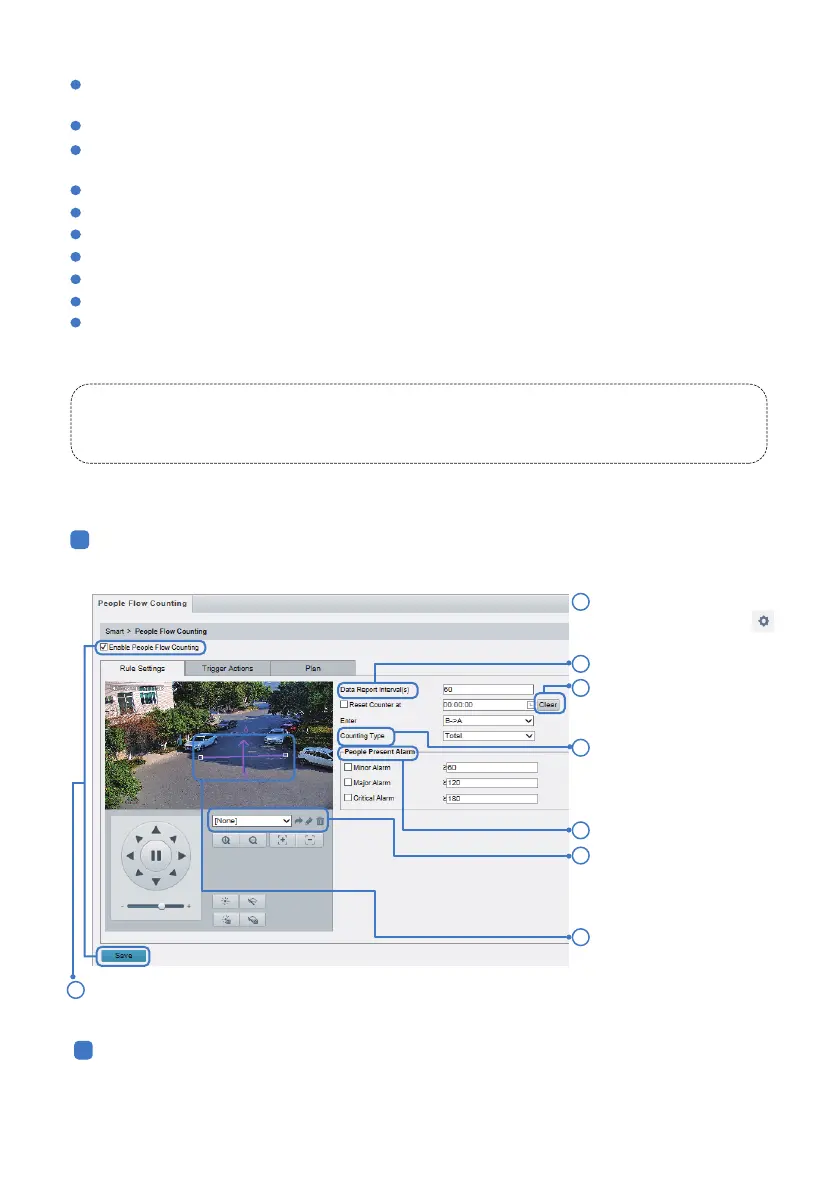
Select People Flow
Counting and then click .
Please leave it disabled.
People Counting cannot be enabled when Perimeter Protection, Face Detection 0r Auto Tracking is
turned on.
Click Setup > Intelligent > Smart > People Counting.
Click Setup > Intelligent > Smart > People Counting.
Set the alarm-triggered actions and plan as required.
Set report interval.
Set enter direction, and then
draw the line on the preview
window on the le.
Counting Type: Select
whether to count people
entered, people existed or
total (both).
Set people present alarm.
Click Clear to reset
counting results.
2
1
3
4
5
7
10.3 People Counting
Click Save and then enable it.8
Add a pre-designated view
as a home position preset,
please refer to Chapter 6.3
for detaills.
6



 To Next Page