2
1
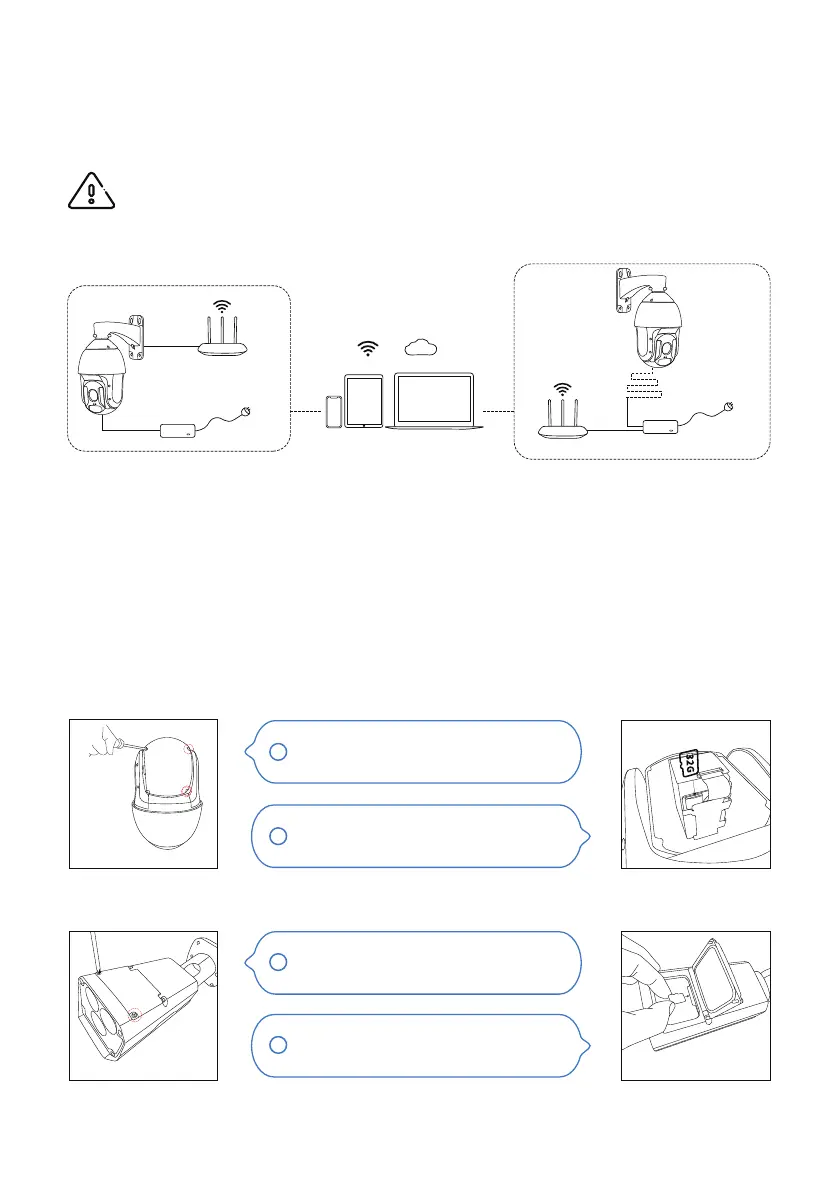
1.2 Micro SD Card Installation
Pan Tilt Zoom Camera
Bullet Camera
1.Connection and Installation
1.1 Connection
PoE Injector
Router
Router
1. DC Power
2. PoE+ Power
Phone Pad Computer
- 03 -
WARNING! It is important to perform a pre-installation test (bench-test) indoor prior to
outdoor installation.
The camera can be powered by a DC12V power adapter (came with the package) and transmit video data
using a network cable to a router/switch.
The camera can also be connected to a PoE injector/switch which would let the network cable supply both
power and data connection.
Sunba PTZ camera requires the PoE adapter (switch/injector) to support IEEE 802.3at standard, which is
also known as PoE+.
Sunba IP camera comes with a built-in micro SD card slot that can store videos and snapshots.
Insert the TF card as directed by the
arrow.
Remove the 4 screws to take o the
camera back cover.
Remove the 4 screws located on the
top of the camera.
Open the top cover, and insert the TF
card as directed by the arrow.
1
2



 To Next Page