17
Shot Volume Programming
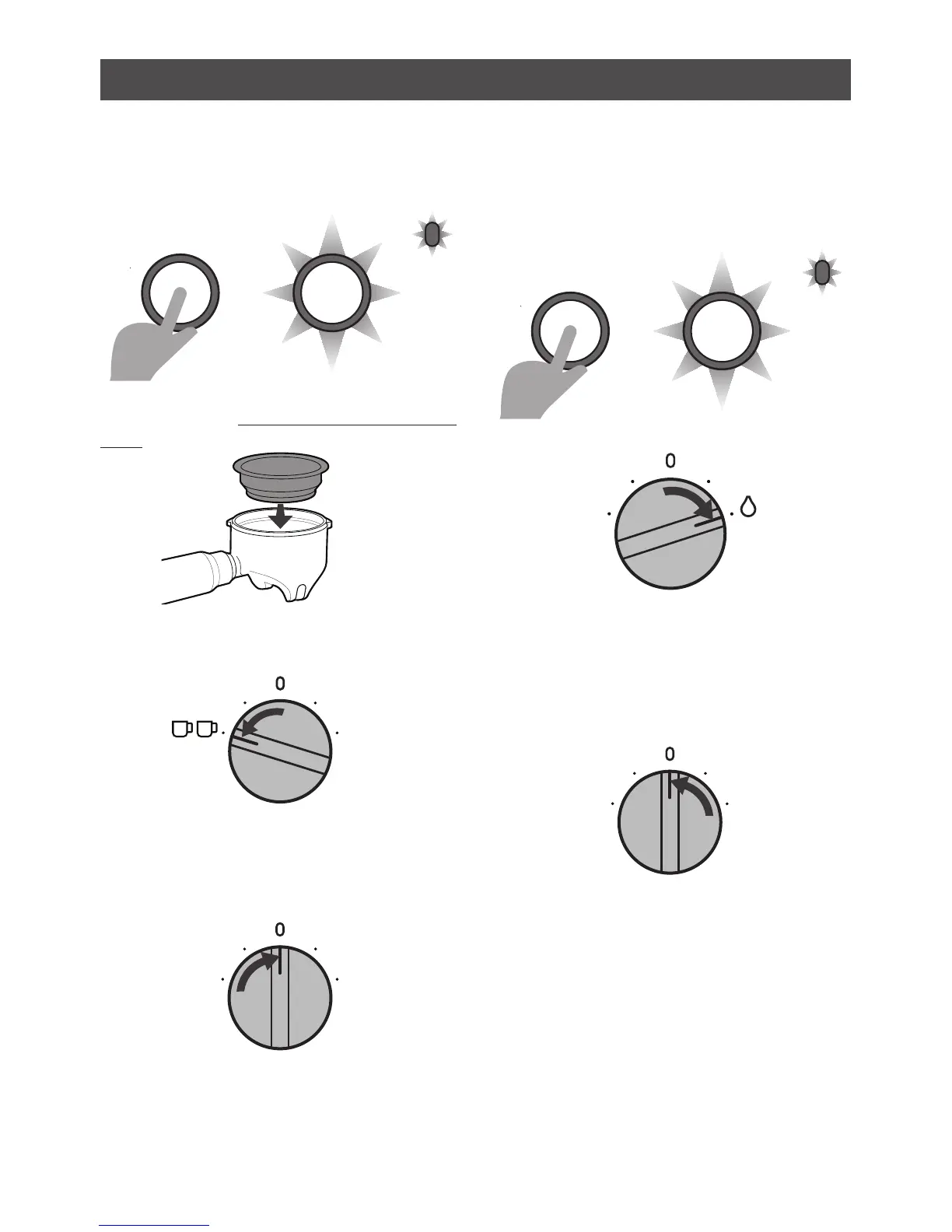
Two Cup - Shot Volume Program
- Press & hold the ON/OFF BUTTON for 4
seconds or until a
flashing light combination
between the
ON/OFF & READY LIGHTS
begins.
- Insert a Two Cup Filter Basket into the
Group Handle & fill with coffee grinds then
tamp. Place in the Group Head.
- Turn the DIAL to the TWO CUP position.
The ON/OFF & READY LIGHTS will continue
to flash once every few seconds.
Espresso will start to pour.
- When you reach your desired 2 Shot
Volume, return the DIAL to the vertical
READY position.
The espresso pour will stop.
The new 2 Shot Volume has been
programmed. The Programming Mode has
finished and returned to the Ready state.
Restore Default One & Two Cup -
Shot Volumes
- Press & hold the ON/OFF BUTTON for 4
seconds or until a
flashing light combination
between the
ON/OFF & READY LIGHTS
begins.
-
Turn the DIAL to the HOT WATER position.
All LIGHTS will flash together 3 times.
The Default Volumes has been restored.
The Programming Mode has finished.
- Return the DIAL to the vertical Ready
position.
ON /OFF
ON /OFF
READY
LIGHT
HOLD
4 SEC










 To Next Page