EasyManua.ls Logo

SunBeat 5010A - System Power Operations

SunBeat 5010A
37 pages
Print Icon
To Next Page IconTo Next Page
To Previous Page IconTo Previous Page
Loading...
15
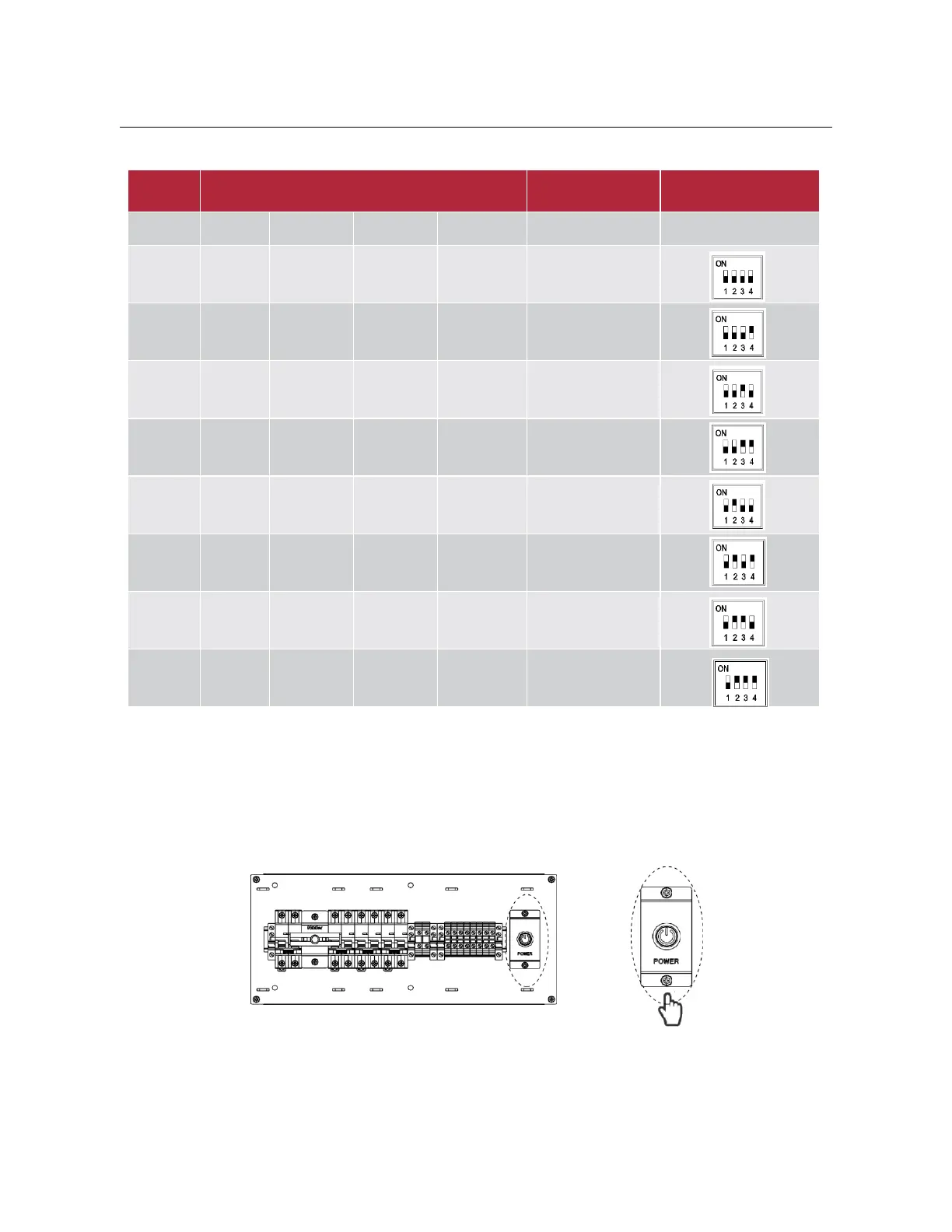
Dip switch setting table:
No.
DIP switch setting position
Explain
Signal
1
2
3
4
0
OFF
OFF
OFF
OFF
1# Battery Module
1
OFF
OFF
OFF
ON
2# Battery Module
2
OFF
OFF
ON
OFF
3# Battery Module
3
OFF
OFF
ON
ON
4# Battery Module
4
OFF
ON
OFF
OFF
5# Battery Module
5
OFF
ON
OFF
ON
6# Battery Module
6
OFF
ON
ON
OFF
7# Battery Module
7
OFF
ON
ON
ON
8# Battery Module
4.2 Operating Instructions
4.2.1 System Power Turn on
(1)
Open the front door of the system, press the POWER button, the battery indicator lights, and the battery is
turned on.
(2)
Press the inverter ON/OFF switch, the LCD screen of the inverter lights up, and the inverter is turned on.
(3)
Set the inverter DC switch to "ON".

Related product manuals