Operation manual of solar water controller SR868C8/SR868C8Q
---------------------------------------------------------------------------------------------------------------------------------------------------
- 5 -
“Holiday” button(SR868C8 have no such function)
“Heating”- manual heating button
“ESC”, exit program setup
“+” Parameter adjust button
“-” Parameter adjust button
2.Installation
Controller can only be installed indoors, far away from dangerous place and away from
the electromagnetic field. Controller should be equipped with an additional plug, which
should have minimum 3mm distance between the pole of the plug or effective
compliance with the provisions of the installation. For example, switch or fuse, please
note that it should be separated between the wires, and use AC power.
2.1 Installing the display unit of controller
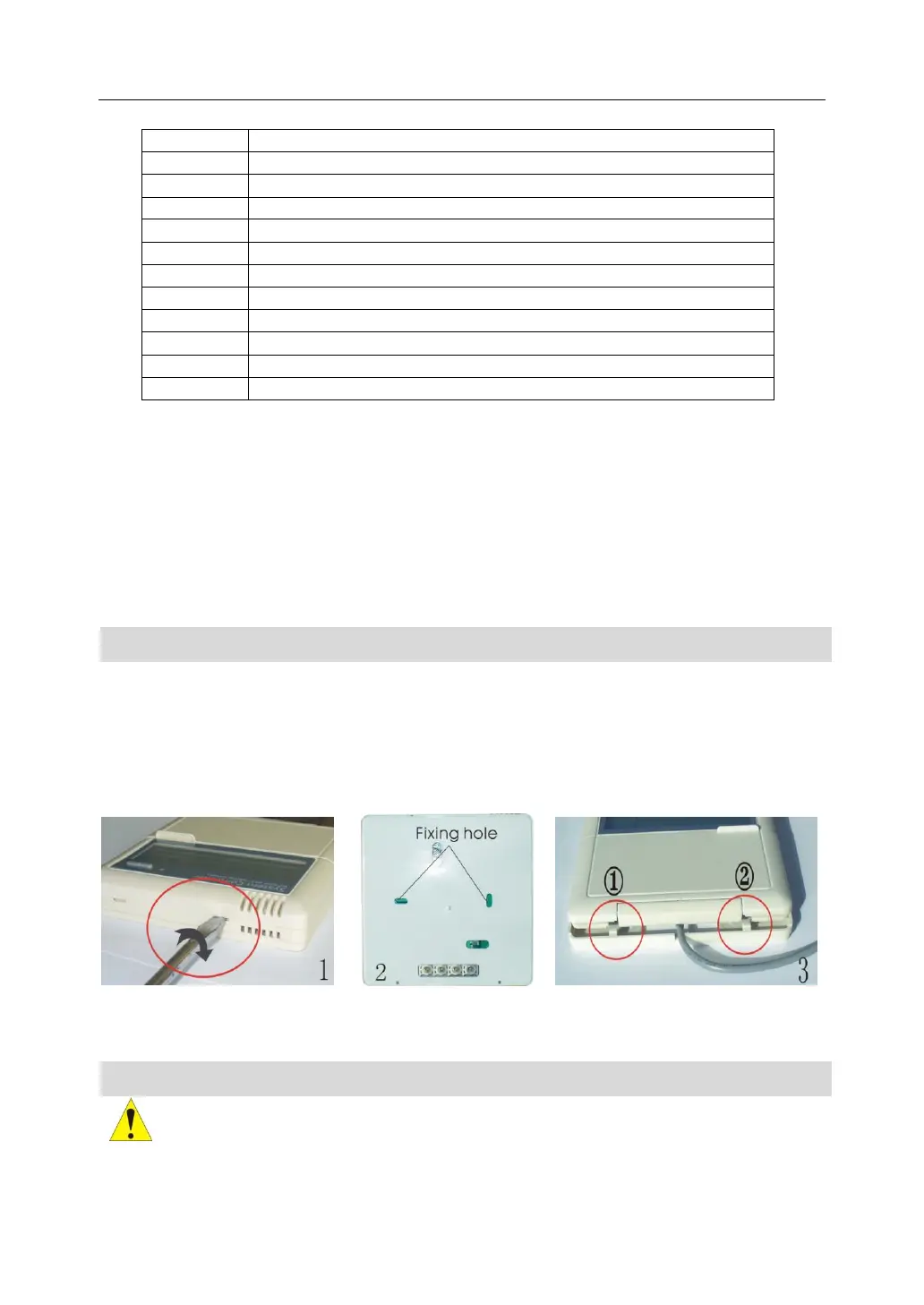
► Take away the back cover plate of display unit by screwdriver, see picture ①
► Fix the back cover plate on wall; see picture ②, (Note: don’t drill hole on the cover
plate)
► Insert display into groove of back cover ①②, installing the display unit on the back
cover plate see picture ③
Picture 1 Picture 2 Picture 3
2.2 Installing the control unit
Note: the controller can only be installed in an area having an adequate level of
protection.


 To Next Page