Operation manual of solar water controller SR868C8/SR868C8Q
---------------------------------------------------------------------------------------------------------------------------------------------------
- 6 -
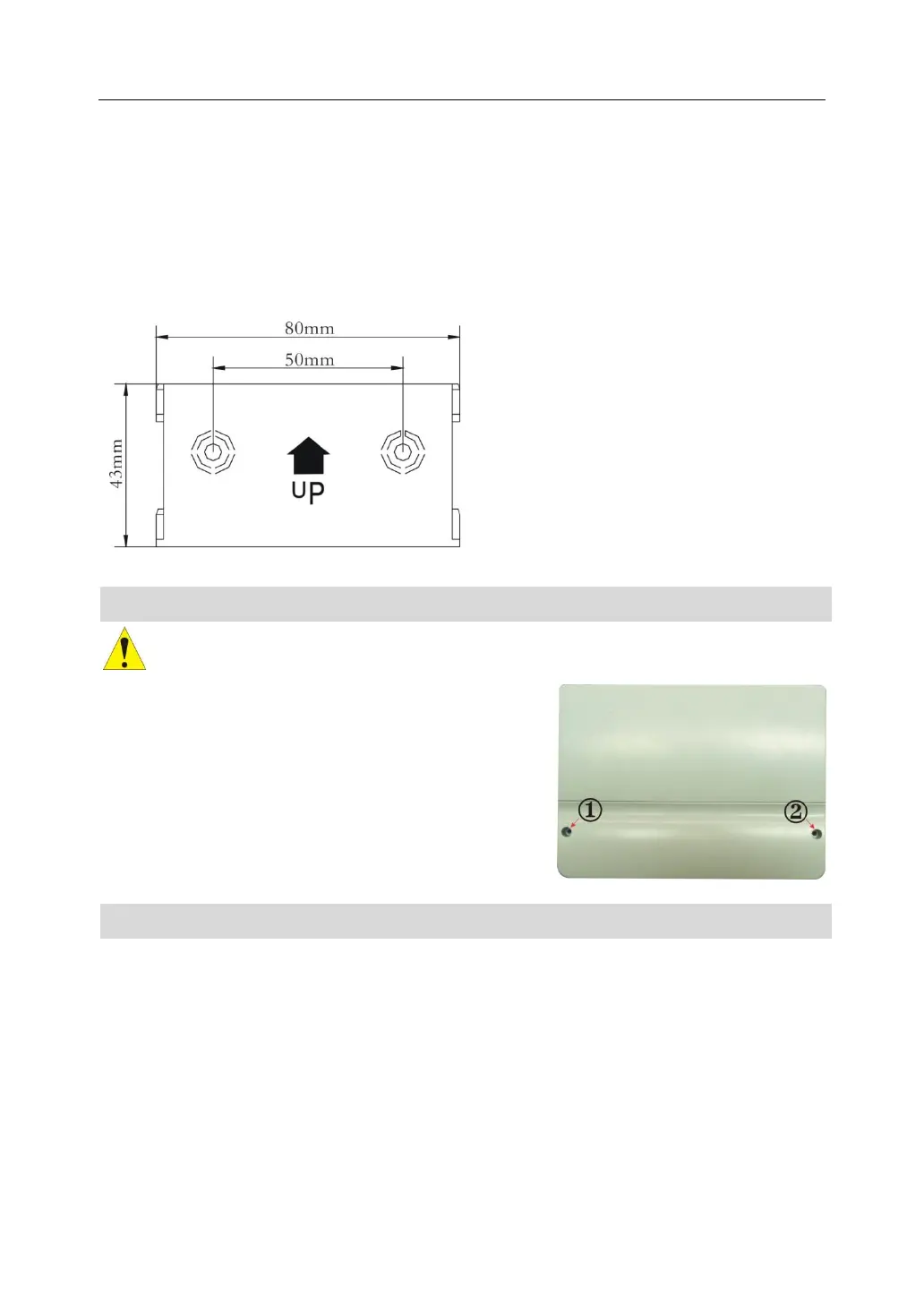
Fixing the hang-panel of controller
►Choose a suitable site
►Mark the position of hole
►Drill the fixing hole, insert the expansion screw
►Fix the hanging plate by using screw
►Press the control unit on the hanging plate
2.3 Preparing before wire connection
Please switch-off the power net before opening the controller cover, and note
the regulation of local electricity supply.
Open/ close the cover of terminal
►Loosen the screw ①②, move cover upwards and
take away the cover
►Close the cover: downwards close cover
►fix cover by using screw ①②。
2.4 Power connection
Power can only be switched on when the house of controller is closed, an installer must
make sure that the IP protection class of the controller is not damaged during
installation.
Depending on the type of installation, the cables may enter the device through the rear
hole of the case ④or the lower side hole of the case ⑤
Cable come from the rear ④: remove the plastic flaps from the rear side of the case
using an appropriate tool.


 To Next Page