14
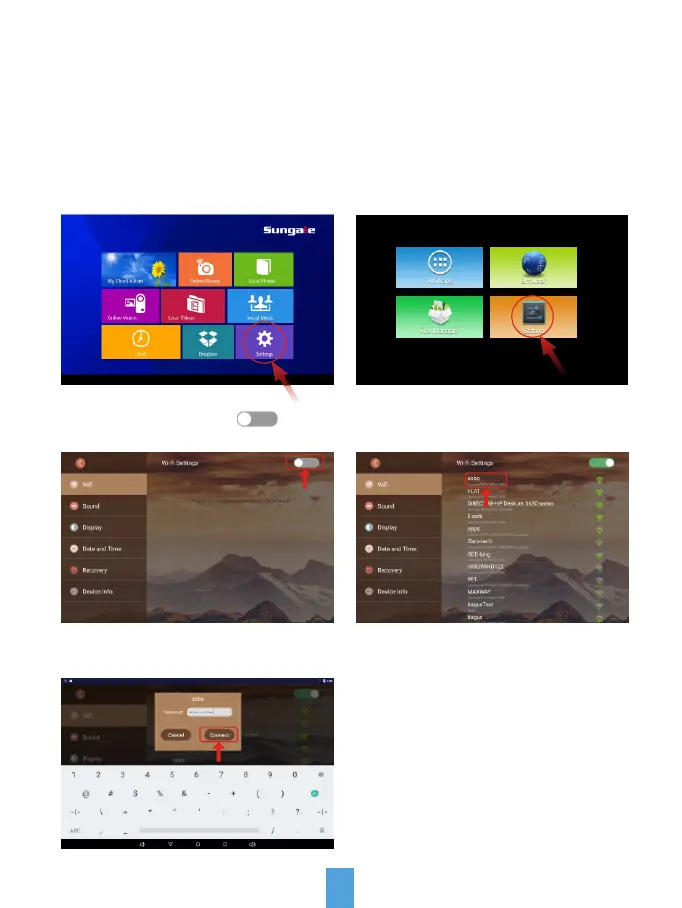
WiFi Setup
Step2: Select the "Settings" menu icon.
You should automatically be prompted to setup your WiFi connection during the
frame registration process, but if you ever need to connect to a new WiFi network,
follow below instructions:
Note: A WiFi internet connection is
required in order to register and use
your frame as well as access the
online features available.
Step1: To setup the WiFi Connection
on your photo frame, click "Settings"
from the home screen.
Step3: Tap WiFi button ( ) to
turn on.
Step4: Select your network.
Step5: Input your password, and then
tap "Connect" button.



 To Next Page