4
Know your Cloud Frame
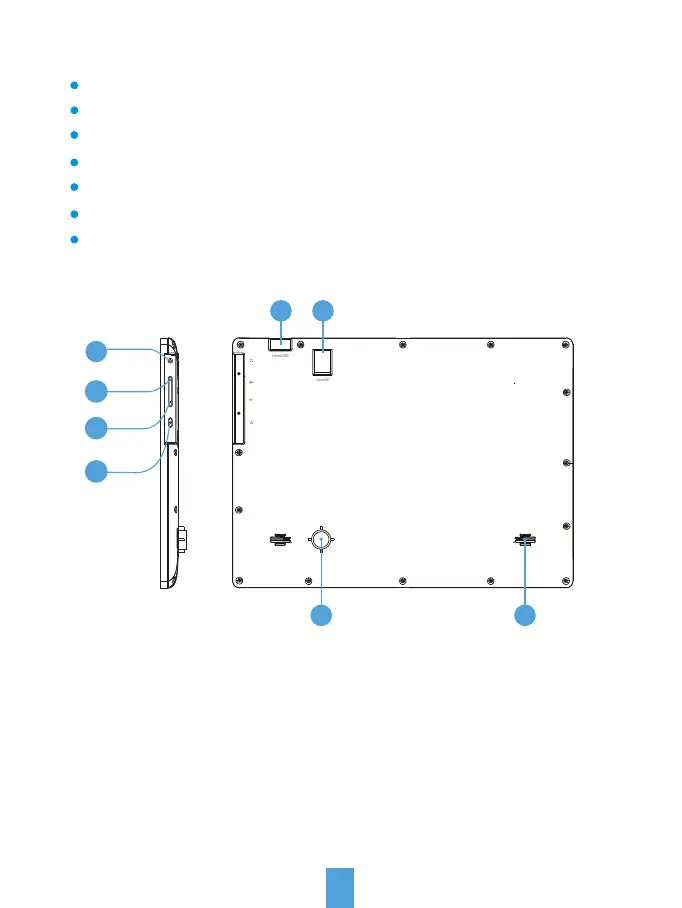
1. Earphone jack: Audio output connection for earphones.
2. Volume up: Press to increase the volume level.
3. Volume down: Press to decrease the volume level.
4. Power: Press and hold on for more than 3 seconds to turn on or turn off
the unit. One quick press to turn the screen on and off.
5. Micro USB port:
a. Charge and power the frame with the included power adapter and USB cable.
b. Connect this unit to your computer by USB cable, and read U-disk by OTG cable.
6. MicroSD card slot: Insert one of the microSD cards each time(support up to 32GB).
7. Stand: Using the stand provided that the frame can sit on the top of a surface.
8. Speaker: Stereo speakers built-in.
What's-In-The Box?
1 Cloud Frame
1 Quick Start Guide
1 Power Adaptor
1 USB cable
1 OTG cable
1 Warranty card
1 Cloud Frame Stand
2
4
3
1
7 8
5 6



 To Next Page