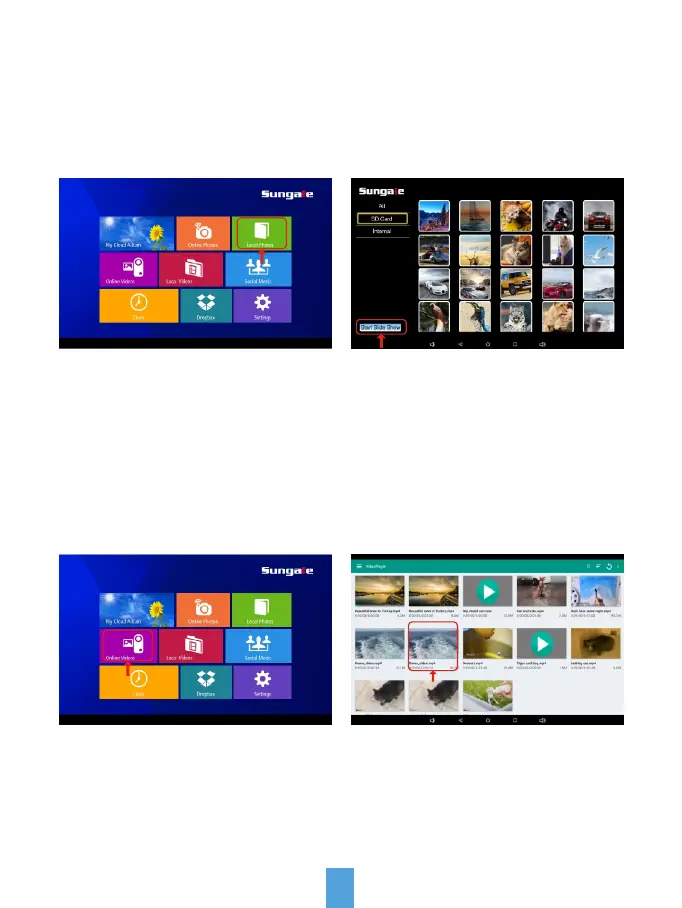
Local Photos
To access and view local photos, tap "Local Photos" icon, all the photos will load
on the screen as thumbnails mode, select the album and photos you want to as
a slide show, tap the "Start Slide Show" icon to start.
Your frame comes with internal memory and also a microSD card slot for
additional memory access.
Local Videos
Step 1. From the main menu,
tap "Videos" icon.
Step 2. Select the video you want
to play.
26
If you want to stop the slide show, tap the photo and the slide show will stop and
you will be back to Local Photos menu.
Note: Photos in Local Photos will automatically play based on the settings you
have setup from "Sungale Cloud" App or the website, except weather panel setting.



 To Next Page