15
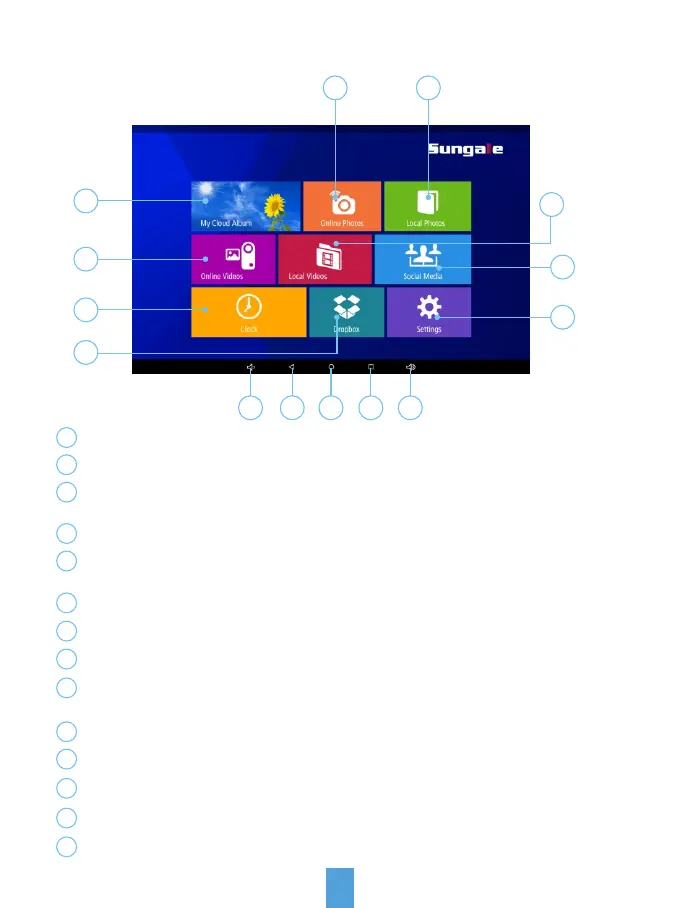
Getting to know your main menu
1
4
2 3
5
6
9
8
7
2
3
4
5
6
7
8
9
My Cloud Album: To load photos pushed from Sungale Cloud.
1
Online Photos: To access your other photos apps.
Local Photos: Display or review the photos stored in internal memory
or microSD card.
Online Videos: To access your other video apps.
Local Videos: Play or view the videos stored in internal memory or
microSD card.
Social Media: To access your social media accounts.
Clock: View the time and date.
Settings: Choose from four icons including Browser, all Apps, Files, and
Settings to adjust frame's features and functions.
Dropbox: 3rd party cloud storage access.
10
Volume down: Press to decrease the Volume level.
11
Back: Press to return to the previous screen.
12
Home screen: Press to return to the home screen.
13
Recent Apps: Press to display the list of Apps that you have worked recently.
14
Volume down: Press to increase the Volume level.
10 11 12 13 14



 To Next Page