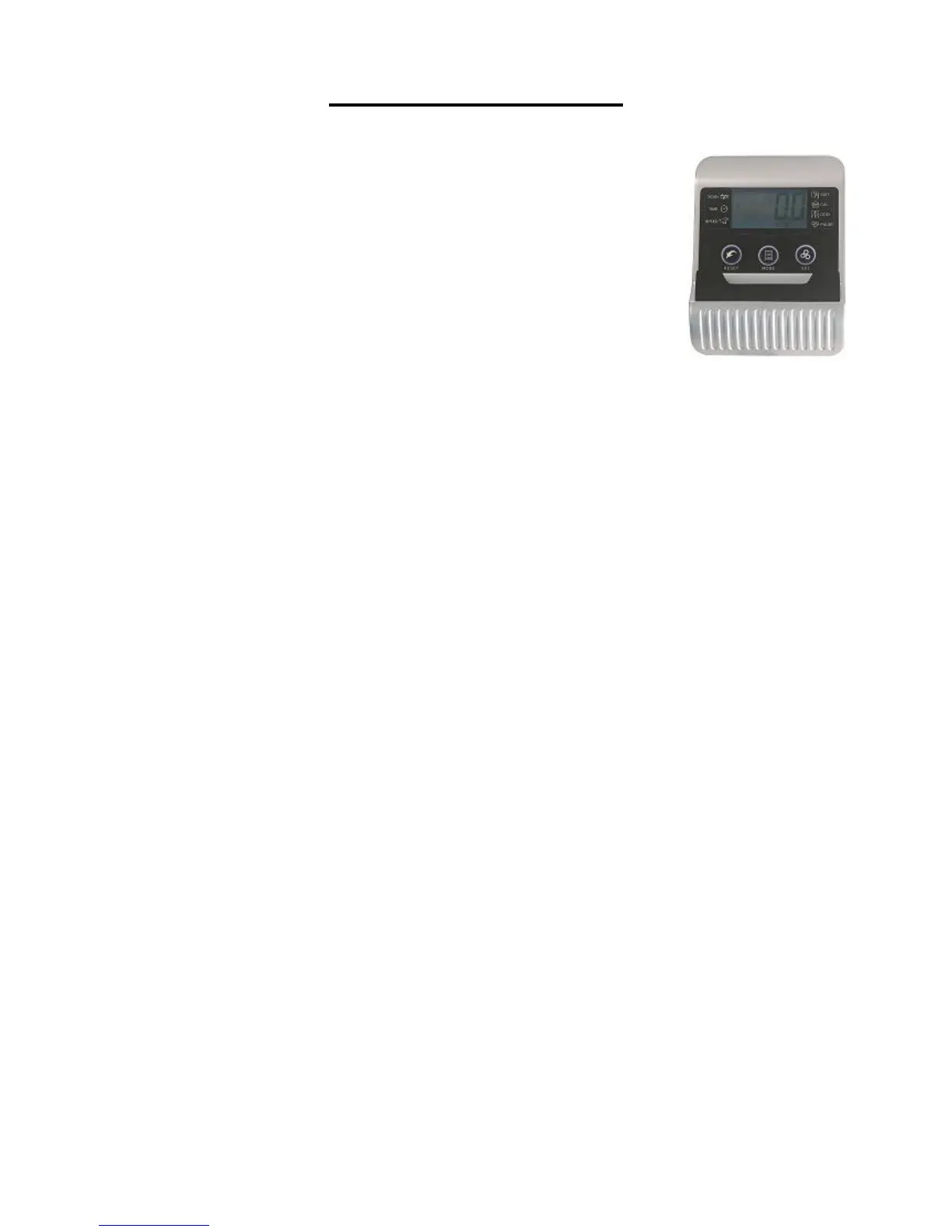
EXERCISE MONITOR
SPECIFICATIONS:
TIME …………………………………...00:00-99:59 MIN: SEC
SPEED ……………………………….. 0.0-999.9 MPH
DISTANCE ……………………………0.00-99.99 MILES
CALORIES ……………………………0.0-999.9 KCAL
ODOMETER…………………………..0.0-9999 MILES
PULSE ……………………………….. 40-240 BPM
FUNCTION KEY:
MODE: Press to select function. (Time, Speed, Distance, Calories,
Pulse).
RESET: Press to reset the value back to zero
SET: Press to preset the desired value of Time, Distance, Calories, or Pulse.
OPERATION PROCEDURES:
1. AUTO ON/OFF:
If the belt is put into motion, or the mode button is pressed the computer will become
active, and shall remain active while either of these two things continues to be done,
however without any signal for approximately 4 minutes, power (monitor), will turn off
automatically.
2. RESET:
The computer can be reset by pressing and holding the MODE button for three
seconds, removing the batteries will also reset the computer and return all function
settings back to zero.
3. MODE:
To select the LOCK MODE setting press the MODE key when the pointer on the
function you wish to select begins to blink, (once locked only the selected function
will be displayed).
4. FUNCTIONS:
TIME: Counts the total time of an exercise from start to finish.
SPEED: Displays the current speed being obtained.
DISTANCE: Counts the total distance of an exercise from start to finish.
CALORIES: Counts the total amount of calories burned during an exercise start to
finish.
ODOMETER: Accumulates the total distance traveled from all workout sessions.
PULSE: Displays the user’s current heart rate in beats per minute.
Place the palms of your hands on both of the pulse sensors, the computer will
display your current heart beat rate on the monitor. (This value in not intended for
medical use) SCAN: Automatically displays all functions repeatedly.
Battery: This monitor uses two AA batteries. If the display appears improper or
difficult to read please try installing new batteries before attempting to contact.


 To Next Page