12 • Questions? Call or Text +1-801-658-0015
Orion
™
mPulse User Manual
How to Use the Touchscreen Interface
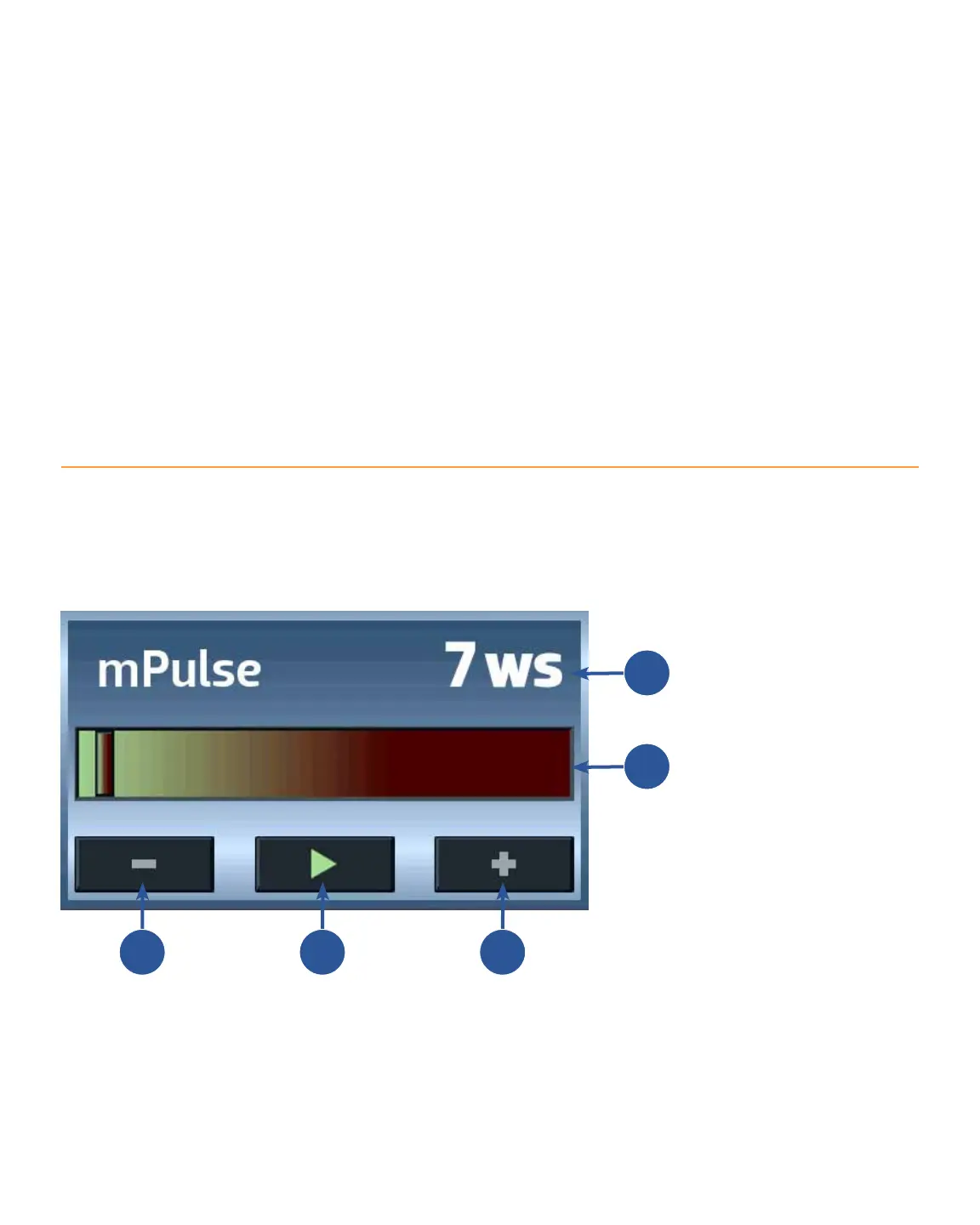
The Orion touch screen interface is very user friendly. Users have access to every welding parameter with one
touch. Below is an explanation of the various buttons and options found on the Orion mPulse interface. *Orion
touch screens are resistive touch screens. This means they respond best to a little bit of pressure. The end of
your ngernail or the tip of the alligator clip works best when touching the screen.
C D E
A
B
Weld Energy Level. This number
represents the amount weld energy
level, in Joules, ready to be released
through the electrode.
Energy Bar. Use a nger and slide
horizontally to adjust the weld energy
level, in Joules. The Current Energy
Level (A) will change as a nger is
moved across the Energy Bar.
Minus Button. Tap this
button to reduce the weld
energy level by 1 Joule.
The Weld Energy Level (A)
will change as this button
is tapped.
Play/Pause Button. This
button alternates between
Play and Pause as it is
tapped. The welder will
operate when in the Play
mode; the welder will not
operate in the Pause mode.
Plus Button. Tap this
button to increase the
weld energy level by 1
Joule. The Weld Energy
Level (A) will change as
this button is tapped.















 To Next Page