Overview
For a more detailed interface manual please visit the
Gecko website and select the IN.K300 control panel.
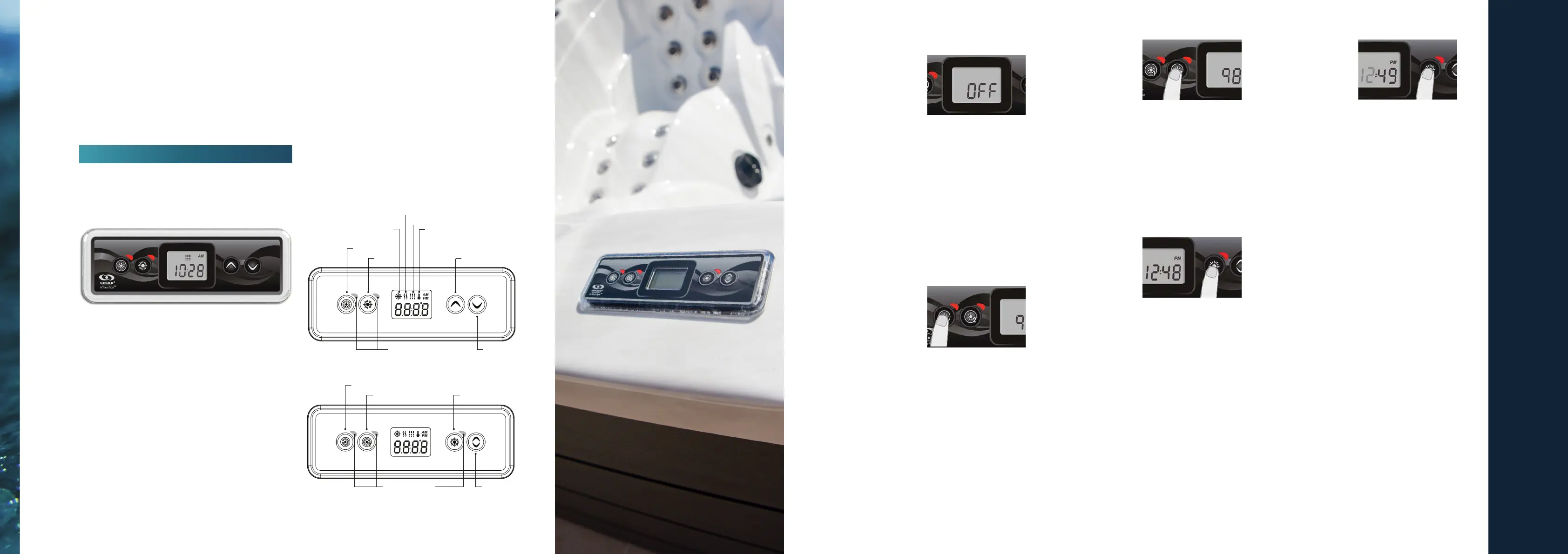
Descripon
One Pump
Two Pump
CONTROL
PANEL OPERATIONS
Our hot tubs use the world leading Gecko control panels. For a more detailed interface manual please visit
the Gecko website and select the control panel you have. The informaon provided below is a summary.
Spa Funcon
O Mode
Pressing Pump 1 for 5
seconds will enable the
O mode. This mode
allows you to stop
all outputs including
automac funcons such as lter cycle, heat request
and smart winter mode for 30 minutes to perform
quick spa maintenance. When O mode is acve,
the display will toggle between the “OFF” message,
the clock and the water temperature.
The spa light will ash for a few seconds before the
end of the 30 minutes to warn you that the system
is about to resume its normal operaon. Press Pump
1 or Pump 2 (if available) to restart the system
before the expiraon of the 30 minute delay. When
the system resumes its normal operaon, the display
shows “On“ for 3 seconds.
Pump One
Press Pump 1 key to
turn Pump 1 on at low
speed. Press a second
me to turn pump to
high speed (with a dual-
speed pump*). A third me turns pump o. A built-in
mer automacally turns pump o aer 20 minutes,
unless pump has been manually deacvated rst.
The “Pump 1” indicator lights up when Pump 1 is
on. With a dual-speed pump, the indicator will ash
when pump 1 is on at low speed.
Pump Two Key
Not available on all
models.
Press Pump 2 key to
turn Pump 2 on at low
speed. Press a second me to turn pump to high
speed (with a dual-speed pump*). A third me turns
pump o. A built-in mer automacally turns pump
o aer 20 minutes, unless pump has been manually
deacvated rst.
The “Pump 2” indicator lights up when Pump 2 is
on. With a dual-speed pump, the indicator will ash
when pump 2 is on at low speed.
Programming Steps
Program Menu
The program menu is
accessible by holding
down the Light key
for 5 seconds. In the
program menu the
following parameters can be set: clock, the lter
or purge cycles, economy mode and temperature
units. While you are in the program menu, use the
Up or Down key to adjust the parameters and use
the Light key to jump to the next parameter. The
changes will be saved aer the conrmaon of
the last parameter only. If there is no acon taken
for 10 seconds, the system will exit the program
menu without saving any changes.
Seng the Clock
Enter the program
menu by holding down
the Light key for 5
seconds. The display
will show the current
clock seng with the hour ashing.
Depending on factory sengs your system may
be set to 24-hour me or 12-hour me. Seng
the hour: Use the Up or Down keys to adjust the
hours. Press the Light key to jump to the next
parameter, the minutes.
Programming the Filter/Purge Cycles
Depending on system conguraon your spa will
perform either a lter or a purge cycle. The lter
cycle menu consists of the following parameters:
the start me (FS), the duraon (Fd) and the
frequency (FF). The purge cycle menu consists of
the following parameters: the start me (FS) and
the frequency (FF).
A lter cycle consists of starng all the pumps and
blower in high speed for 1 minute (purge step) then,
the pump associated with the lter will run in low.
ENJOYING YOUR HOT TUB OR SWIM SPA
| 25
Set Point
Smart Winter
Mode
Heater
Filter
Up
Down
Light
Pump 1
Indicator lights
Up / Down
Indicator lights
LightPump 2
Pump 1
Gecko In.K300



 To Next Page