ENJOYING YOUR HOT TUB OR SWIM SPA
| 27
Programming Steps
Program Menu
The program menu is
accessible by holding
down the Light key for 5
seconds. In the program
menu the following
parameters can be set: clock, the lter or purge
cycles, economy mode and temperature units. While
you are in the program menu, use the Up or Down
key to adjust the parameters and use the Light key
to jump to the next parameter. The changes will be
saved aer the conrmaon of the last parameter
only. If there is no acon taken for 10 seconds, the
system will exit the program menu without saving
any changes.
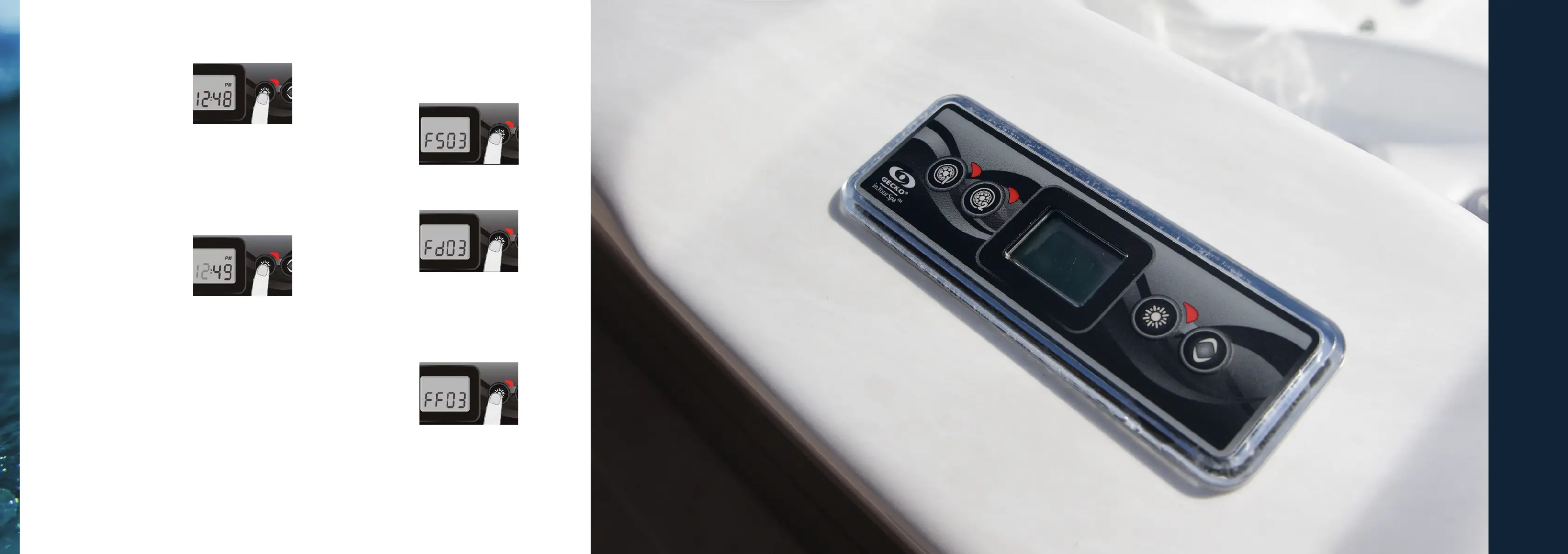
Seng the Clock
Enter the program menu
by holding down the
Light key for 5 seconds.
The display will show the
current clock seng with the hour ashing.
Depending on factory sengs your system may be
set to 24-hour me or 12-hour me. Seng the
hour: Use the Up or Down keys to adjust the hours.
Press the Light key to jump to the next parameter,
the minutes.
Programming the Filter/Purge Cycles
Depending on system conguraon your spa will
perform either a lter or a purge cycle. The lter
cycle menu consists of the following parameters: the
start me (FS), the duraon (Fd) and the frequency
(FF). The purge cycle menu consists of the following
parameters: the start me (FS) and the frequency (FF).
A lter cycle consists of starng all the pumps and
blower in high speed for 1 minute (purge step) then,
the pump associated with the lter will run in low
speed for the remaining duraon of the lter cycle
(clean step). A purge cycle is used when the spa is
equipped with a 24 hour circulaon pump which
provides a connuous clean step. It consists of starng
all the pumps and blower in high speed for 1 minute.
Seng Filter or Purge
Cycle Start Time
The display will show
FSxx, “xx” represenng the
starng hour of the cycle.
Use the Up or Down key
to adjust the hours. Use the Light key to jump to the
next parameter, lter duraon (Fd).
Seng Filter Cycle
Duraon
(not available on purge
systems) The display
will show Fdxx, “xx”
represenng the duraon
in hours of the lter cycle. Use the Up or Down key to
adjust the duraon. Use the Light key to jump to the
next parameter, lter or purge frequency (FF).
0 = no ltraon 24 = connuous ltraon
It is not recommended to set this to “0”.
Seng Filter or Purge
Cycle Frequency
The display will show
FFxx, “xx” represenng
the number of cycles per
day. Use the Up or Down
key to adjust the frequency. Use the Light key to
jump to the next parameter, economy mode (EP).
The “Filter cycle” indicator lights up when lter is
on and ashes when suspended.



 To Next Page