Connecng to your hot tub via Bluetooth has never
been easier. Simply follow the instrucons below to
sync your hot tub to your tablet/device.
Troubleshoong
Quite oen, issues with connecvity via Bluetooth
is because your phone (or tablet) is already
connected to, or in use with another device. Some
Bluetooth devices can only connect to one other
device at a me; therefore, you’ll have to disrupt
any current connecons before you can link up.
If this approach doesn’t solve connecvity issues, we
recommend re-establishing the Bluetooth connecon
by pressing ‘forget this device’ in sengs. To reset
bluetooth, the spa will need to be switched o for
at least 15 minutes.
BLUETOOTH
IMPORTANT:
Updates to phone soware and sound systems
may impact connecvity or instrucons.
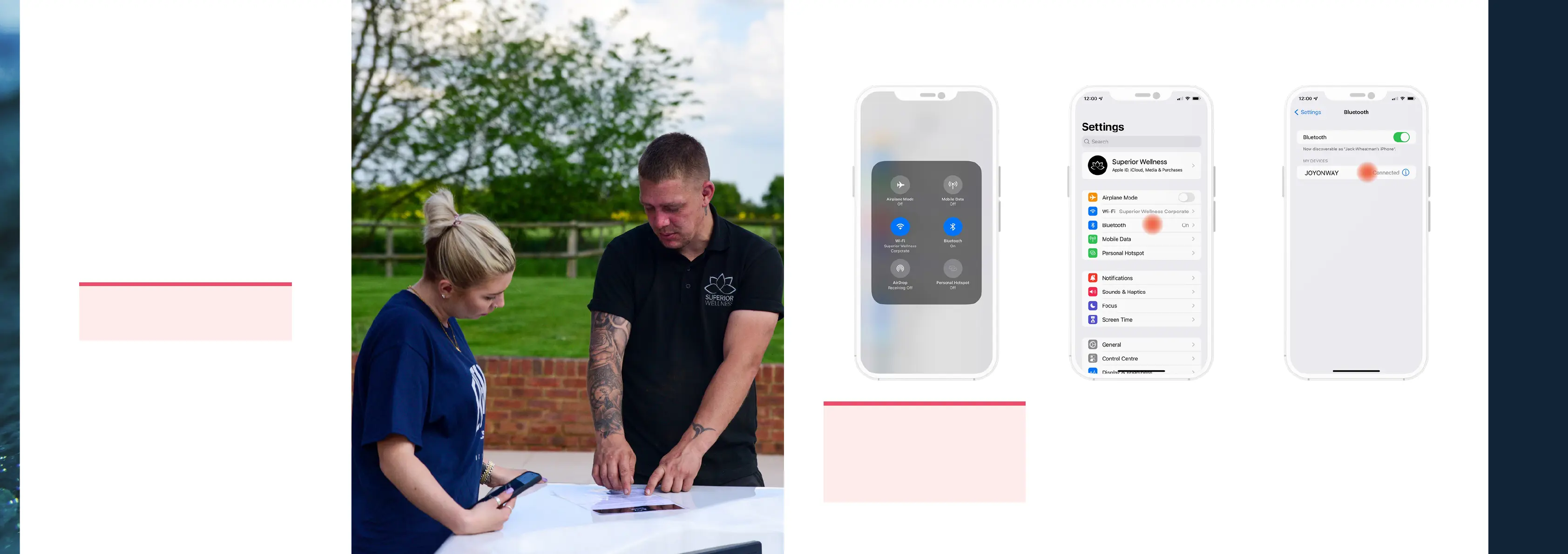
Connecng to your device
Step 1:
Make sure the devices are turned on and ready to
be connected. On your phone, tablet, or computer
make sure that Bluetooth is turned on (you can do
this by opening sengs, clicking on the Bluetooth
menu and tapping the feature on).
Step 2:
Once your device has picked up the pairing with
your hot tub, you will be able to select it on the
drop down menu for pairing. The name will usually
appear on your device as ‘JOYONWAY’ and the
code for your hot tub will be 2288.
Once all of these steps have been completed, your
device and hot tub should be paired, ready for you
to begin using this feature.
IMPORTANT:
Make sure the devices are in range. To
maintain full connecvity, make sure the
devices are within at least 20 feet of each
other. If you face issues with the quality of
your connecon, please try bringing the
devices closer together.
ENJOYING YOUR HOT TUB OR SWIM SPA
| 49



 To Next Page