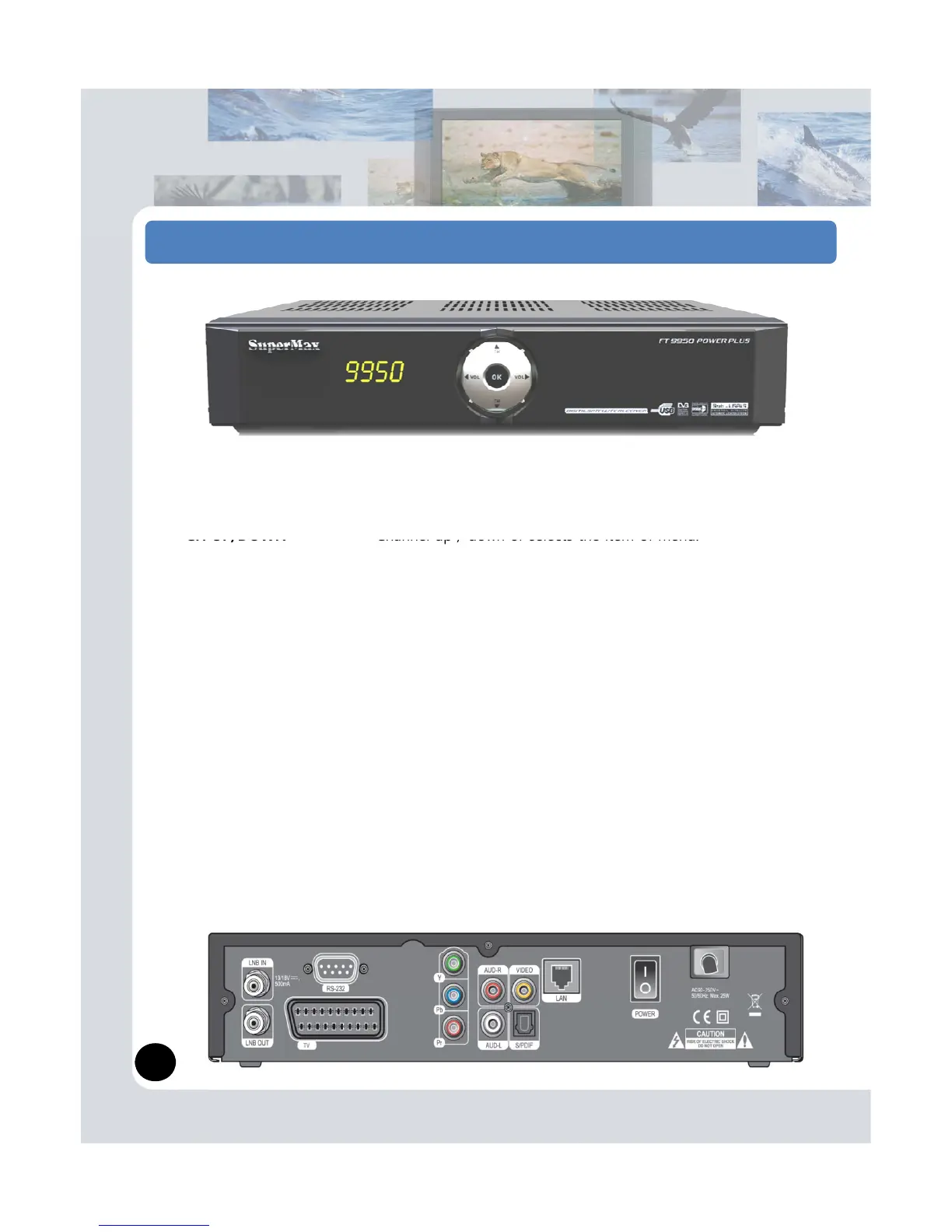
(1) The front of the digital receiver
STANDBY Switches the receiver power On and Standby.
VOL UP/DOWN Volume up / down or selects the item of menu.
USB Connects your USB devices to USB Port.
Firmware update, data transfer and Save recording files available.
Card Slot [Optional] Insert Smart Card to this slot.
CI Slot [Optional] Insert CAM to this slot.
(2) The back of the digital receiver
LNB IN Satellite broadcasting signal input socket.
LNB OUT Satellite broadcasting signal output socket through the LNB IN
socket for another digital receiver.
RS-232 Connects to personal computer for software upgrade.
TV SCART [Optional] Composite video output socket for the television set
TV OUT Connects to RF-Modulator Cable.
Y/Pb/Pr [Optional] Component video output socket for the television set.
VIDEO Composite video output socket for the television set(yellow).
system(white/red).
S/PDIF [Optional] Dolby digital output socket for the audio system.
LAN [Optional] This is allows you to set network Configuration for network
applications.
3


 To Next Page