on
In this chapter you can Searching channels,
Satellite Scan, Provider Scan, Edit TP/Satellite,
DiSEqC Positioner and Factory Reset.
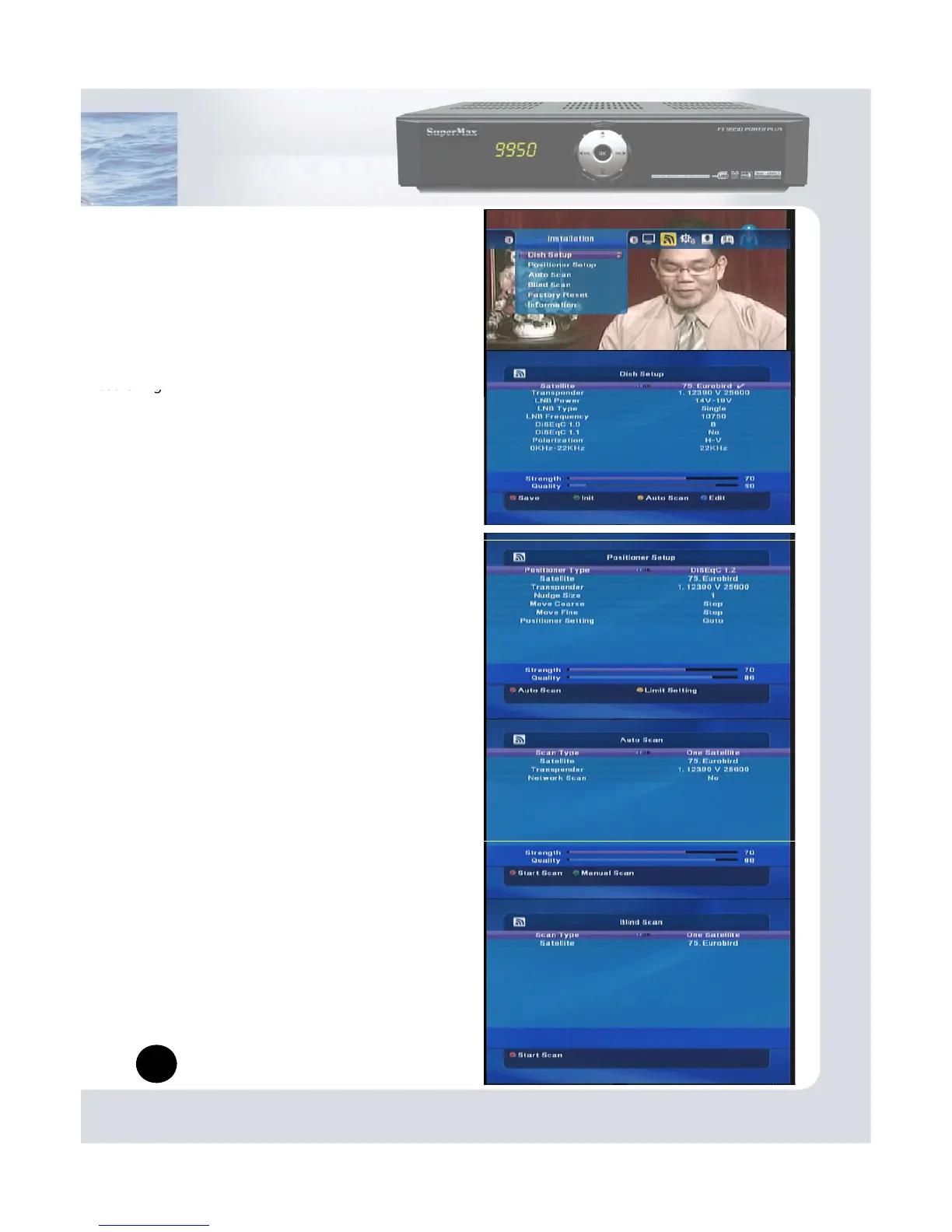
(1) Dish Setup
This Chapter describes how to searching channels.
You can set Dish and LNB Information for channel
Note:
Save: Red button.
Initialize: Green button.
Auto Scan : Yellow button.
Edit : Blue button.
(2) Positioner Setup
You can control several dishes by DiSEqC1.2 or USALS.
When you use USALS, please set Longitude
and Latitude in your area accurately.
Note
:
Auto Scan: Red button
Limit Setting: Yellow button.
(3) Auto Scan
Auto scan is convenient way searching
Multi-satellite in one time
Press Start scan, It will start searching.
Start Scan: Red button
Manual Scan: Green button
-you can search advance way as like PID search and
edit frequency also.
(4) Blind Scan
Searching all channels without TP information.
If you don’t know information about TP and dishes,
this function will help you searching channels easily.
6
Start Scan: Red button


 To Next Page