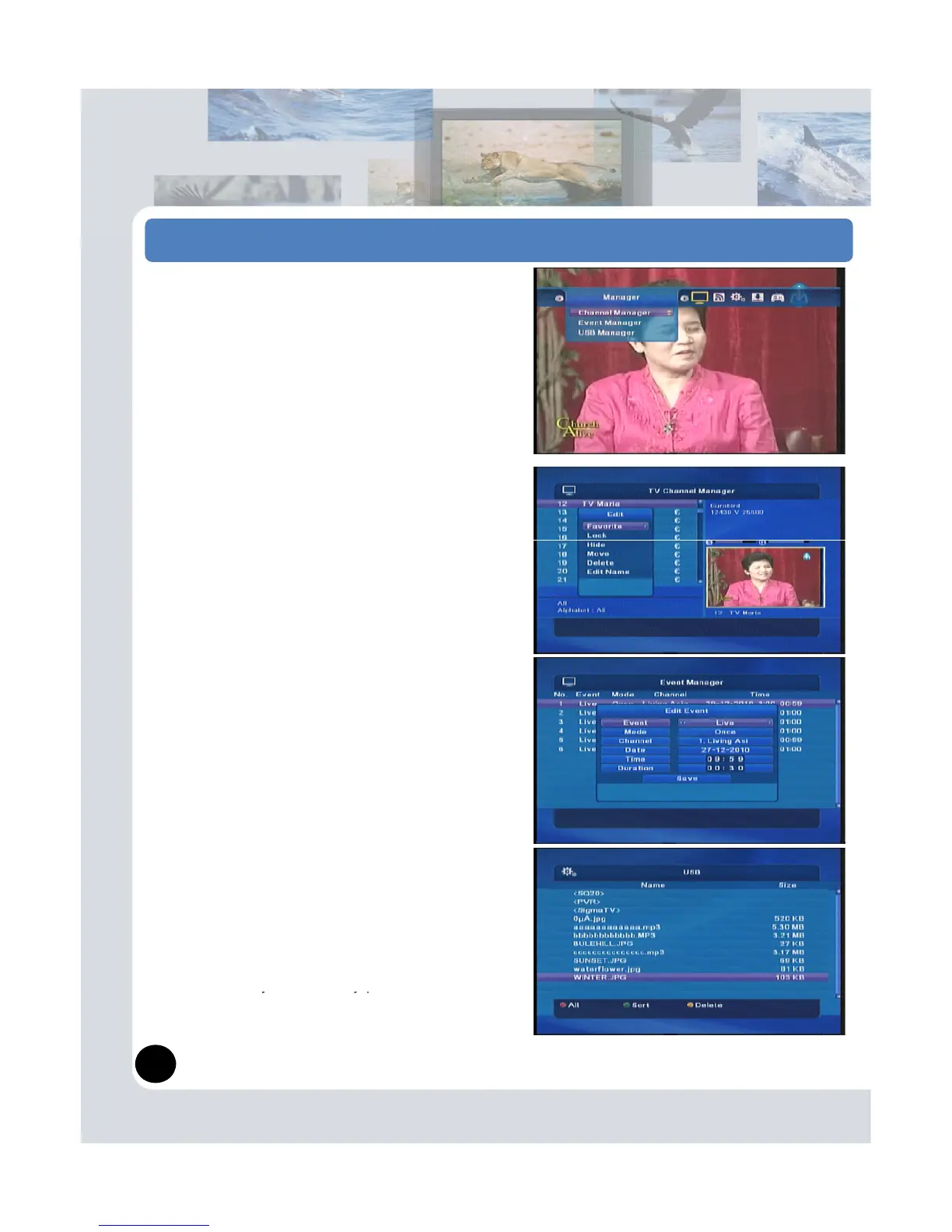
Press OK button. Then you can control channels by
Favorite, Lock channel, Hide channel, Move, Delete,
Edit name and Edit PID.
Note:
Detail usage is at Chapter 5. ‘Channel List information’
in this manual.
(2) Event Manager
Displaying record reservation list on this menu.
Event timer is possible to add EPG Menu and
Event Timer menu.
Event manager: Press RED (Insert) , you can see
the Edit event popup menu.
Event : you can setup as like “Record, Live, Wakeup,
Sleep”. And then setup other items and then press
Save. You can use event manager.
(3) USB Manager
USB functions are,
Press Sort key(Green button) then it shows Software →
Music → Photo → Movie
- S/W upgrade: Detail usage is at chapter 6. ‘S/W
upgrade by USB Stick memory.
- Music: MP3 format is available.
- Photo display: *.jpeg format is available.
- Movie: PVR/*.ts file format is available.
Press PVR file, you can play recorded channels.
- Delete: You ma


 To Next Page