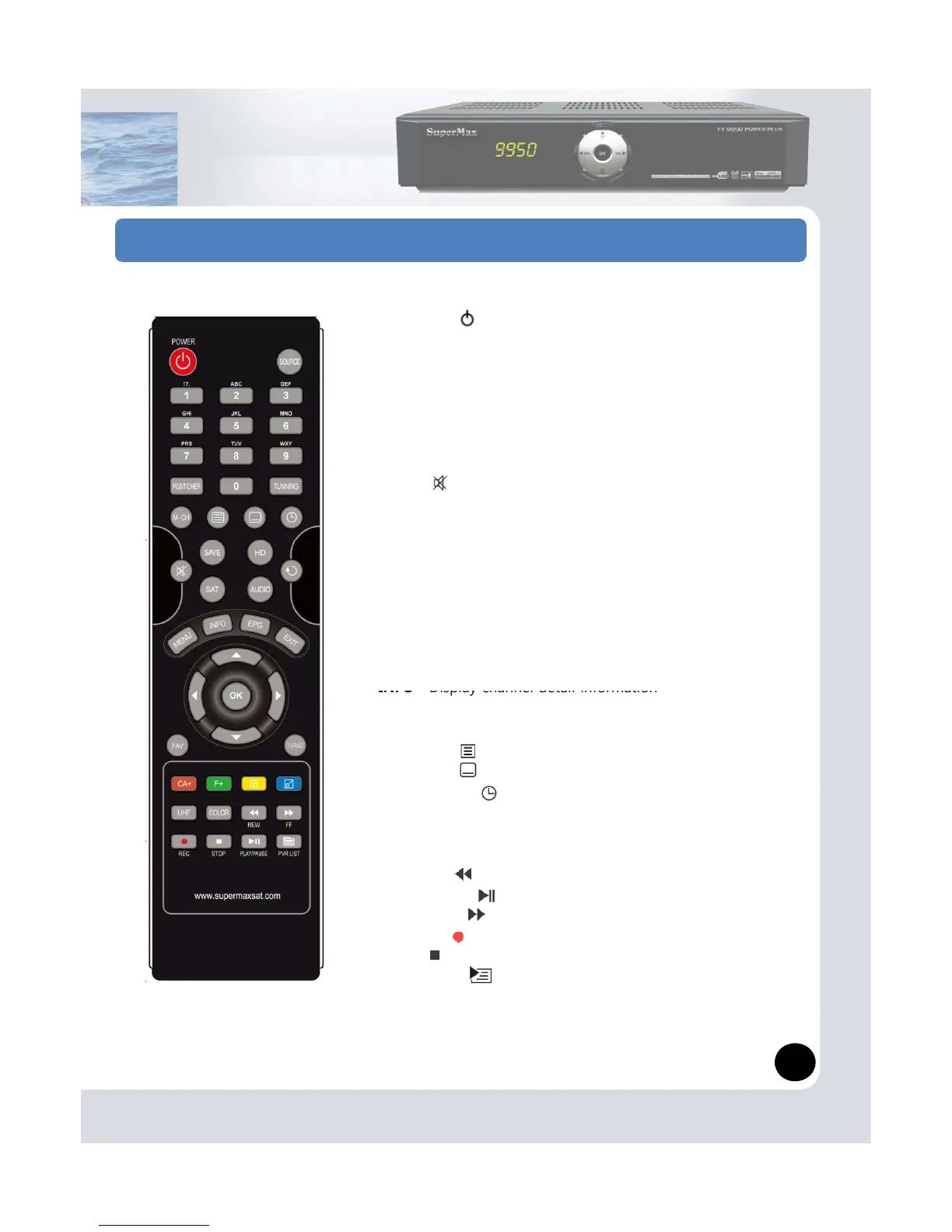
STANDBY ( ) Switches between operation and standby
modes
SOURCE Switching among TV/AV/VCR mode
NUMERICAL BUTTONS (0~9) Used to enter a service
number for service change or to specify values for menu
options
POSITIONER Control Diseqc1.2 or USALS miscellaneous
TUNING Control tuner signal miscellaneous
MUTE ( ) Mutes or un-mutes the audio temporarily
AUDIO Used to select alternative audio track and
audio channel (stereo, mono, etc)
ume.
BACK Recall
MENU Go to Menu
SAT Display Satellite list
EPG Electronic Program Guide
EXIT Exit
FAV Display Favorite channels list
Display channel detail information
TV/RADIO Switching TV / RADIO channel
COLOR KEYS (CA+, F+ …) Special functions
TELETEXT ( ) Enters the digital text service
SUBTITLE ( ) Displays the subtitle language list
SLEEP TIMER ( ) Sets the sleep timer
UHF RF-Modulator Channel control
COLOR Adjust Video color
MULTICH Multi feed
REWIND ( ) Reverse playback
PLAY/PAUSE( ) Play files or Pause
FORWARD ( ) Fast Forward
RECORD ( ) Starting channel record (PVR)
STOP ( ) Stop recording
Record List ( ) Display Record list
4


 To Next Page