
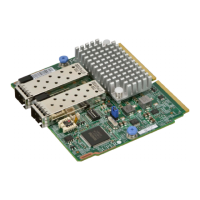
 Need help?
Do you have a question about the Supermicro AOC-MTGN-i2S and is the answer not in the manual?
 General
| Brand | Supermicro |
|---|---|
| Model | AOC-MTGN-i2S |
| Category | Computer Hardware |
| Language | English |
Lists the primary features of the AOC-MTGN-i2S, including dual SFP+ ports and virtualization support.
Details the general, I/O, and virtualization specifications of the AOC-MTGN-i2S controller.
Identifies and describes the key hardware components installed on the AOC-MTGN-i2S.
Details the S1 DIP switch for SMBUS address selection and thermal reading configuration.
Explains Electrostatic Discharge (ESD) risks and necessary precautions during handling and installation.
Provides steps for system preparation before installation and instructions for inserting the card into the SIOM slot.
Details how to install the SIOM card into the motherboard and secure it within the chassis.
Instructions for downloading and installing drivers for Windows operating systems.


 To Next Page