Sutron Corporation X-Link Operations & Maintenance Manual, Rev 1.63 5/24/2016 pg. 39
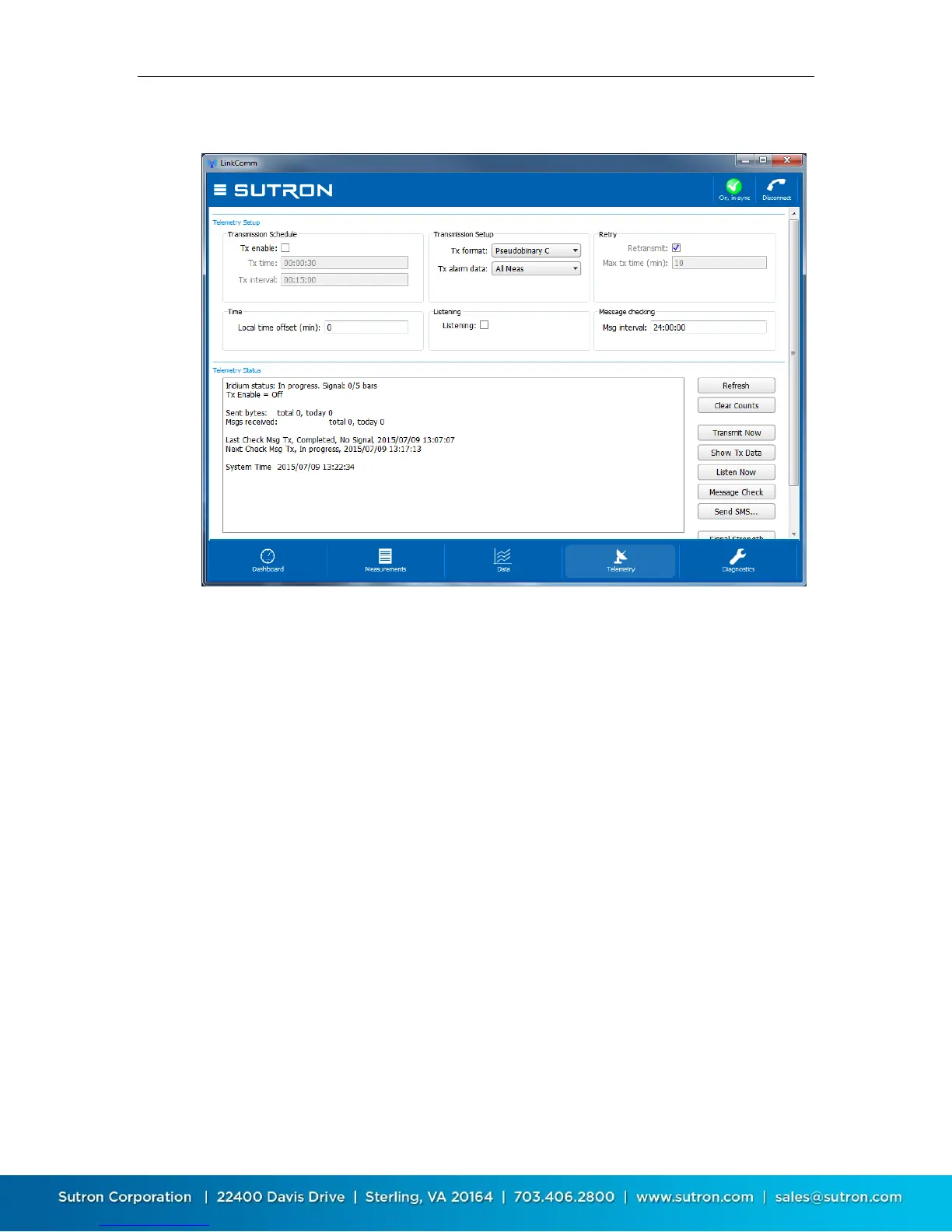
Telemetry tab showing Iridium settings:
4.6.1. Telemetry Status
Telemetry status is displayed on the telemetry tab, just below the telemetry
setup. You may need to scroll down to see the status section.
The status text is retrieved from X-Link the first time you display the telemetry
tab, and can be refreshed as needed on demand.
Press the Refresh button to update the status text to the latest
Press the Clear Counts button to clear all telemetry tallies
Press Transmit Now to cause X-Link to transmit now
Press Show Tx Data to show the data in X-Link’s transmit buffer
Press Listen Now to have X-Link start listening for incoming TCP/IP
connections
Press Message Check to have X-Link check for incoming messages over
Iridium SBD or Cellular SMS
Press the Signal Strength button to open a dialog showing a graph of the
signal strength over time


 To Next Page