19
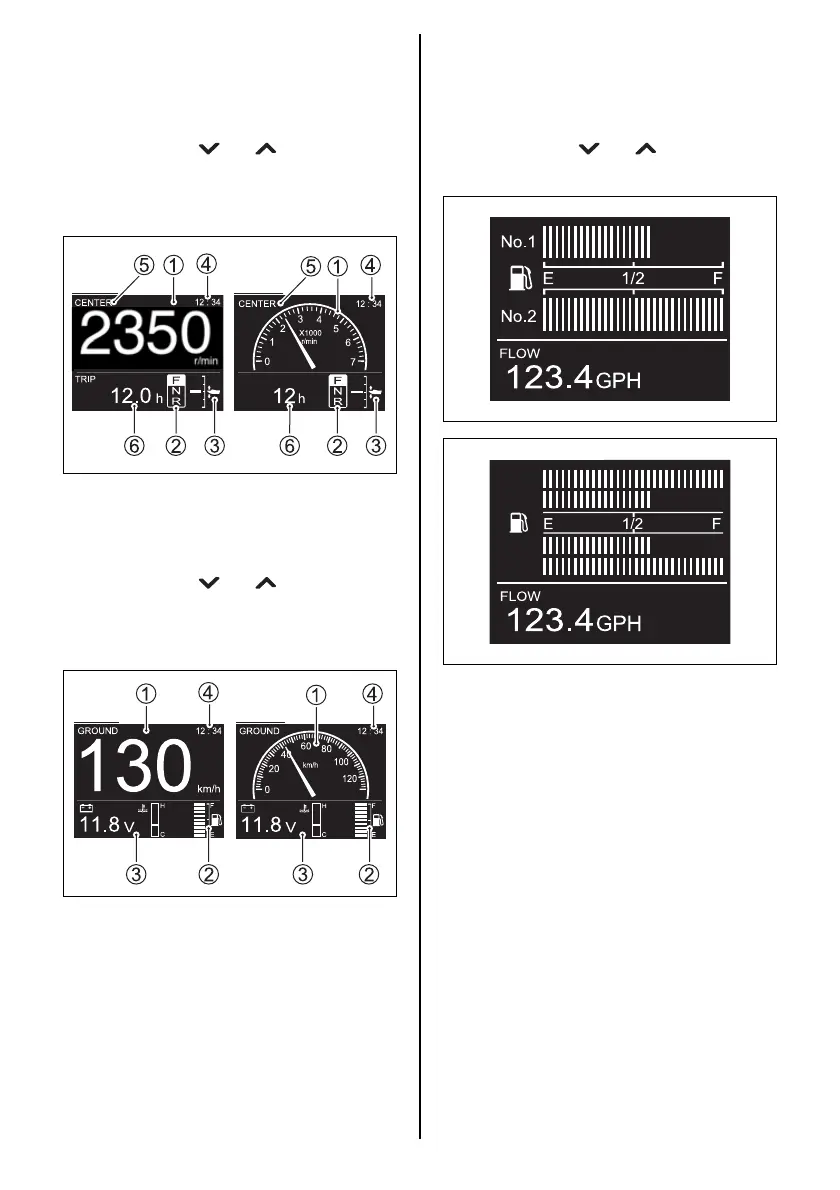
1. Engine Speed Display Screen
The engine speed 1, shift position 2, trim
position 3, time 4, engine position 5 and
sub information 6 are displayed.
The sub information display can be switched
by pressing the [ ] or [ ] buttons.
This screen can be selected between digital
and analog display. (Refer to the MENU
INFORMATION SELECTION section)
2. Speed/Fuel Information Display Screen
The speed 1, fuel level 2, sub information
3 and time 4 are displayed.
The sub information display can be switched
by pressing the [ ] or [ ] buttons.
This screen can be selected between digital
and analog display. (Refer to the MENU
INFORMATION SELECTION section)
Digital Analog
Digital Analog
3. Fuel Information Display Screen
This screen indicates the remaining fuel lev-
els of each tank installed, along with sub
information.
The sub information display can be switched
by pressing the [ ] or [ ] buttons.
This screen indicates only in digital mode.
4. All Items Display Screen
This screen displays all the general indica-
tion items for this gauge.
This screen can be selected between digital,
analog1 and analog2 display. (Refer to the
MENU INFORMATION SELECTION sec-
tion)
No.3
No.4
No.1
No.2



 To Next Page