59
Setting the Troll Mode
1. Shift into forward or reverse gear and make
sure that the throttle is fully closed (in-gear
idle speed).
2. Press the “UP” or “DN” position of the troll
mode switch, until you hear one beep.
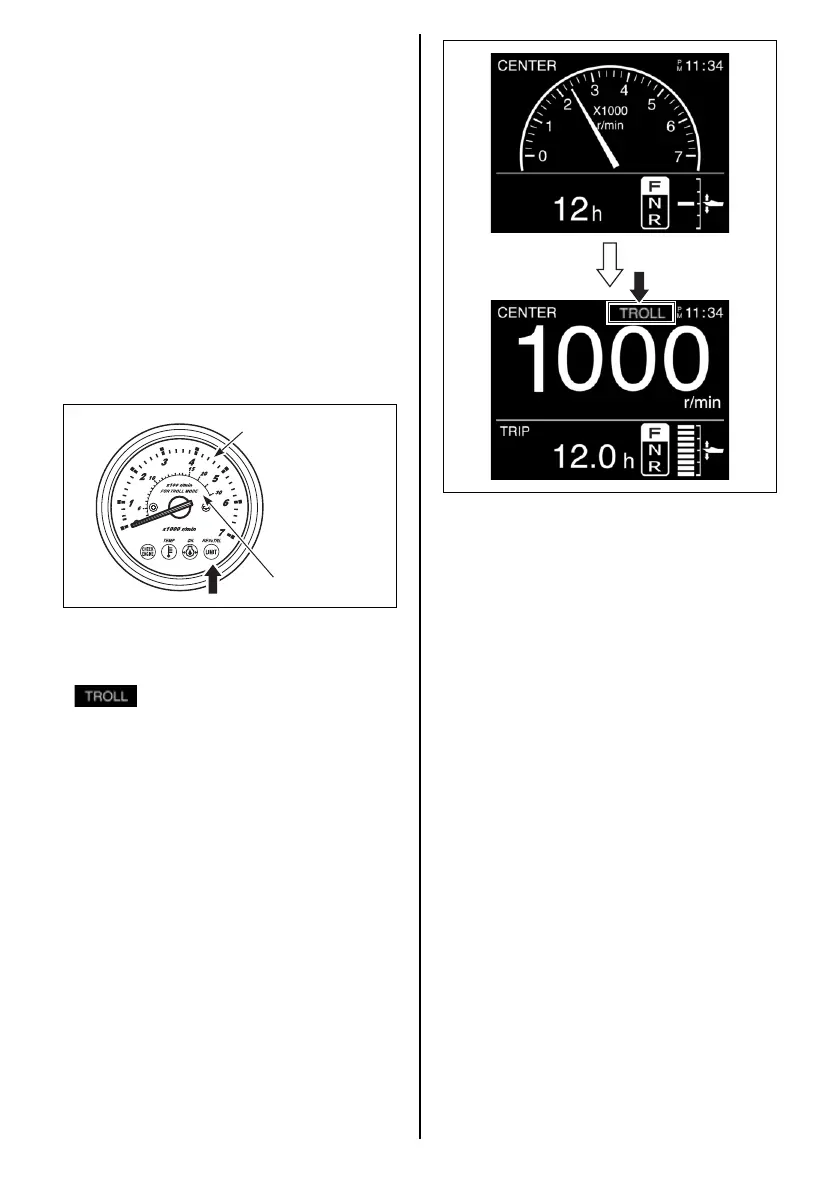
If equipped with monitor-tachometer:
The REV/TRL (or REV) lamp on the monitor
gauge will light indicating that the monitor
has been set to the troll mode. The REV/
TRL (or REV) lamp will continue to light
while the motor is in the troll mode.
NOTE:
To monitor engine speed correctly during the
troll mode operation, Suzuki recommends the
use of the Suzuki 2-scale Monitor Tachometer.
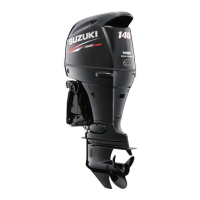
If equipped with multi-function gauge:
The Multi-Function Screen switches over to
the TROLL Mode specific screen and
is displayed on the gauge screen.
When the gauge screen displays “Engine
Speed Screen” or “All Items Screen”, the
engine speed screen automatically changes
from an analog to a digital display.
Usual scale
Trolling mode scale
NOTE:
• This system will not function properly until
engine is at normal operating temperature.
• If the switch is pressed and held while the
remote control lever is set to neutral, the
mode will not switch to TROLL Mode.
• For the dual engines:
– Make sure that both PORT and STBD con-
trol handles are shifted into forward or
reverse at the fully closed throttle position
(in-gear idle speed) before pressing the
troll mode switch.
– In-gear idle speed of all engines is con-
trolled at the same time.
Adjusting Trolling Speed
• When pressing the “UP” switch, one short
beep sounds and the engine speed
increases by 50 r/min.
• When pressing the “DN” switch, one short
beep sounds and the engine speed
decreases by 50 r/min.


 To Next Page