ENG
4
2.0 Multimedia
Speaker System
• Place MSS far away from monitors and TV sets, as insignicant image distortion inthese su-
persensitive devices is possible.
MSS Connecting
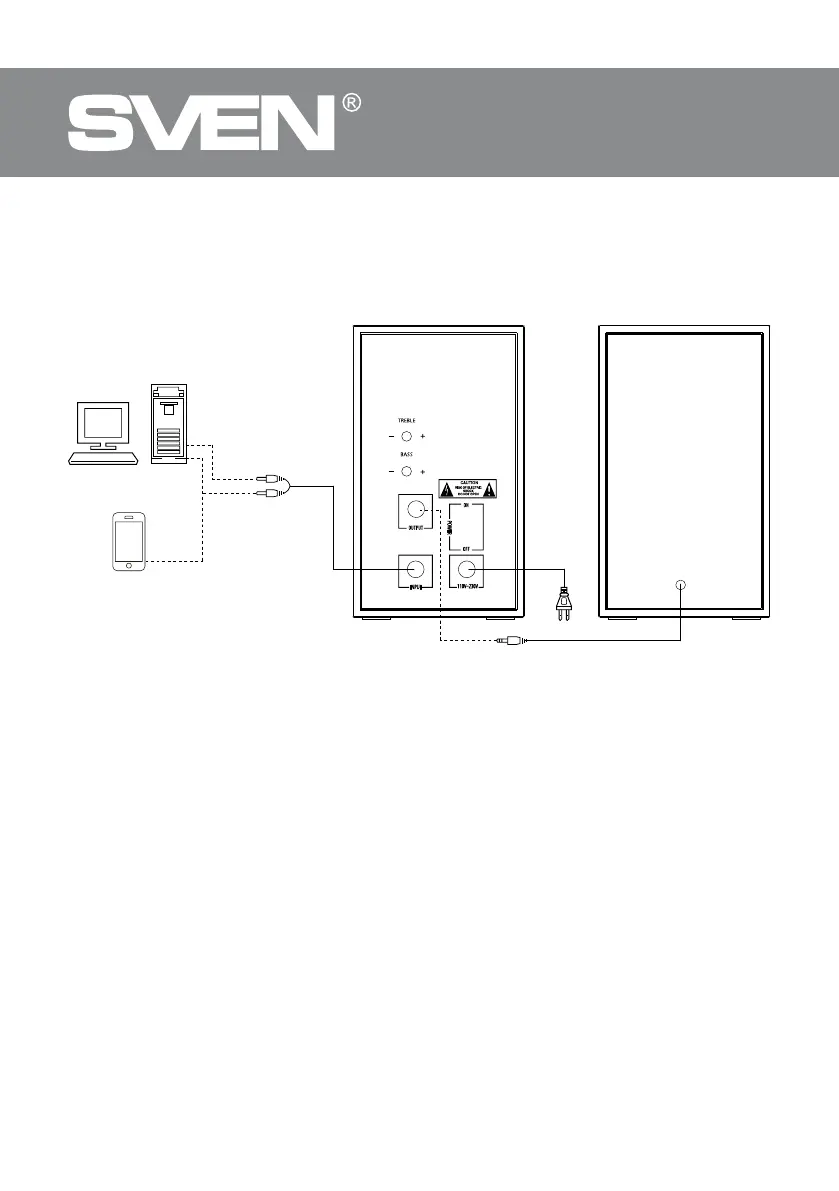
SPS-621 Multimedia Speaker System can be connected to virtually any audio source: PC sound
card, mobile device, etc. (seeconnection diagram in Fig. 2).
• Before making any connections, make sure that the MSS is unplugged. Then connect thespeak-
ers via the audio cable (see Fig. 2).
• Plug the built-in 3.5 mm mini-jack signal cables: connect the audio cable (green mini-jack)
to the audio output jack of your sound source and the microphone cable (pink mini-jack) —
tothemicrophone jack (see connection diagram, Fig. 2).
• Plug your microphone into the microphone jack b, and your headphones into the head-
phone jack a.
• Plug the power cord into a mains outlet. Set the master volume level to the minimum by turn-
ing the VOLUME control knob f counterclockwise until it stops.
• Switch on power supply by ON/OFF switch on the active speaker rear panel.
• Select a desired signal source AUX/BT by pressing short button f on the control panel.
• Adjust the treble and bass levels by turning the TREBLE control knob c and BASS control knob
d respectively. By turning the knobs clockwise, you increase the treble/bass level; byturning
theknobs counterclockwise, you reduce it.
“Line input” Mode (AUX)
• Press button f on the front panel to switch the AUX mode. Indicator on the front panel will
change its light to red.
to mic input
PC
Mobile
device
Active speaker Passive
speaker
to audio
source
Power
cord
Fig. 2. Connection diagram


 To Next Page