ENG
5
SPS-621
User Manual
Bluetooth Mode (BT)
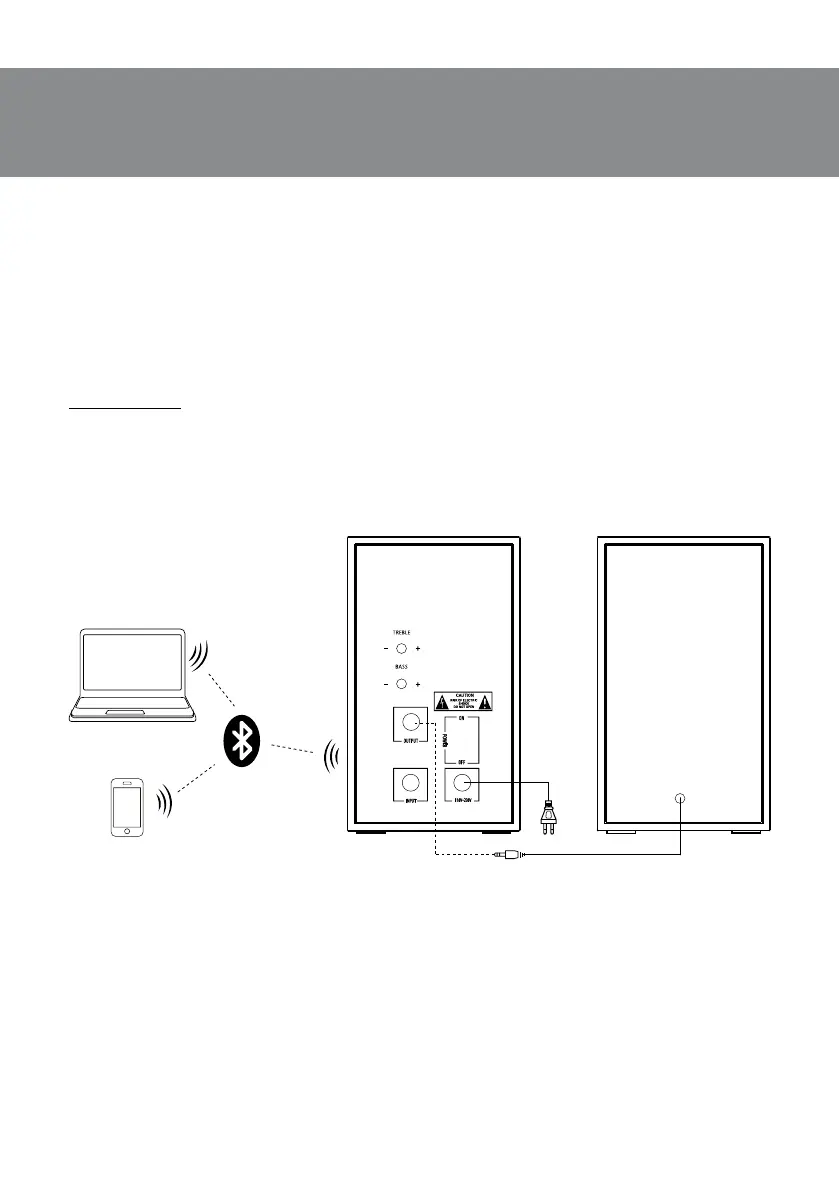
• In order to transmit signal in this mode it is necessary at rst to connect the device withasig-
nal source (see Fig. 2). For this purpose select the Bluetooth mode using button f on the front
panel. Speaker system will enter the search mode, indicator will blink blue color.
• It is necessary to select the search mode of devices with Bluetooth on a signal source (tele-
phone, notebook, smartphone, etc.). “SVEN SPS-621” massage will be displayed on the screen,
which is to be connected to*.
• The indicator lights continuously when connection is successful. If there is no connection, indi-
cator will blink. In this case the system should be switched over to the search mode once again
(turn o and turn on Bluetooth mode)**.
* You might have to enter “0000” code to connect some models of devices via Bluetooth.
** If the item has been already registered in the device list of a source, then the second search
mode activation is not obligatory. Choose only the item name and the “connect” command
onthesource.
Note. After using the MSS, mind to switch it o on the active speaker rear panel by ON/OFF
switch, and unplug the power cord.
PC
Active speaker Passive
speaker
Mobile
Power
cord
Fig. 3. Connection diagram audio source via Bluetooth-module


 To Next Page