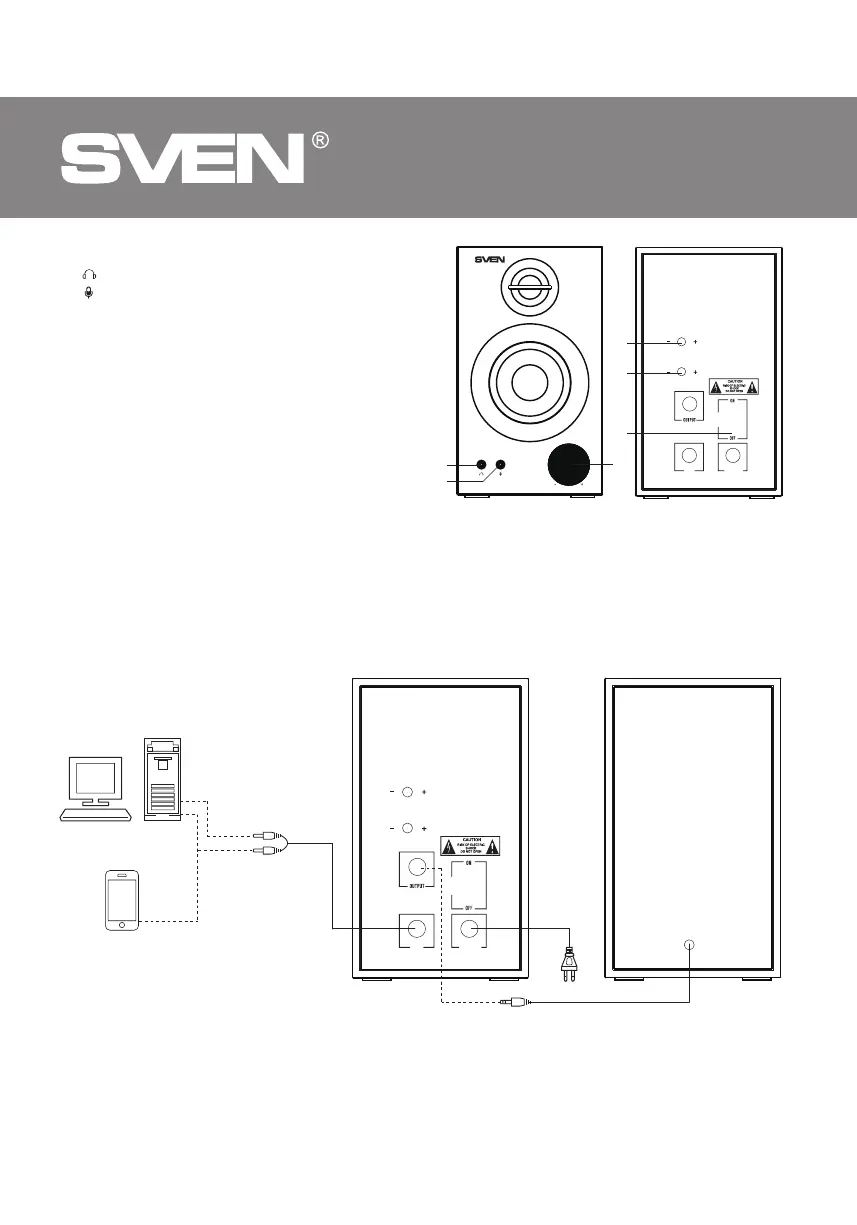
Fig. 2. Connection diagram
to mic input
PC
Control panel
a : headphone jack
b : microphone jack
c TREBLE: treble control knob
d BASS: bass control knob
e POWER ON/OFF : power switch
f VOLUME: volume control knob;
AUX/BT switch mode button
5. PREPARATION AND OPERATION
Speaker placement
• Place the speakers symmetrically to the
listener at least one meter away.
• Place MSS far away from monitors and TV
sets, as insi- gnificant image distortion in these
supersensitive devices is possible.
MMOODDEE
VV OOLLUUMMEE
BASS
TREBLE
POWER
110V~230V
INPUT
Fig. 1.
a
b
c
d
e
f
MSS Connecting
SPS-621 Multimedia Speaker System can be connected to virtually any audio source: PC sound card,
mobile device, etc. (seeconnection diagram in Fig. 2).
Mobile
device
BASS
TREBLE
POWER
110V~230V
INPUT
Active speaker Passive speaker
to audio
source
Power
cord
4
ENG
2.0 Multimedia Speaker System
Audio cable


 To Next Page