©2018 SwellPro All Rights Reserved
43
How to use the APP
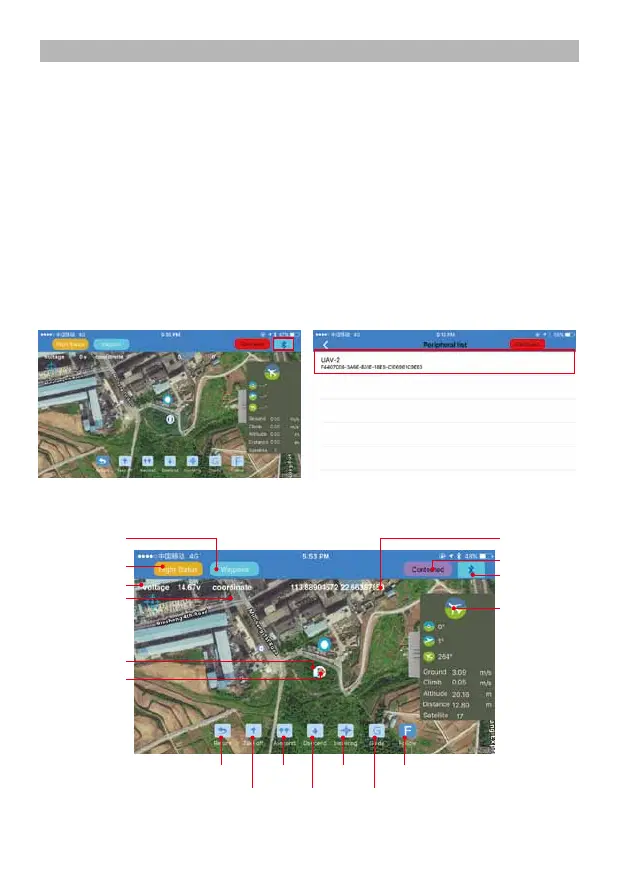
2. Power on the Bluetooth datalink module, switch on the GPS and Bluetooth on your
smartphone. Find the corresponding Bluetooth Link (e.g: UAV-2…) and link it (Note: when
the bluetooth is linked, the blue light on the Bluetooth datalink module will stop blinking).
3. Run the “Swellpro Fly” APP, click the Bluetooth icon to link the device (UAV..). When it links,
you will see the drone parameters on the screen, e.g battery voltage, GPS coordinates, height,
distance, GPS signal etc.
1. Download Swellpro Fly App into your iPhone. Or download the APK from
www.swellpro.com for your Android phone.
Flight Data
Flight Data
Connection Status
Bluetooth Datalink
Connection Icon
Flight Path Select GPS coordinates
Return Home
Take Off Descend
Ascend Hover
Point to Fly
Follow Me
GPS coordinates
Drone and its
flying direction
Battery voltage
Latitude & longitute














 To Next Page