14
*3 Only under SDI I signal, channel1-2 can be selected.
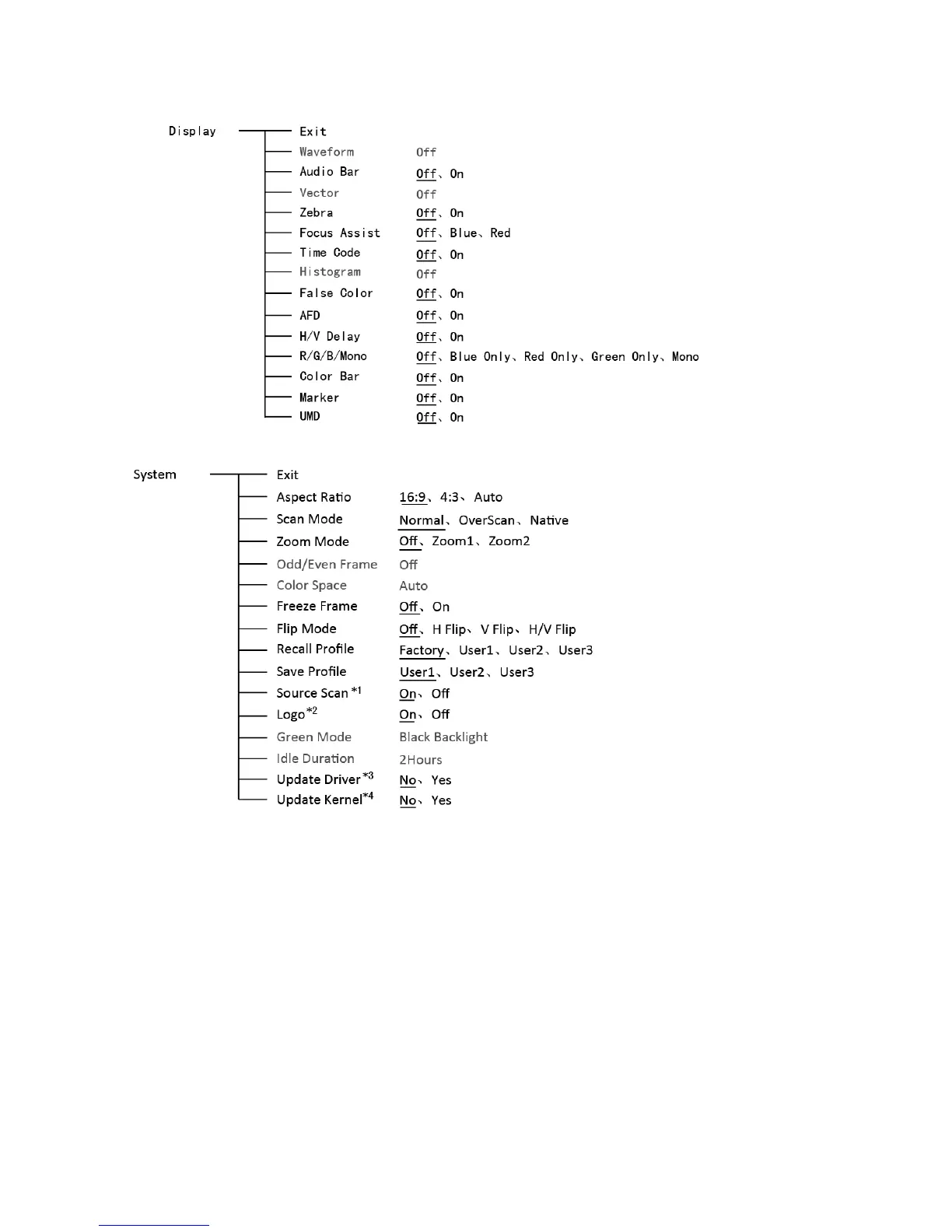
9. Display
10. System
*1 Source Scan
When set to “ON”, after turn on the monitor, the signal will be inspected and follow the sequence
of “SDI→HDMI→CVBS”.
For example: if channel is selected to SDI, SDI-IN has no input, and CVBS has input. When turn
on the monitor, after automatic inspection, SDI has no recognized signal, and CVBS has recognized
signal, then the input signal will be CVBS.
When set to “Off”, source scan will not be supported.
*2 Logo
When powered on, the screen will display SWIT logo.
*3、*4 Update Driver/ Kernel
⑴ Power the monitor, insert the USB equipment with update software into the USB socket.
⑵ Press “OK” to open the main menu, and revolve to “system” submenu,
⑶ Set “Update Driver” and “Update Kernel” to “Yes” under “System” Submenu, press “OK” to
apply.
⑷ During the update procedure, please do not power off to make sure the software writing has



 To Next Page