22
○B Hazard Switch
Push the switch to position when the ignition switch is in “On” position. All the turn signal lights and
turn signal indicators will blink.
○C Dimmer Switch
High and low beam can be selected with this switch. When the headlight is on high beam , the high
beam indicator (page 10) goes on.
High beam
Low beam
○D Turn Signal Switch
When the turn signal switch is turned to the left or right , the corresponding turn signals blink on
and off. To stop blinking, push the switch in.
○E Horn Button
When the horn button is pushed when the ignition switch is turned on; the horn sounds.
○F TCS Button
This scooter is equipped with traction control system (TCS). The traction control system can be turned
off/on by pushing this button for approximately 3 seconds. Refer to page 32 for more information.
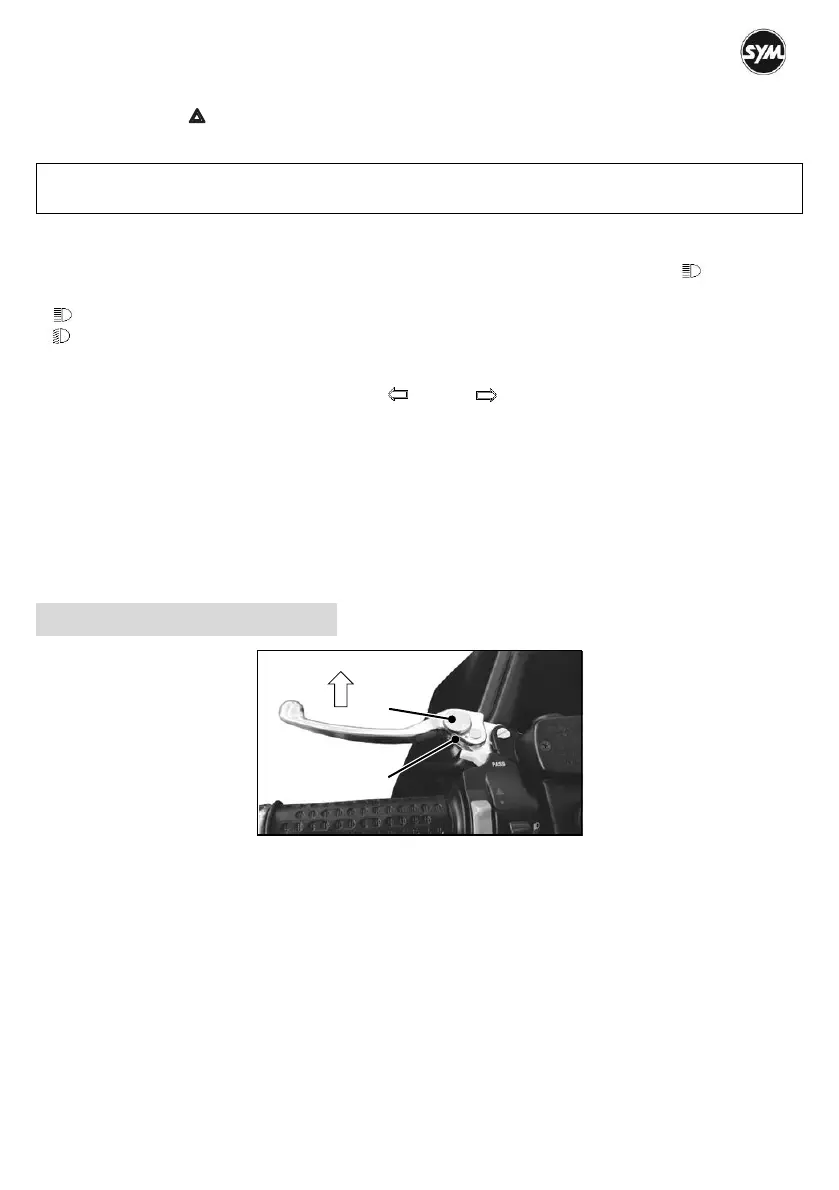
Front/Rear Brake Lever
This scooter is equipped with four-position adjustable front/rear brake levers for fitting different hand sizes.
To adjust the brake levers, do the below steps:
Push the brake lever forward ○a .
Turn the adjuster ○A until the number (position) aligns with the indicative mark ○B while pushing the
lever forward.
Release the brake lever and check that the lever operates correctly.
NOTE :
Do not use the hazard lights for a long period of time, or the battery may become totally discharged.


 To Next Page