EasyManua.ls Logo

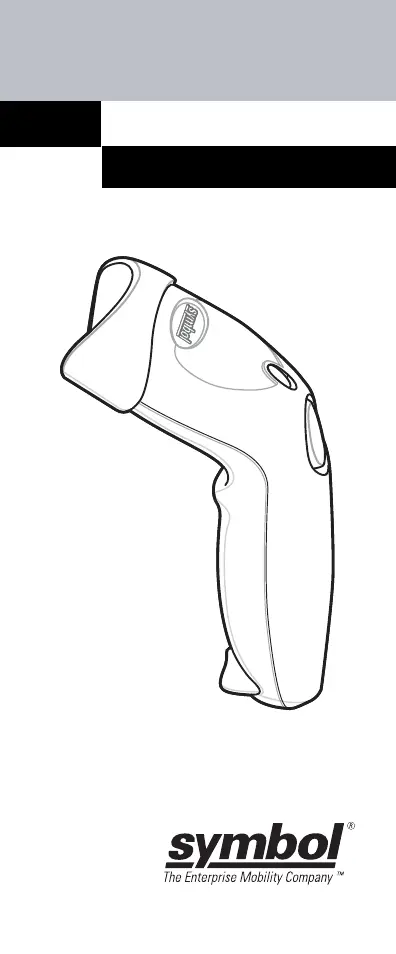
Symbol LS1203 - User Manual

Symbol LS1203
124 pages
Print Icon
To Next Page IconTo Next Page
Loading...
LS1203
QUICK REFERENCE GUIDE

Table of Contents

Other manuals for Symbol LS1203

Questions and Answers

  • D
    danieledwardsAug 31, 2025
    Why does my Symbol LS1203 Barcode Reader emit low/high beeps?
    • J
      jdrakeAug 31, 2025
      If your Symbol Barcode Reader emits low/high beeps, it indicates an input error. This means an incorrect barcode or a Cancel barcode was scanned. To resolve this, scan the correct numeric barcodes within the programmed parameter range.
  • A
    aguirrejohnAug 30, 2025
    What does it mean when my Symbol LS1203 Barcode Reader emits four long low beeps?
    • M
      Maurice RichardsonAug 30, 2025
      If your Symbol Barcode Reader emits four long low beeps, a transmission error was detected in a scanned symbol, and the data is ignored. This often occurs if the unit is not properly configured, so check the option setting.
  • R
    Richard RoseAug 29, 2025
    Why does my Symbol Barcode Reader emit frequent beeps (USB host interface only)?
    • L
      Lori HollandAug 29, 2025
      If your Symbol Barcode Reader emits frequent beeps when using a USB host interface, it is normal and usually happens when the host cold boots. This occurs because the USB bus may cycle the scanner's power on and off more than once.
  • M
    mariosteeleAug 28, 2025
    What does it mean when my Symbol Barcode Reader emits five long low beeps after a bar code is decoded?
    • R
      Robin ScottAug 28, 2025
      If your Symbol Barcode Reader emits five long low beeps after decoding a barcode, a conversion or format error was detected. Ensure the scanner’s conversion parameters are properly configured. Also, an ADF rule might have been set up with characters that can't be sent for the selected host; in this case, change the ADF rule or switch to a host that supports the ADF rule. Alternatively, a barcode might have been scanned with characters that can't be sent for that host; try changing the barcode or switching to a host that can support the barcode.
  • D
    Daniel CampbellAug 27, 2025
    Why does my Symbol LS1203 decode the bar code but not transmit the data to the host?
    • A
      Ashley FitzpatrickAug 27, 2025
      If your Symbol Barcode Reader decodes the barcode but doesn't transmit the data to the host, first check if the scanner is programmed for the correct host type by scanning the appropriate host type programming bar code. Also, check the interface cable for loose connections and re-connect the cable if necessary.
  • N
    nsmithAug 27, 2025
    What to do if my Symbol Barcode Reader emits the laser but does not decode the bar code?
    • E
      Erin WashingtonAug 27, 2025
      If your Symbol Barcode Reader emits the laser but doesn't decode the barcode, it could be due to several reasons. First, ensure the scanner is programmed to read the correct barcode type. If the barcode symbol is unreadable, scan test symbols of the same barcode type to see if the barcode is defaced. Adjust the distance between the scanner and the barcode, moving closer or further away. Make sure the scan line crosses every bar and space of the symbol by adjusting the symbol's position until the scan line is within the acceptable aiming pattern.
  • T
    Terri GutierrezAug 25, 2025
    Why is my Symbol Barcode Reader displaying scanned data incorrectly on the host?
    • W
      Wesley LarsenAug 26, 2025
      If the host is displaying scanned data incorrectly from your Symbol Barcode Reader, first ensure that the proper host is selected by scanning the appropriate host type programming bar code. For RS-232 connections, set the scanner's communication parameters to match the host's settings. If you are using a USB HID keyboard or Keyboard Wedge configuration, program the system for the correct keyboard type and language, and turn off the CAPS LOCK key. Also, program the proper editing options, such as ADF or UPC-E to UPC-A Conversion. Check the scanner’s host type parameters or editing options.
  • A
    Amanda AbbottAug 25, 2025
    What to do if nothing happens when I press the trigger button on my Symbol LS1203 Barcode Reader?
    • K
      Katherine ShawAug 25, 2025
      If nothing happens when you press the trigger button on your Symbol Barcode Reader, there could be a few reasons. First, check the system power and reconnect the power supply if your configuration needs one. Next, check all cable connections to make sure they are securely connected. Finally, ensure you are using the correct host interface cable; if not, connect the correct cable.

Summary

Scanner Connection and Interfaces

Connecting the Scanner Cable

Instructions for connecting and disconnecting the scanner's cable.

Host Interface Setup

Guides for connecting the scanner to Keyboard Wedge, RS-232, and USB interfaces.

Core Scanning Procedures

Aiming and Scanning Barcodes

Proper technique for aiming and scanning barcodes for successful reads.

Triggered and Auto-Scan Modes

Details the two scanner modes and how to switch between them.

Scanner Features and Troubleshooting

Scanner Parts and Scanning Modes

Identifies scanner parts and details Triggered/Auto-scan modes.

Troubleshooting Scanner Issues

Lists common problems, causes, and suggested solutions for the scanner.

Scanner Feedback Mechanisms

Beeper Sequence Definitions

Explains beep sequences and their corresponding status indications.

LED Indicator Light Definitions

Defines the meaning of different LED colors displayed by the scanner.

Scanner Configuration and Programming

Restoring Default Settings

Instructions on how to reset all scanner parameters to their default values.

Host Interface Configuration Details

Detailed configuration for Keyboard Wedge, RS-232, and USB interfaces.

Scan Data Transmission Format

Information on setting scan data formats like Carriage Return/Line Feed.

Safety, Regulatory, and Compliance

Ergonomic Recommendations for Users

Guidelines to prevent ergonomic injuries and ensure user safety during operation.

Power Supply and Regulatory Compliance

Covers general regulations and specific power supply requirements and warnings.

Radio Frequency Interference Requirements

Details FCC compliance and potential radio frequency interference.

Laser Device Safety Information

Details safety precautions and classifications for laser devices.

Scanner Labeling and Compliance Marks

Understanding Scanner Compliance Labels

Explains the meaning of various compliance marks and certifications found on the scanner label.

Symbol LS1203 Specifications

General IconGeneral
Scan PatternSingle line
Scan TechnologyLaser
ConnectivityWired
Decode Capability1D
Weight4.3 oz./122 g
Light Source650 nm visible laser diode
Scan Rate100 scans per second
Storage Temperature-40° to 158° F / -40° to 70° C
InterfaceUSB, RS-232, Keyboard Wedge
Drop SpecificationWithstands multiple 5 ft./1.5 m drops to concrete
Operating Temperature32° to 104° F / 0° to 40° C
Humidity5% to 95% (non-condensing)
Supported BarcodesUPC/EAN, Code 39, Code 128

Related product manuals