1-7-3 T2127EA
3. Setting for Y DL Time TV,
Y DL Time EXT, Y SW LPF,
Black Stretch Off,
Black Stretch CONT and
C. Angle Data Values
1. Enter the Service mode. (See page 1-7-1.)
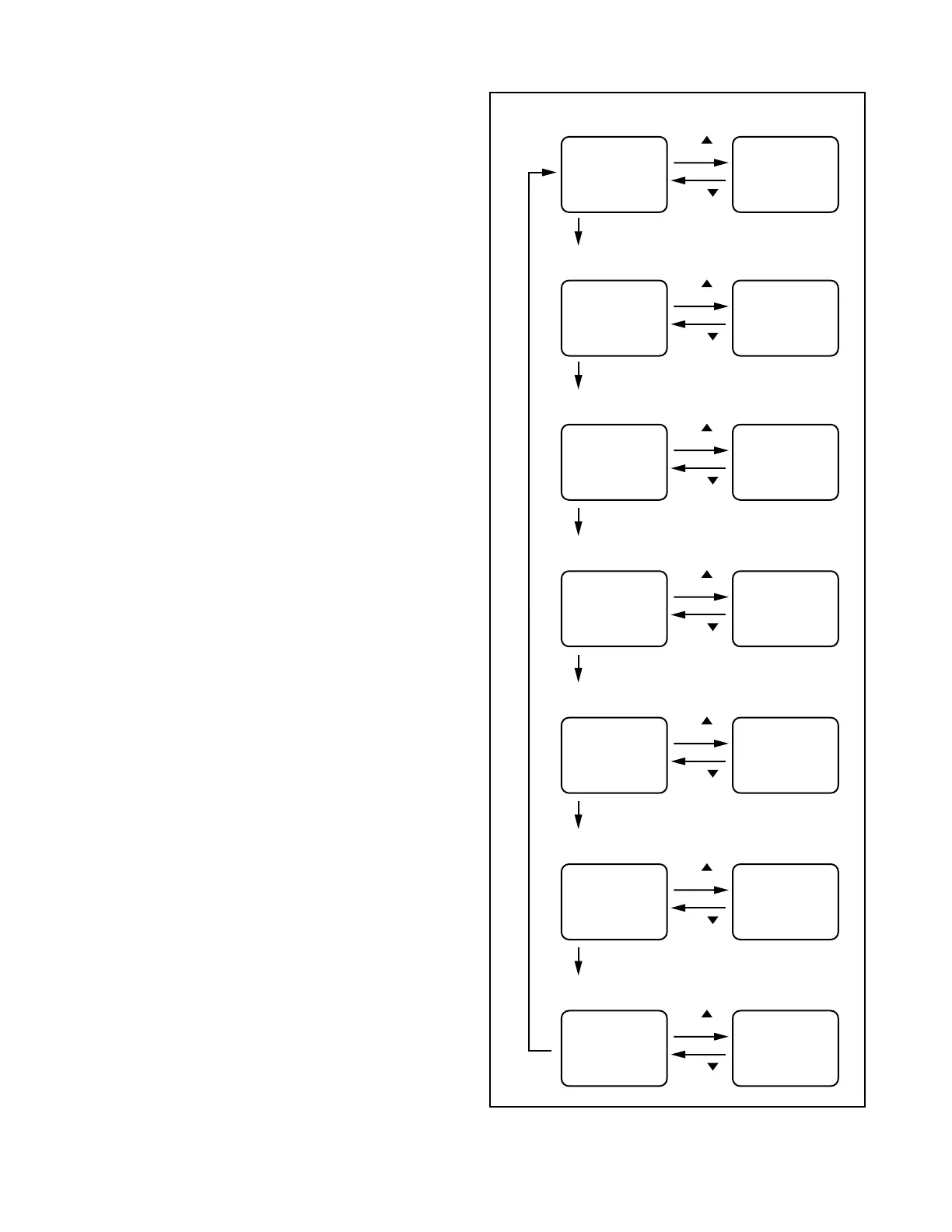
2. Y DL Time TV Adjustment: Press [0] button on
the service remote control unit twice to show "D-T
TV" on the display.
Y DL Time EXT Adjustment: Press [0] button on
the service remote control unit three times to show
"D-T EXT" on the display.
Y SW LPF Adjustment: Press [0] button on the
service remote control unit four times to show "Y
SW" on the display.
Black Stretch Off Adjustment: Press [0] button
on the service remote control unit five times to
show "B-S" on the display.
Black Stretch CONT Adjustment: Press [0] but-
ton on the service remote control unit six times to
show "BS2" on the display.
C. Angle Adjustment: Press [0] button on the ser-
vice remote control unit seven times to show "C-
ANG" on the display.
3. Y DL Time TV Adjustment: Select "2" by pressing
[CH. o / p] buttons on the service remote control.
Y DL Time EXT Adjustment: Select "2" by press-
ing [CH. o / p] buttons on the service remote con-
trol.
Y SW LPF Adjustment: Select "0" by pressing
[CH. o / p] buttons on the service remote control.
Black Stretch Off Adjustment: Select "OFF" by
pressing [CH. o / p] buttons on the service remote
control.
Black Stretch CONT Adjustment: Select "0" by
pressing [CH. o / p] buttons on the service remote
control.
C. Angle Adjustment: Select "103" by pressing
[CH. o / p] buttons on the service remote control.
"0"
button
C-TRAP Adjustment (Factory mode)
CH.
button
C-TRP 0 C-TRP 1
button
CH.
Y DL Time TV Adjustment
CH.
button
D-T TV 0 D-T TV 1
button
CH.
"0" button
Y DL Time EXT Adjustment
CH.
button
D-T EXT 0 D-T EXT 1
button
CH.
"0" button
Y SW LPF Adjustment
"0" button
CH.
button
Y SW
button
CH.
0 Y SW
"0" button
1
Black Stretch Off Adjustment
CH.
button
B-S OFF
button
CH.
B-S 0
Black Stretch CONT Adjustment
CH.
button
BS2 0
button
CH.
"0" button
BS2 1
C. Angle Adjustment
CH.
button
C-ANG 103
button
CH.
"0" button
C-ANG 95
Fig. 3



 To Next Page