- 6 -
a. Note: Before mounting the terminal to the back plate, you will need to plug in the electrical
connection and the communications wires to the bottom of the terminal before sliding the terminal
into place.
3.0 Terminal Configuration
The SY-765 Terminal can be connected to the host computer using either RS-232(Direct), RS-485(LAN),
Ethernet including Wi-Fi.
3.1 Entering Technician Mode
The SY-765 Terminal contains a built in configuration program called Technician mode. Technician mode
enables the set-up of the following options:
Real Time clock I (RTC) calibration
Printer Baud rate
Station ID settings
Network connection settings
User Field – A field in which the user can fill-in 4 digits that will characterize that terminal
To enter technician mode:
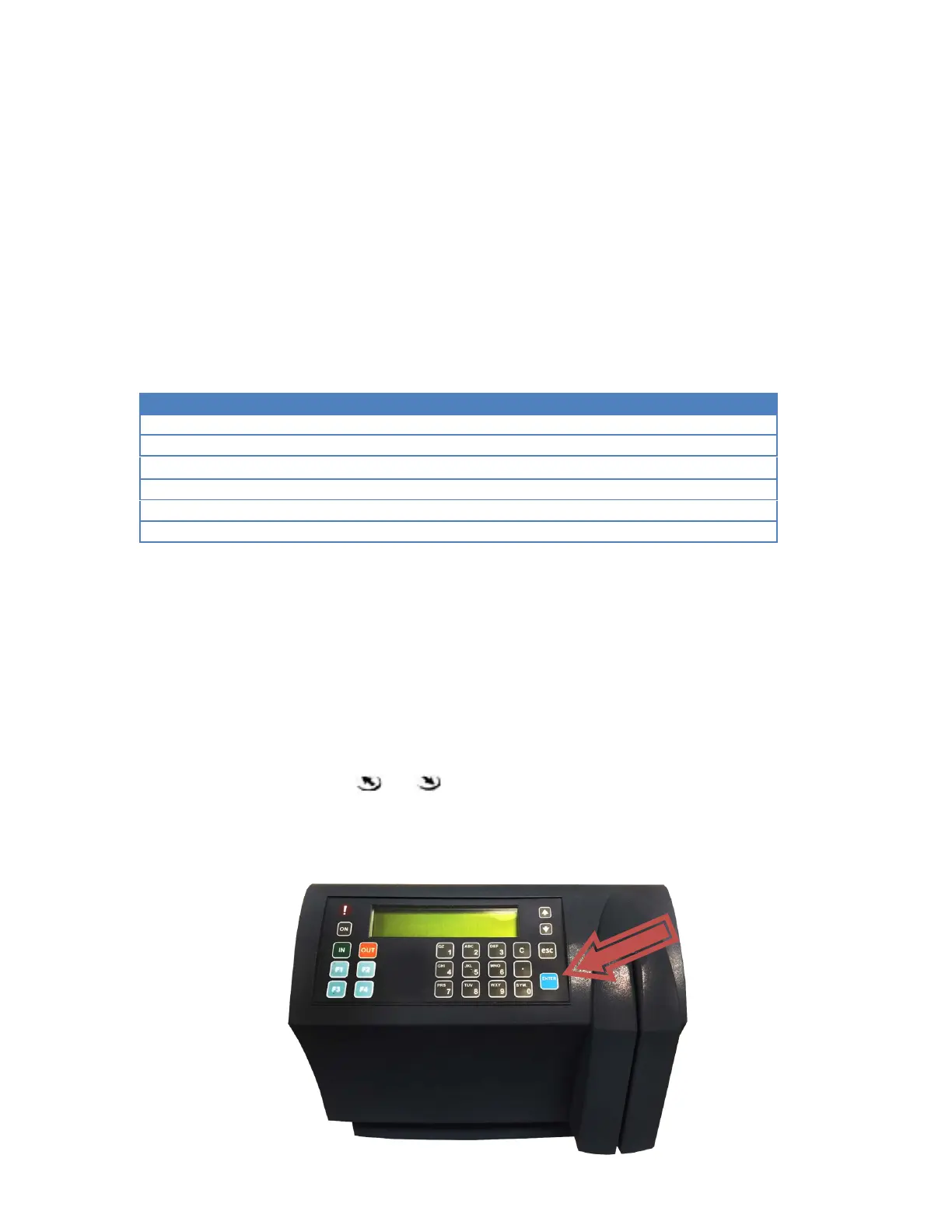
• If the Terminal screen is di
splaying “NO PROG”.
o Press the
key 6 times, then press
.
If the clock has a Barcode reader or a Magnetic reader, using a badge with six zeros (000000) will
work as well.
o Use the
key to move from one screen to the next. To return to the previous screen, use the
key.
• If the Terminal screen is displaying the date and time.
o Simultaneously press the
and keys 6 times.
If the clock has a Barcode reader or a Magnetic reader, using a badge with six zeros (000000) will
work as well.
o Use the
key to move from one screen to the next. To return to the previous screen, use the
key.


 To Next Page