- 8 -
•
o Option is for internal clock calibration purposes.
•
Adjust host baud rate: 19200
o
If using XactTime, the default baud rate should be 9600.
•
Adjust fingerprint unit baud rate: 57600
•
Adjust printer baud rate: 19200
•
o The Station ID is the TA-785’s unique identifier for multi-terminal communication. Any number from 0 to
31 may be used as the ID, but it must match the ID in the software.
•
Adjust the amount of modem rings: N
o Choose
for no rings.
•
o The main screen enables three modes:
for Serial connection,
(not used)
(10/100Base) Ethernet, or
for using WI-FI.
RS-232 uses the default
setting.
•
o Specify 4 digits which characterize the terminal.
•
FPU - Setting the fingerprint unit mode N
3.3.1.1 RS-232 Connection
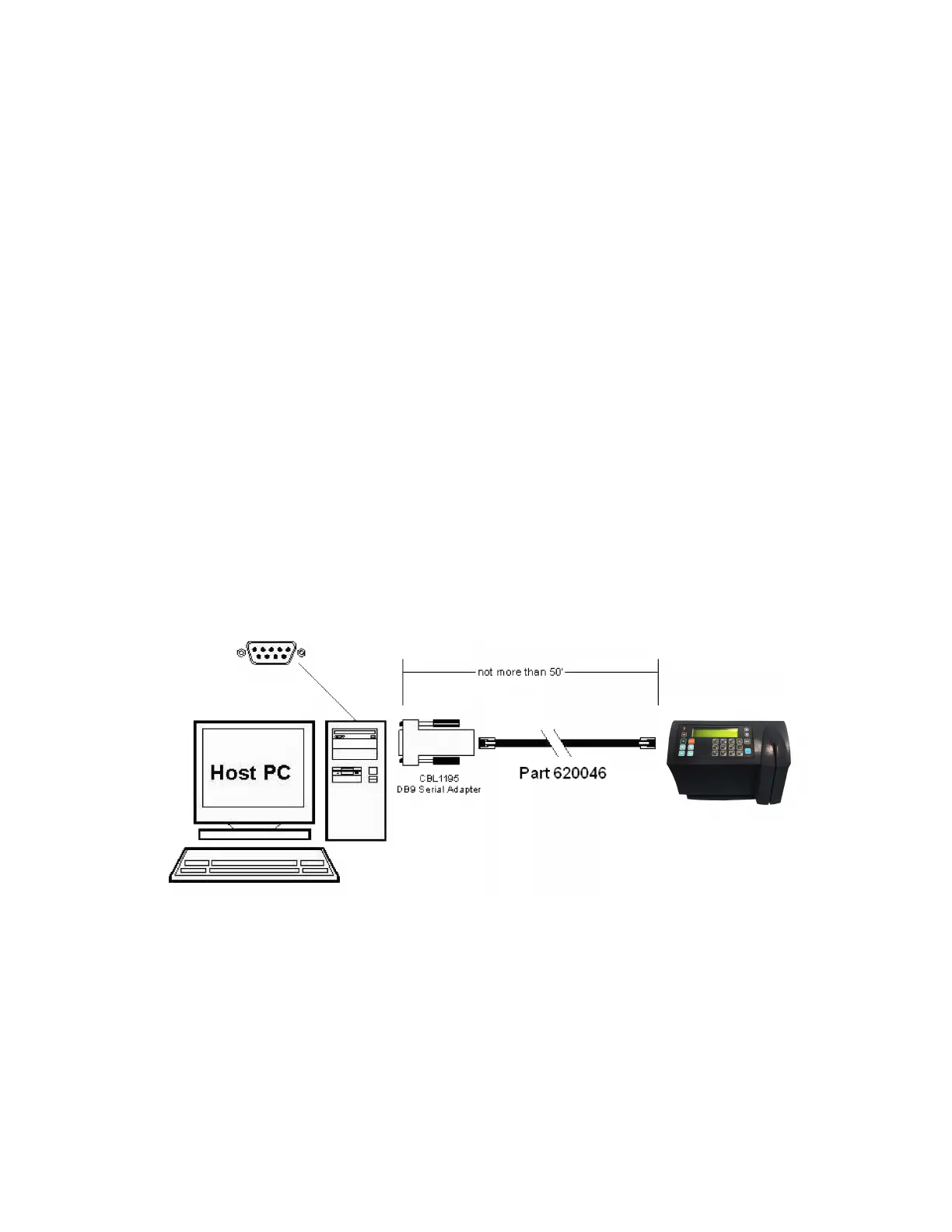
The SY-765 terminal can be connected to the host computer via RS-232 with the DB9 Serial Adapter and a
serial cable. The maximum supported cable length for the serial cable is currently 50’.
When plugging the seri
al cable into the clock, make sure that it is plugged into the HOST port.


 To Next Page