14
Chapter 2: Hardware Setup
Add a Memory Module to Synology NAS
Optional Synology memory modules are designed to expand the memory of your Synology NAS. Follow the steps
below to install, check, or remove a memory module on your Synology NAS.
The following table shows the memory conguration for best practice:
Slot 1 Slot 2 Total Memory
8 GB - 8 GB
8 GB 8 GB 16 GB
16 GB 16 GB 32 GB
To remove the memory module
1
Shut down your Synology NAS. Disconnect all cables from your Synology NAS to prevent possible damage.
2
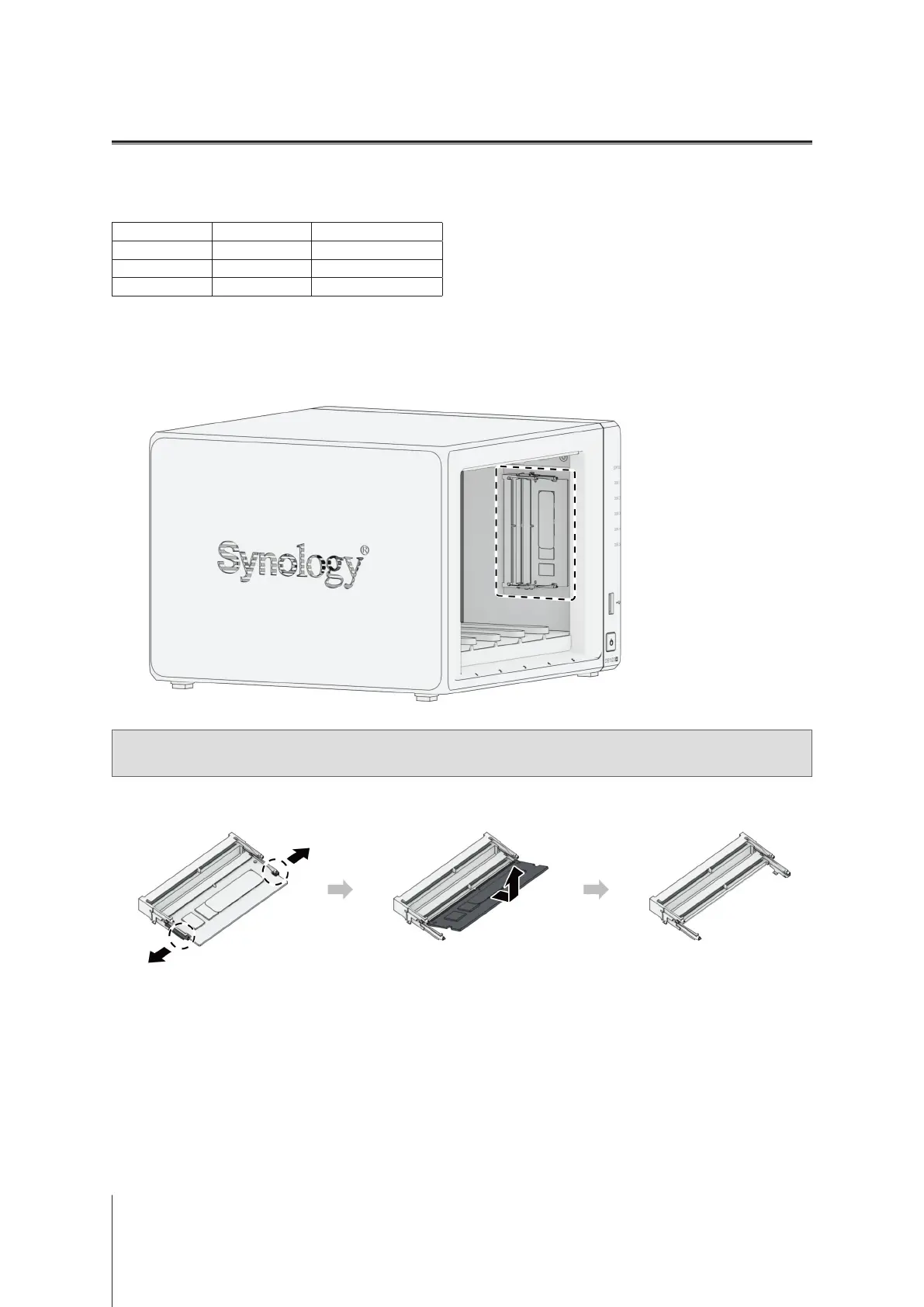
Remove the hard drive trays from the drive bays. The memory slots are located on the inner right side of your
Synology NAS.
Note:
When you remove the drive trays, sensitive internal components are exposed. Avoid touching anything
other than the memory assembly when removing or adding memory.
3
Push the levers on both sides of the memory module outward. The memory module will be released from its
slot.
4
Hold the memory module by its edges and remove it from the slot.
5
Insert the drive trays back into the drive bays.
6
Reconnect the cables removed in step 1, then press the power button to turn on your Synology NAS.








 To Next Page