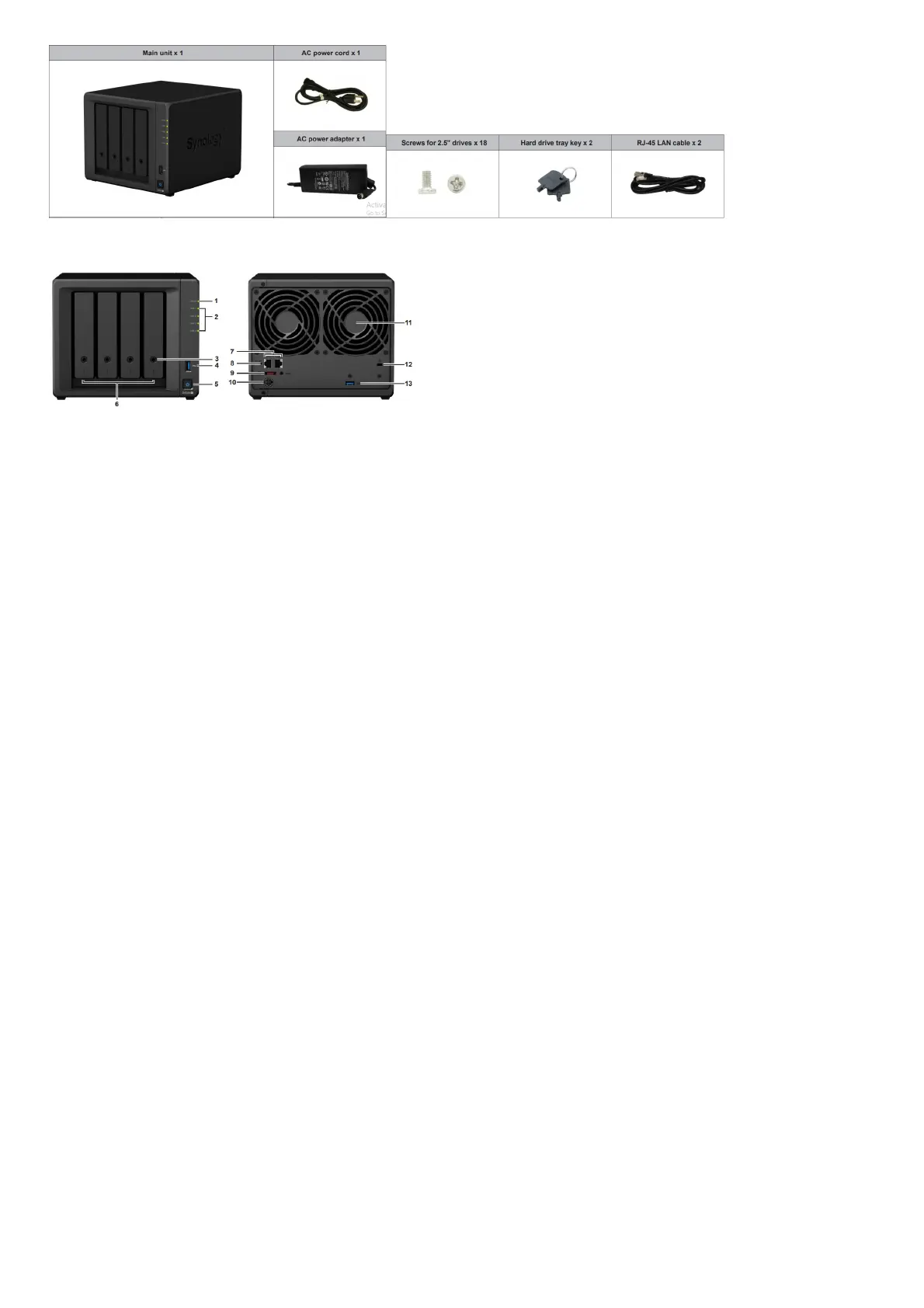
Synology DS920+ at a Glance
No. Article Name Location Description
1 Status Indicator
Front
Displays the status of the system. For more information, see “LED Indicator Table”.
2 Drive Status Indicator Displays the status of the system. For more information, see “LED Indicator Table”.
3 Drive Tray Lock Lock or unlock drive trays.
4 USB 3.0 Port Connect external drives or other USB devices to the ynology NAS here
5 Power Button
1. Press to power on your Synology NAS.
2. To power off your Synology NAS, press and hold until you hear a beep sound and the Power LED starts
blinking.
6 Drive Tray Install drives (hard disk drives or solid state drives) here.
7 LAN Port
Rear
Connect network cable here.
8 RESET Button
1. Press and hold until you hear a beep sound to restore the IP address, DNS server, and password for the
admin account to default.
2. Press and hold until you hear a beep, then press and hold again until you hear three beeps to return the
Synology NAS to “Not installed” status so that DiskStation Manager (DSM) can be reinstalled.
9 eSATA Port Connect external SATA drives or Synology Expansion Unit to the Synology NAS here.
10 Power Port Connect power cord here.
11 Fan
Disposes of excess heat and cools the system. If the fan malfunctions, the Synology NAS will emit a beeping
sound.
12 Kensington Security Slot Attach a Kensington security lock here.
13 USB 3.0 Port Connect external drives or other USB devices to the ynology NAS here.
LED Indicator Table
LED Indicator Color Status Description
STATUS
Green Static Volume normal
Orange Blinking
Volume degraded/Volume crashed
Volume not created
DSM not installed
Off HDD hibernation
Disk 1-4
Green
Static Drive ready and idle
Blinking Accessing drive
Static Drive error/Port disabled
off No internal drive/Advanced HDD hibernation
Power blue
Static Powered on
Blinking Booting up/Shutting down
Rear LAN (on upper side of
jack)
off Powered off
Green
Static Network connected
Blinking Network active
Off No network
Green Static Gigabit connection
Rear LAN (on lower side of
jack)
Orange Static 100 Mbps connection
off 10 Mbps connection/No network Green
Hardware Specification













 To Next Page