How to choose a suitable HDD for my Synology NAS/IP SAN
How to diagnose drives’ health status when receiving bad sector warning?
How to fix drive failure and retrieve the data from your drives
What should I do if my Synology NAS cannot recognize installed drives?
How do I know whether the problem is with my Synology NAS or drive when drive errors occur?
Memory
How can I run a memory test on my Synology NAS?
LED
How do I recognize a hibernating Synology NAS via the LED indicators?
What can I do if the STATUS LED keeps flashing orange?
Why can’t my Synology NAS be powered on and why is the POWER LED indicator blinking
constantly?
Fan
What type of fan speed modes are available on my Synology NAS?
Install DSM on Synology NAS
After hardware setup is completed, please install DiskStation Manager (DSM) – Synology’s browser-based
operating system – on your DS920+.
Install DSM with Web Assistant
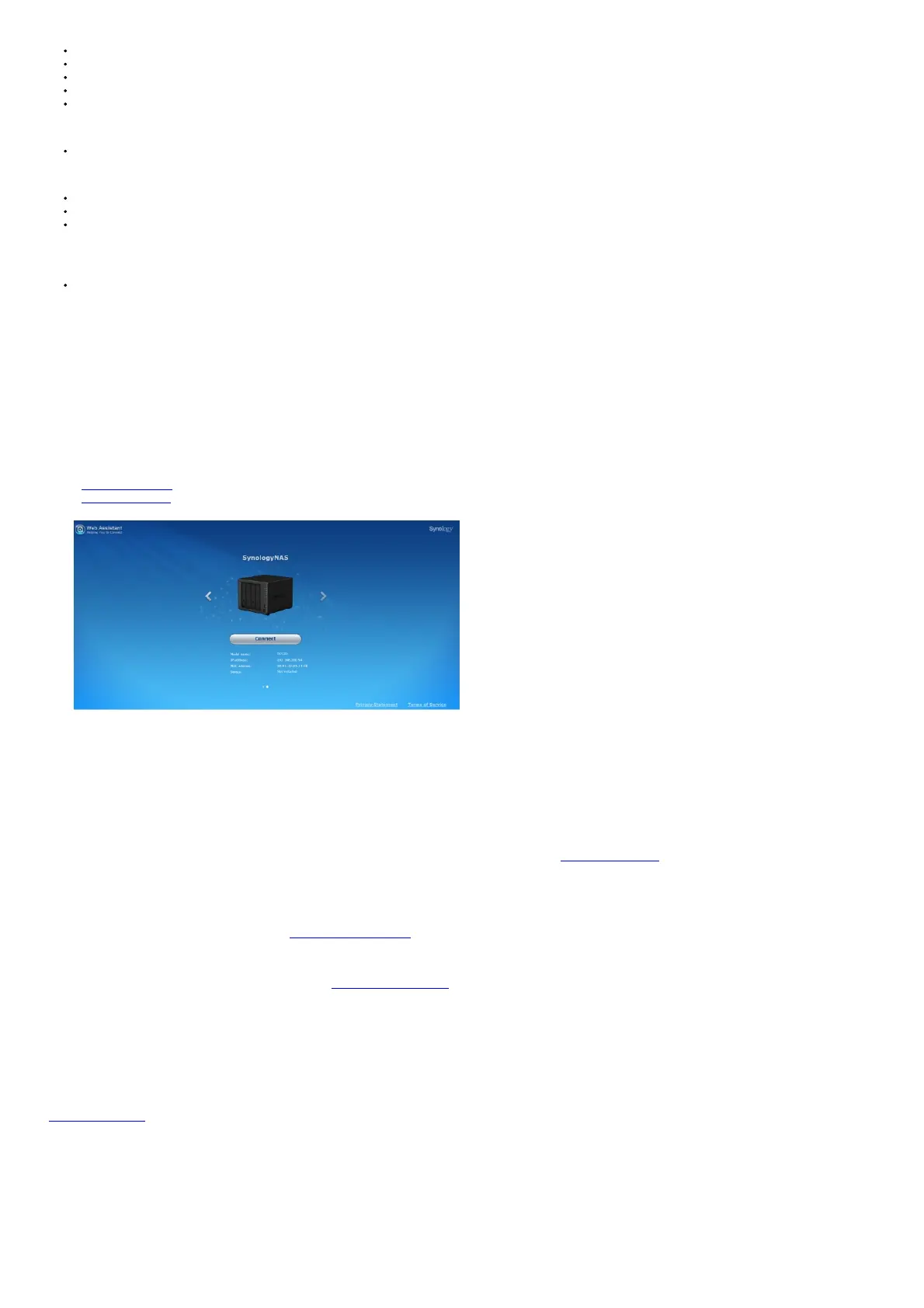
Your DS920+ comes with a built-in tool called Web Assistant that helps you download the latest version of DS
from the Internet and install it on your DS920+. To use Web Assistant, please follow the steps below.
1. Power on your DS920+.
2. Open a web browser on a computer connected to the same network as the DS920+.
3. Enter either of the following into the address bar of your browser:
a find.synology.com
b synologynas:5000
4. Web Assistant will be launched in your web browser. It will search for and find the Synology NAS within the local network. The status of the DS920+ should be Not Installed.
5. Click Connect to start the setup process and follow the onscreen instructions.
Note:
• The Synology NAS must be connected to the Internet to install DSM with Web Assistant.
• Recommended browsers: Chrome, Firefox.
• Both the Synology NAS and the computer must be in the same local network.
6. If you accidentally leave the installation process before it is finished, sign into DSM as admin (default
administrative account name) with the password left blank.
Learn More
Your DS920+ is now ready for action. For more information or online resources about your DS920+, please visit www.synology.com.
SYNOLOGY, INC.
END-USER LICENSE AGREEMENT
IMPORTANT–READ CAREFULLY: THIS END USER LICENSE AGREEMENT (“EULA”) IS A LEGAL AGREEMENT BETWEEN YOU (EITHER AN INDIVIDUAL OR A LEGAL
ENTITY) AND SYNOLOGY, INC. (“SYNOLOGY”) FOR THE SYNOLOGY SOFTWARE INSTALLED ONTO THE SYNOLOGY PRODUCT PURCHASED BY YOU (THE
“PRODUCT”), OR LEGALLY DOWNLOADED FROM WWW.SYNOLOGY.COM OR ANY OTHER CHANNEL PROVIDED BY SYNOLOGY ( “SOFTWARE”).
YOU AGREE TO BE BOUND BY THE TERMS OF THIS EULA BY USING THE PRODUCTS CONTAINING THE SOFTWARE, INSTALLING THE SOFTWARE ONTO THE
PRODUCTS OR DEVICE CONNECTED TO THE PRODUCTS. IF YOU DO NOT AGREE TO THE TERMS OF THIS EULA, DO NOT USE THE PRODUCTS CONTAINING
THESOFTWAREOR DOWNLOAD THE SOFTWARE FROM WWW.SYNOLOGY.COM, OR ANY OTHER CHANNEL PROVIDED BY SYNOLOGY.INSTEAD, YOU MAY RETURN
THE PRODUCT TO THE RESELLER WHERE YOU
PURCHASED IT FOR A REFUND IN ACCORDANCE WITH THE RESELLER’S APPLICABLE RETURN POLICY.
Section 1. Limited Software License. Subject to the terms and conditions of this EULA, Synology grants you a limited, nonexclusive, non-transferable, personal license to install, run
and use one copy of the Software loaded on the Product or on your device connected to the Product solely relating to your authorized use of the
Product.
Section 2. Documentation. You may make and use a reasonable number of copies of any documentation provided with the Software; provided that such copies will only be used for
internal business purposes and are not to be republished or redistributed (either in hard copy or electronic form) to any third party.
Section 3. Backup. You may make a reasonable number of copies of the Software for backup and archival purposes only.
Section 4. Updates. Any software provided to you by Synology or made available on the Synology website at
www.synology.com (“Website”) or any other channel provided by Synology that updates or supplements the original Software is governed by this EULA unless separate license
terms are provided with such updates or supplements, in which case, such separate terms will govern.
Section 5. License Limitations. The license set forth in Sections 1, 2 and 3 applies only to the extent that you have ordered and paid for the Product and states the entirety of your
rights with respect to the Software. Synology reserves all rights not expressly granted to you in this EULA. Without limiting the foregoing, you shall not authorize or permit any third
party to: (a) use the Software for any purpose other than that in connection with the Product; (b) license, distribute, lease, rent, lend, transfer, assign or otherwise dispose of the
Software; (c) reverse engineer, decompile, disassemble or attempt to discover the source code of or any trade secrets related to the Software, except and only to the extent that such
conduct is expressly permitted by applicable law notwithstanding this limitation; (d) adapt, modify, alter, translate or create any derivative works of the Software; (e) remove, alter or
obscure any copyright notice or other proprietary rights notice on the
Software or Product; or (f) circumvent or attempt to circumvent any methods employed by Synology to control access to the components, features or functions of the Product or
Software. Subject to the limitations specified in this Section 5, you are not prohibited from providing any services hosted by Synology NAS server to any third party for commercial













 To Next Page