14 p250 Laser Quick Start Guide Version 3.1
p250 Quick Start Guide
Cooling Connections (Continued):
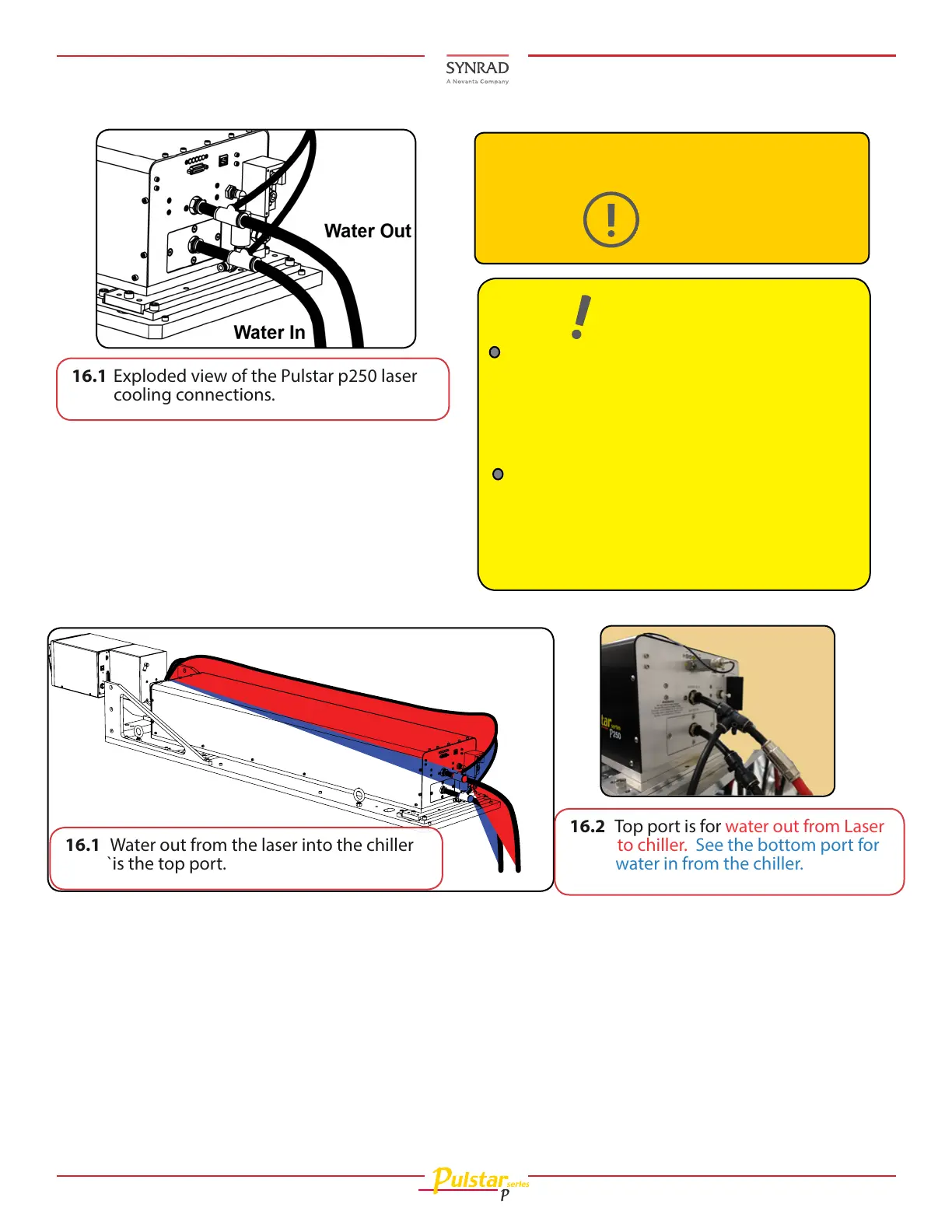
16.1 Exploded view of the Pulstar p250 laser
cooling connections.
Caution
Possible equipment
damage
Do not exceed coolant
pressure of 414 kPa (60
PSI)!
Assure coolant flow is within specifications
located in the Technical Reference chapter of the
Laser’s Operation Manual.
Refer to the dew point table and coolant flow
specifications in the aforementioned chapter in
the Operator’s Manual and gradually increase
coolant temperature until it is above the dew
point temperature and condensation disappears.
Do not exceed a coolant temperature of 30 °C (86
°F).
Important
Note:
If coolant ow needs adjusting:
Water In
Water Out
to chiller
16.1 Water out from the laser into the chiller
`is the top port.
16.2 Top port is for water out from Laser
to chiller. See the bottom port for
water in from the chiller.








 To Next Page