Document Number: MKT-70-1096 Revision 1 Page 3
SYSMEX XE-5000
TM
Start-Up
Power On Sequence
1. XE Information Processing Unit.
2. XE-5000 Main Unit.
3. GP Printer
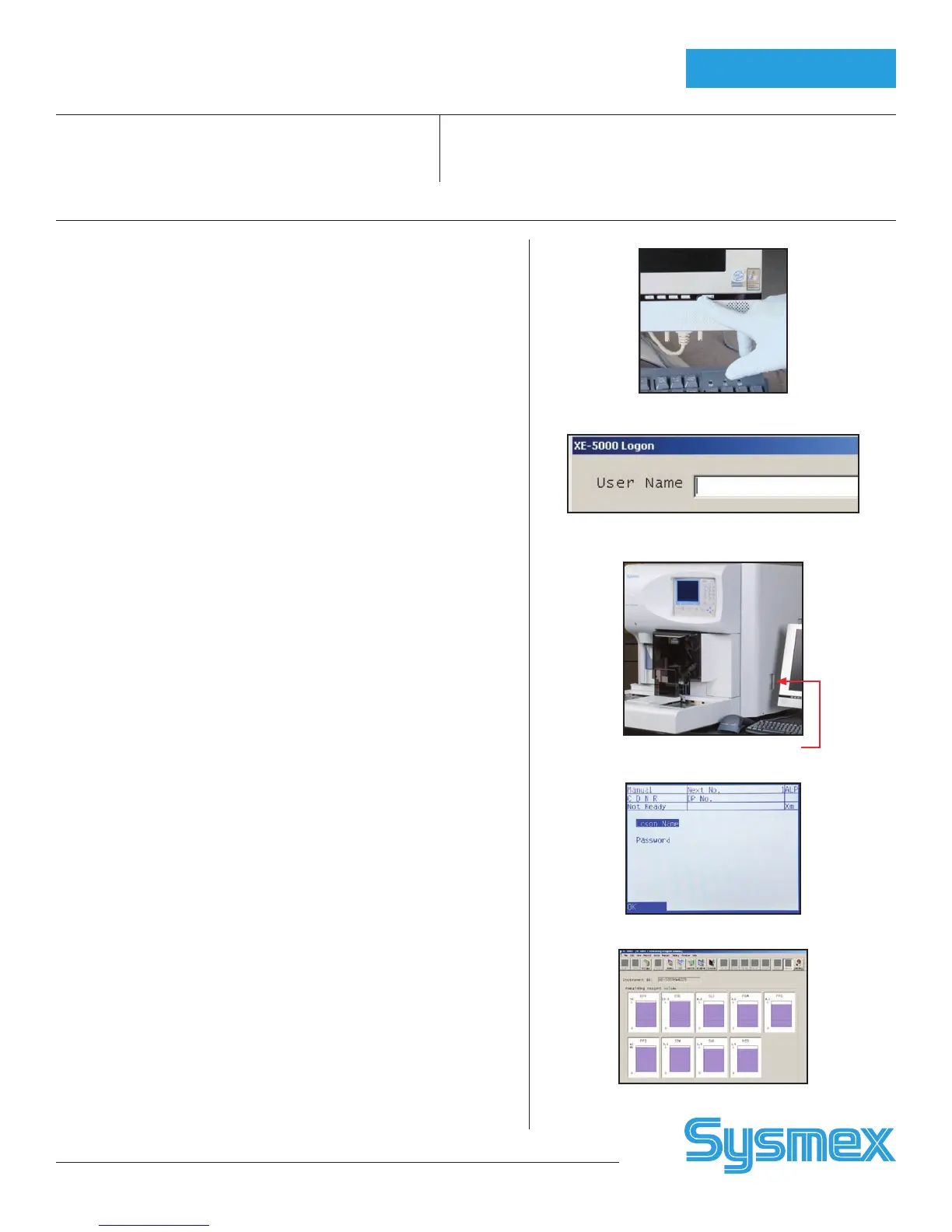
Power On Information Processing Unit (IPU)
1. Turn on IPU power (power switch on monitor).
Windows
®
system is automatically loaded.
2. When XE log-on displays, input your Lab’s user name _________
and password (if any). ____________
Press [ENTER] or [OK].
Power On Main Unit and Log On
IPU must display XE-5000 program before powering Main Unit on.
1. Turn on Main Unit power (switch on right side).
2. Pneumatic Unit power is controlled by the Main Unit.
Pneumatic Unit power switch should always remain on.
3. XE-5000 performs self-checks. If any checks fail, an error message
displays. Refer to XE-5000 Information for Use, Troubleshooting Chapter.
4. Main Unit log-on displays after the Background is completed.
• If needed, press [NUM/ALPH] to change from “NUM” to “ALP” or
“alp” on XE Main Unit LCD panel.
• Enter your Lab’s user name ___________________ and password
(if any). _____________________ by pressing specific keys until
desired character is displayed.
• Press [ENTER].
CAUTION: If you have to power the Main unit off and on, power off and wait
30 seconds before turning power back on.
Background Checks
1. If no “Background Error” message is displayed, Background check is
within acceptable limits.
2. If background counts are greater than the acceptable limits, a
‘Background Error’ message is displayed.
3. Parameter(s) that exceed the Background limit are displayed and marked
with a ‘+’on Main Unit.
4. Select ‘RETRY’ on Background error screen on Main Unit to perform
another Background check.
5. To resolve a Background Error, refer to XE-5000 Information for Use,
Troubleshooting Chapter.
Reagent Volume Check
1. Click [CONTROLLER] in the IPU Menu Tab.
2. Double click on [Remaining Reagent] (bottle) icon to check for low
volume reagents.
3. Do not replace the reagent until the Replace Reagent error occurs.
(Purple = full, white = empty)
Power button on IPU
IPU Log-on Dialog Box
Main Unit ON/Off Toggle
Main Unit Log-on Screen
Remaining Reagent Screen



 To Next Page