Document Number: MKT-70-1096 Revision 1 Page 10
SYSMEX XE-5000
TM
Summary of Body Fluid Analysis
The body fluid analysis mode of the XE-5000 uses the 4 DIFF scattergram
and the RBC distribution obtained from a specialized analysis sequence to
calculate and display the WBC counts, mononuclear cell (MN) /
polymorphonuclear cell (PMN) count and percentages, and the RBC (RBC-BF)
counts found in the body fluid.
Analysis Parameters
WBC-BF, RBC-BF, TC-BF #, MN#, MN%, PMN#, PMN%
Sample Analysis In Body Fluid Analysis Mode
Body Fluid Mode must be selected to perform body fluid analysis.
1. Make sure that the instrument is in READY status. The READY LED
should be lit.
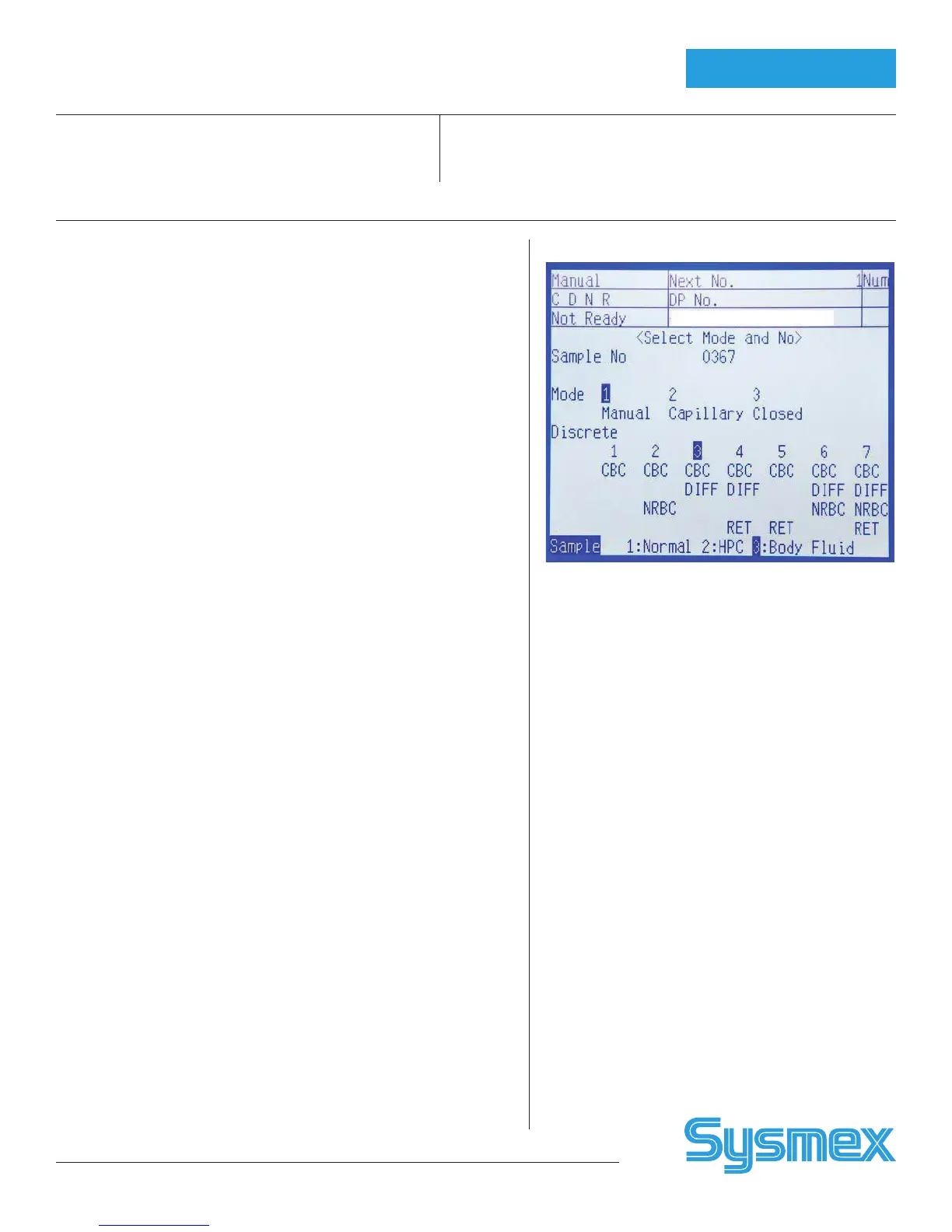
2. Press the MANUAL key on the Main Unit panel keypad. The Manual
Sample No. Setting screen will appear on the LCD.
3. Using the numeric keys, input the sample ID number or, read the bar-
code using a hand held barcode reader (optional).
4. When analysis mode is not set in manual mode, press the ↑ key and
change the set item to “Mode.” Then using the → and ← keys, set the
manual mode.
5. Use the ↑ key to change the setting parameter to Discrete, then use the
→ and ← keys to set CBC + DIFF unless any of the following is already
selected:
a. CBC+DIFF
b. CBC+DIFF+RET
c. CBC+DIFF+NRBC
d. CBC+DIFF+NRBC+RET
Note: Whichever of the above discrete settings is chosen, Discrete will change to
CBC+DIFF when the ENTER key is pressed to confirm the input.
6. Using the ↑ key to change the setting parameter to Sample, and then
use the → and ← keys to set to Body Fluid.
7. After all the setting are completed, press the ENTER key to set sample
NO.
8. When the ENTER key is pressed, a background check is run at the same
time. Background check analysis is repeated three times for the back-
ground check. If the background value is judged to be within range the
background check is completed.
If the background value is not within the specified range, the message
“Background Error” will be displayed on completion of the background
check.
In the case of a “Background Error,” select “B-Check” on the LCD menu
to perform automatic cleaning and repeat background. If the value af-
ter the automatic cleaning is not lower than the acceptable background
value, a “+” is displayed to the right of the value. To resolve background
error, see the Instructions for Use.
Note: The basic analysis procedure is the same as for Normal Mode, but for
body fluid analysis it is necessary to reliably eliminate background influ-
ences.
Body Fluid Mode
Body Fluid Order



 To Next Page