Document Number: MKT-70-1096 Revision 1 Page 14
SYSMEX XE-5000
TM
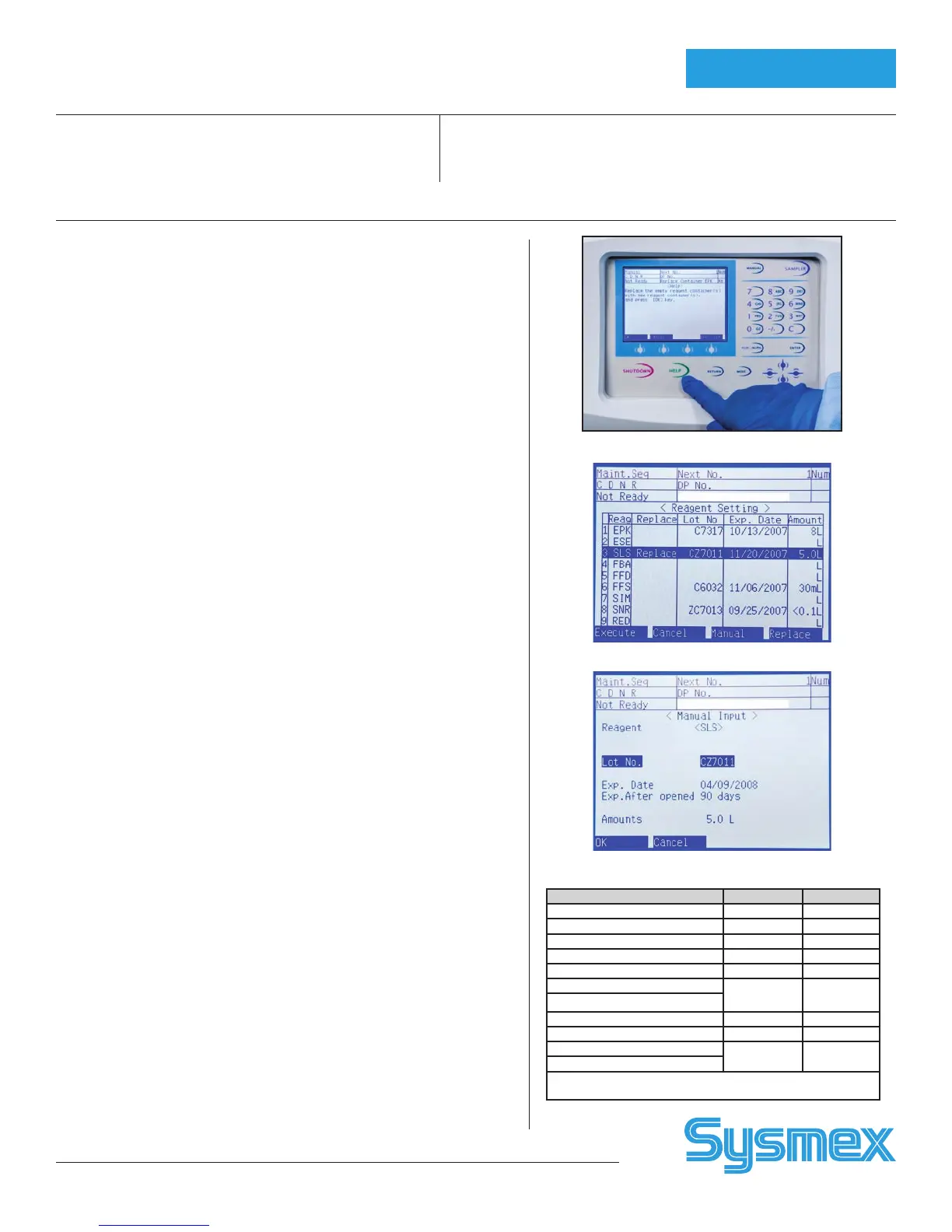
1. When a reagent container is empty, an alarm sounds and error message
displays. Press [HELP] on XE-Main Unit. Select [OK].
2. Reagent Setting Screen is displayed with “Replace” next to reagent that
needs replacing. Verify which reagent to change by matching reagent
abbreviation to proper name of reagent. (See reagent label)
3. Using hand held barcode reader, scan long reagent barcode
(EAN-128) on reagent box. Updated information is displayed (lot,
exp. date, volume).
Note: Use barcode on box for RED, SNR, and FFS. Do not use barcode label on
bottle or foil dye pack.
Caution: NR(S) MUST be replaced each time the NR(L) cube is replaced.
Empty NR(S) does not trigger message.
If needed, manually input Reagent information:
a. Press [↑] or [↓] to select reagent for manual entry.
b. Press [MANUAL] on function menu. Manual Input is displayed.
c. Press [↑] or [↓] and input information for new lot:
• For Lot No.
• Press [NUM/ALP] 1 time (ALP). Input 1st letter of Lot No.
• Press [NUM/ALP] 2 times (Num). Input 4 digit Lot No.
• [↓] to Exp. Date. Use “Num” key, input Month (nn).
Press [→] to Day. Use ‘Num” key (nn).
Press [→] to Year. Use ‘Num” key (nnnn).
• [↓] to Exp. after Opened. Use “Num” and input open dating.
Open dating is 60 days except SULFOYSER which is 90 days.
• [↓] to package size. Input size from box.
d. Press [OK] to exit Manual input display and return to Reagent Setting
screen. Lot No., open Exp. Date, and package size is displayed.
4. Remove cap from new reagent container. Using clean technique, remove
reagent tubing from empty container and insert into new container.
Initial and date new reagent container.
5. Select [EXECUTE] from reagent replacement screen. The new reagent is
primed.
6. Reagent replacement is documented on Reagent Log in XE Main Menu,
Controller icon, Reagent Log icon. This Log may be printed by Report,
Ledger (LP) Print. A Remaining Reagent Volume icon is also available.
Notes:
• When changing NR(L) and RED, the diluent and dye must be changed at
the same time. NR(S) does not trigger message.
• If STROMATOLYSER-NR or RET-SEARCH (II) reagents are empty and no
replacement reagents are available, XE may still be analyzed using Open
Manual Mode for CBC and DIFF orders only. Do not perform Auto Rinse or
Shutdown.
• STROMATOLYSER-4DS (FFS) is replaced when the FFS reagent cycle coun-
ter reaches 2000. Do not replace this reagent unless “Replace FFS” Error
message displays or counter will be incorrect.
If replacing reagent foil packs, verify packs are properly seated in holders.
For FFS reagent, both labels must face same direction.
REAGENT MESSAGE VOLUME
CELLPACK
TM
EPK 20L
CELLSHEATH
TM
ESE 20L
STROMATOLYSER -4DL
TM
FFD 5.0L
STROMATOLYSER -4DS
TM
FFS 42mL
STROMATOLYSER -FB
TM
FBA 5L
STROMATOLYSER –NR(L)
TM
SNR
NA
3.6L
42mL
STROMATOLYSER –NR(S)
TM
STROMATOLYSER -IM
TM
SIM 10L
SULFOLYSER
TM
SLS 5.0L
RET-SEARCH (II) DILUENT
TM
RED 1.0L
RET-SEARCH (II) DYE
TM
Open reagent stability is 60 days with the exception of
SULFOLYSER which is 90 days.
Replace Container Message
Reagent Scanned with Wand
Reagent Entered Manually
Reagent Replacement


 To Next Page
 Loading...







