Document Number: MKT-70-1096 Revision 1 Page 17
SYSMEX XE-5000
TM
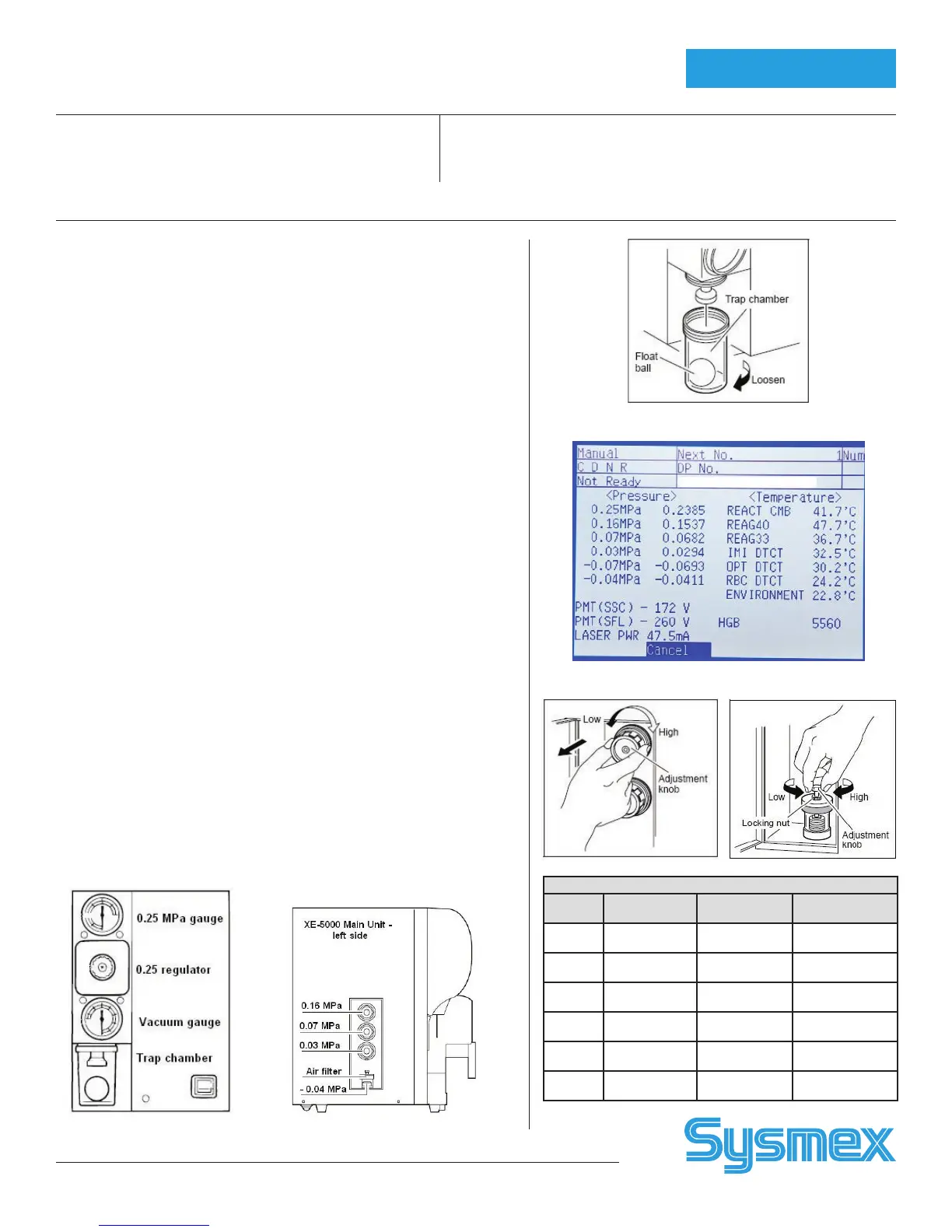
XE Pneumatic Unit:
Inspect Trap Chamber for Fluid
• Visually inspect Trap Chamber for fluid.
• If fluid is present, turn Pneumatic Unit off. Remove Trap Chamber by
turning clockwise. Discard fluid. Dry chamber and re-assemble trap on
Pneumatic Unit. Do not over-tighten.
• Turn Pneumatic Unit On. Verify vacuum gauge is accurate.
XE Pressure and Vacuum Checks
• XE Main unit sensors monitor ranges for pressure and vacuum. If moni-
tored ranges are exceeded (see Table), error messages are displayed.
Press [HELP] and [OK] to display Sensor 1 screen. Then adjust to cor-
rect the error.
• Check pressure and vacuum on Pneumatic Unit before checking the
Main Unit.
• Adjustment procedures listed below. Set using the adjust range (see
Table).
To Adjust XE Pneumatic Unit Pressure
• View XE Sensor 1 screen
• Loosen fixing screw using screwdriver
• Adjust 0.25 pressure using knob
To Adjust XE Main Unit Pressure
• View Sensor 1 screen
• Pull knob to unlock
• Adjust regulator to range
• Push knob in to lock in place
To Adjust XE Main Unit Vacuum
• View Sensor 1 screen
• Loosen lock nut on bellows unit
• Adjust using adjustment knob
• Retighten lock nut
Vacuum Trap Chamber
Sensor 1 Screen
Maintenance
Pressure and Vacuum (In Order of Sensor 1 Screen)
XE-5000
Adjust Range
MPa
Monitored
Static Range
Adjust
Location
PU
Pressure
0.24 to 0.26 2100 to 2900
PU
Regulator
0.16
Pressure
0.159 to 0.161 1500 to 1700
XE Main
Unit
0.07
Pressure
0.069 to 0.071 620 to 780
XE Main
Unit
0.03
Pressure
0.029 to 0.031 270 to 330
XE Main
Unit
PU
Vacuum
must be ≥- 0.05 400 to 700
No PU
Adjustment
- 0.04
Vacuum
- 0.039 to
- 0.041
285 to 315
XE Main
Unit



 To Next Page