DHR Series Getting Started Guide Page 44
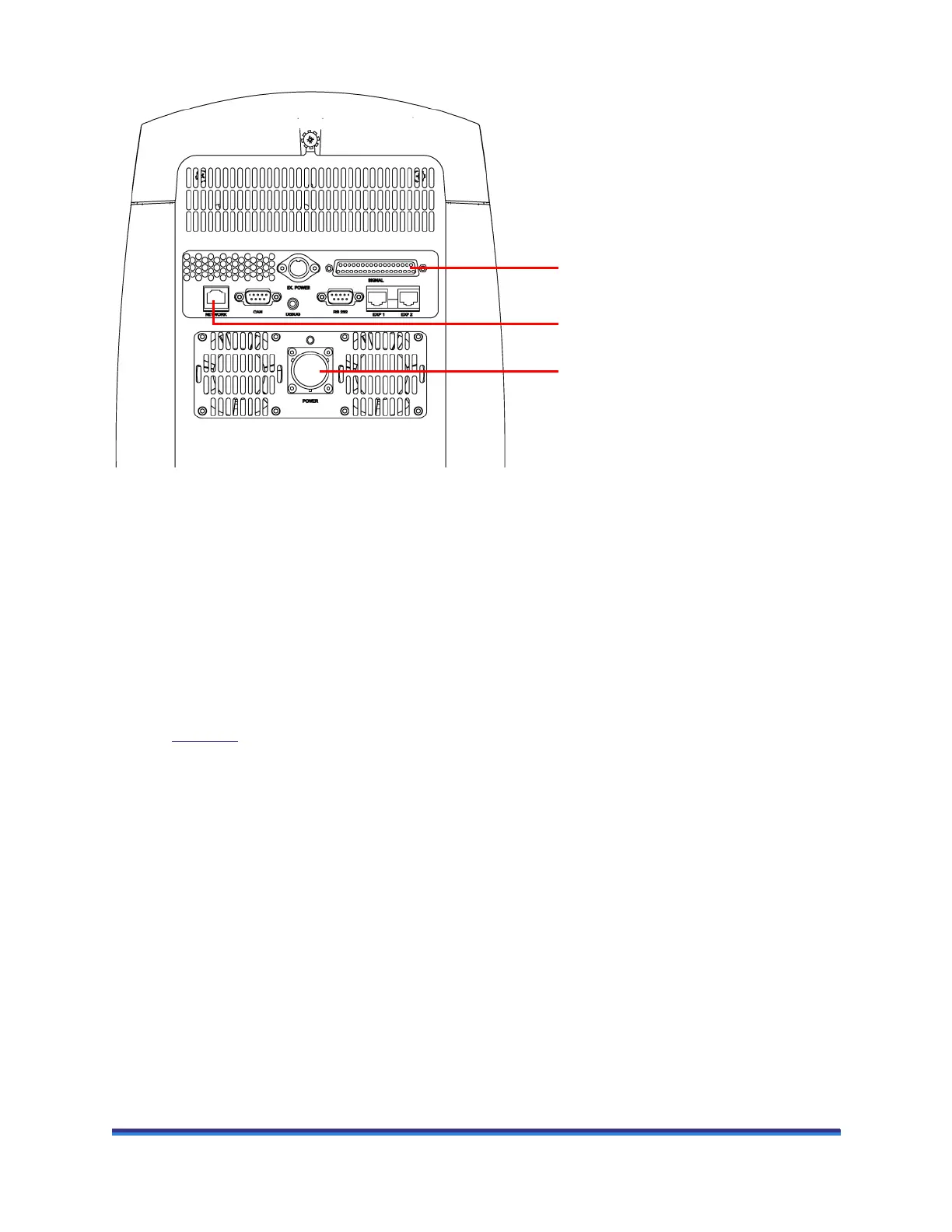
Figure 19 Cable connections to make on electronics box back panel.
Connecting the Computer to the Electronics Box Using Ethernet
Communications
Ethernet communications can be setup in two ways. The electronics box and computer can be connected
directly via a single Ethernet cable, or both can be connected using separate cables to a Local Area
Network [LAN] or router. Full details are provided in the software installation instructions.
Connecting Air and Water to the Rheometer
Refer to Figure 18 on the previous page for the locations of the relevant connections in the instructions
below.
1 For Peltier-based temperature control options, connect a supply of water to the supply and return
connections at the rear of the rheometer.
2 Connect the air supply (from the air regulator assembly) to the AIR IN connection. Set the regulator to
2 bar (30 psi).
Power port
Signal port
Network port for Ethernet cable



 To Next Page