DHR Series Getting Started Guide Page 45
Connecting the TA Air-Cooled Peltier Circulator
Refer to Figure 18 and Figure 19 for the locations of the relevant connections in the instructions below.
To connect the Peltier Circulator, connect the supply and return hoses to the flow supply and return
connections on the rear of the rheometer.
NOTE: After the system has been started, recheck the level of water in the reservoir and refill to the inner
rim, if necessary.
CAUTION: Do not put any liquid other than distilled water and TA Instruments’ Conditioner in the
circulator reservoir.
MISE EN GARDE: Ne versez aucun liquide autre que de l'eau distillée et l'agent de condi-
tionnement de TA Instruments dans le réservoir du circulateur.
Connecting Motor Cooling
The Discovery Series rheometer will operate without motor cooling, but may shut down if operated at
maximum torque for prolonged periods. Providing a source of cooling allows the rheometer to operate at
maximum torque indefinitely. It also improves the performance of the True Position Sensor.
To avoid condensation within the instrument, use water close to ambient temperature. For best perfor-
mance, allow time for the instrument to thermally stabilize before taking measurements.
Establishing Power to the System
To establish power to the electronics box and DHR, follow the instructions below.
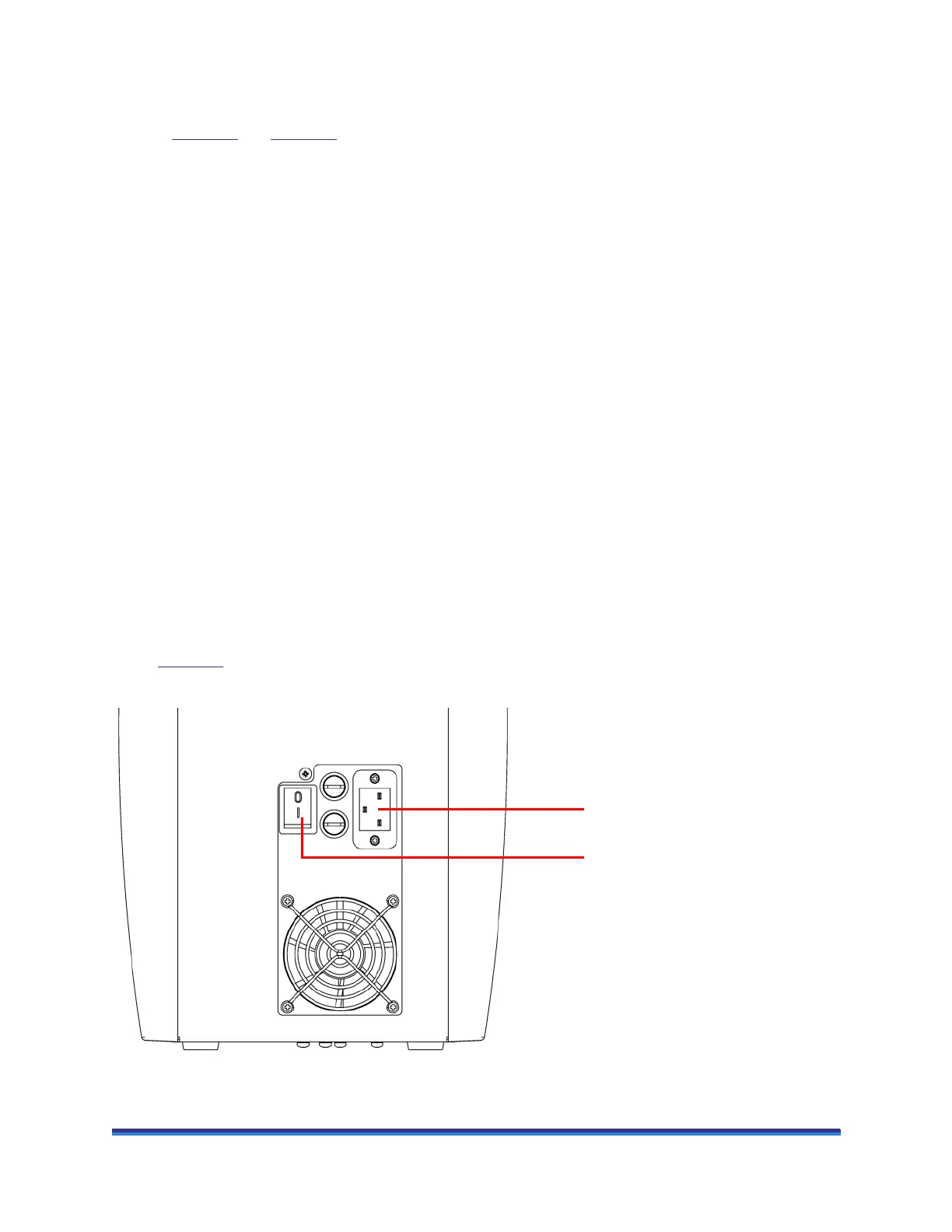
1 Plug the AC power cord into the AC power socket on the lower back panel of the electronics box. Refer
to Figure 20
.
2 To power on the system, press the power switch on the electronics box to the On (I) position.
Figure 20 Lower back panel of electronics box.
AC power socket
AC power switch



 To Next Page