If you can’t get your Powerline Adapters to connect, you should try
the following:
1. Press the Pair button on one Powerline Adapter for 2-3 seconds
(the Power LED will start blinking after you release the button).
Within 2 minutes press the Pair button on the second Powerline
Adapter between 2-3 seconds. Your Powerline LED should then
appear solid.
2. If that doesn’t work, press the Reset button (using a safety pin or
something similar) on each adapter for 1 second, then
repeat step 1.
16
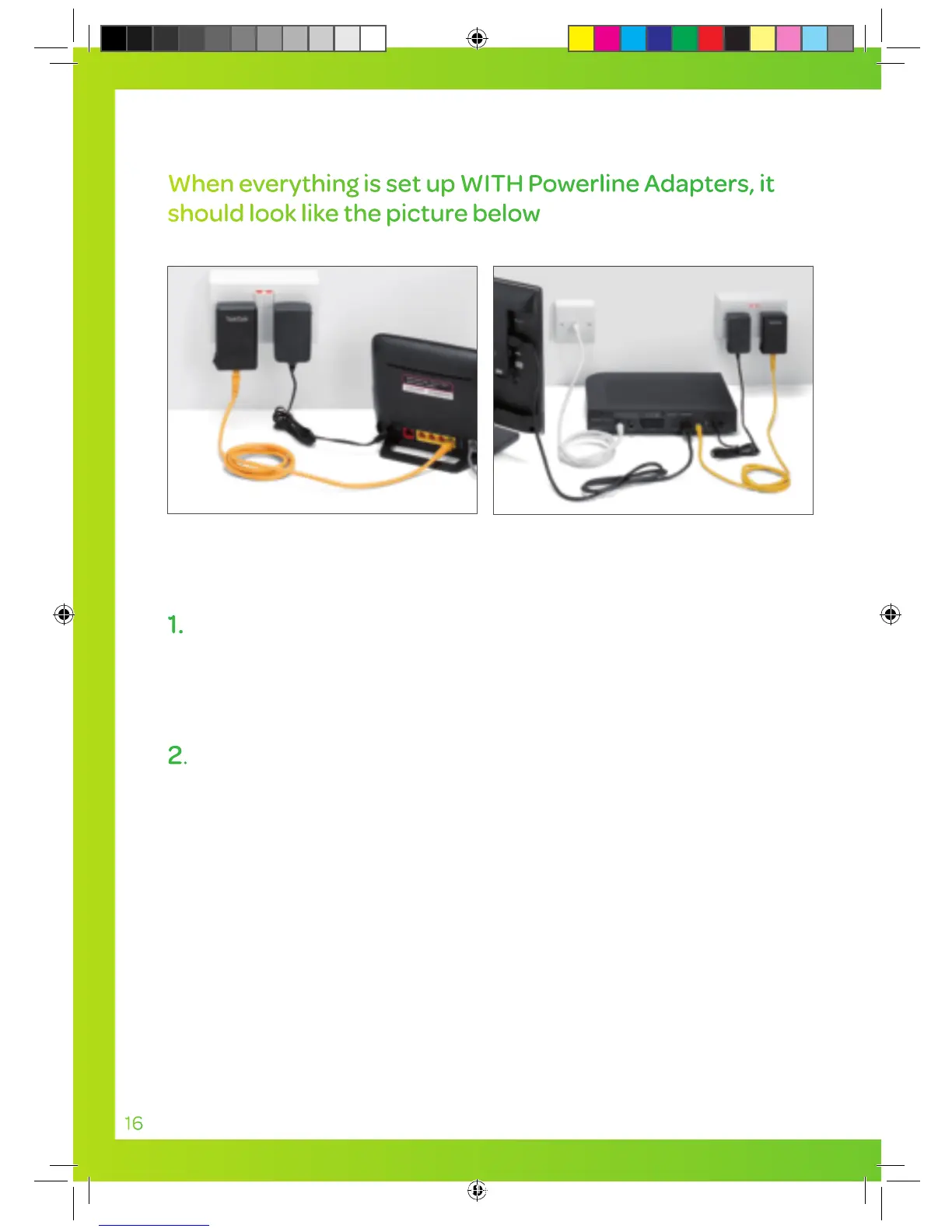
When everything is set up WITH Powerline Adapters, it
should look like the picture below
White aerial
cable
YouView box
Yellow Ethernet cable
HDMI
cable
Yellow Ethernet cable
Powerline
Adapter
Powerline
Adapter
Power
cable
TalkTalk router
TT4286 TT SELF INSTALL GUIDE AMENDS AUG TVSIGUIDE0813V5 V11.indd 16 03/10/2013 15:31


 To Next Page