EasyManua.ls Logo

Tandy TRS-80 - Page 53

Tandy TRS-80
104 pages
Print Icon
To Next Page IconTo Next Page
To Previous Page IconTo Previous Page
Loading...
HOW MUCH
CAN ONE
DISK
HOLD?
SAVE
the
"INPUT
Program"
you now
have
in
memory.
(You'll
be using it
later.)
Now
change it
into
a "LINE
INPUT
Program."
Delete
line
50 and change
lines
40
and 60.
Type:
40 LINE
INPUT
#1
,
L*
50
G0
PRINT
"DATA
LINE
:"
L*
and
RUN . .
.
Line
40 INPUTs
an entire
LINE,
rather than
one single
data item
from the
disk
file.
This LINE
includes
everything
up to the (ENTER)
character
punctuation
marks,
spaces and
all.
In the
"OFFICE/DAT"
file, the
first
LINE
contains
5,
"PEN."
Line 40
labels
this line
as L$ and line
60
PRINTs
it
on your
screen.
The
program
then
INPUTs
and
PRINTs
-
16,
"PAPER"
the
second and final
line in
the file.
We can easily
alter
this
program
so that it
will
count
how
many
bytes are in
the
file.
Add
these
lines
and
RUN it:
25 PRINT
"THIS
FILE
CONTAINS
:"
27 PRINT: PRINT:
PRINT:
PRINT
57
m
=
Lt+
"*"
G0
PRINT
Mt!
G5 L =
LEN(Mt)
+
L
90 PRINT
@ 394t L "BYTES"
Line
57
adds an asterisk
to each
LINE.
This
aster-
isk represents
the (ENTER)
character.
Line
65
then
counts the
total number
of
characters
(bytes)
in
each line.
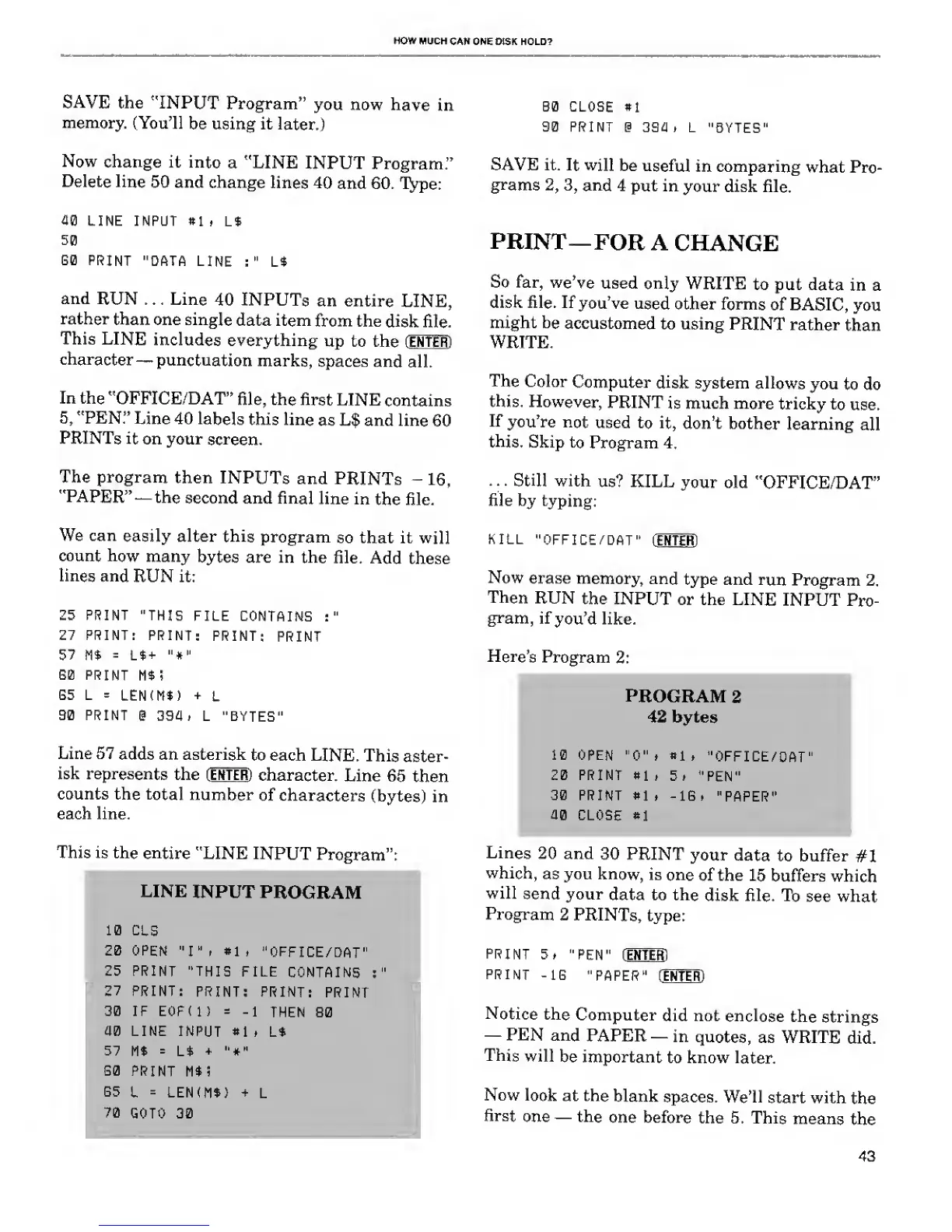
This is the
entire
"LINE
INPUT
Program":
PLINE
INPUT
PROGRAM
10
CLS
20 OPEN
"I"* «li
"OFFICE/DAT"
25
PRINT
"THIS
FILE
CONTAINS
;
27 PRINT:
PRINT:
PRINT:
PRINT
30 IF EOFU)
=
-1
THEN
80
40 LINE INPUT
*1 f L*
57
M*
=
L*
+
"*"
G0
PRINT
M$!
G5
L
=
LEN(M$)
+
L
70
GOTO 30
B0 CLOSE
*l
90 PRINT
@ 394 > L
"BYTES'
SAVE it.
It will
be
useful
in comparing
what Pro-
grams
2, 3,
and
4 put in
your disk file.
PRINT—
FOR A
CHANGE
So far,
we've
used
only
WRITE
to
put
data
in a
disk file. If
you've
used
other forms
of
BASIC,
you
might
be
accustomed
to using
PRINT
rather
than
WRITE.
The
Color
Computer
disk
system
allows
you
to do
this. However,
PRINT
is much
more
tricky
to use.
If
you're
not
used to
it,
don't bother
learning
all
this.
Skip
to Program
4.
. .
.
Still
with
us? KILL
your old
"OFFICE/DAT"
file by
typing:
KILL
"OFFICE/DAT"
(ENTER)
Now
erase
memory,
and
type and
run
Program
2.
Then
RUN
the INPUT
or the LINE
INPUT
Pro-
gram,
if
you'd like.
Here's
Program
2:
PROGRAM
2
42 bytes
10 OPEN
"0"
,
*1
,
"OFFICE/DAT"
20 PRINT 81
,
"PEN"
30 PRINT
*1
, -1G »
"PAPER"
40 CLOSE »1
Lines
20
and
30 PRINT
your
data
to buffer
#1
which,
as you
know,
is
one
of the
15
buffers which
will
send your
data to the
disk file.
To
see
what
Program
2 PRINTs,
type:
PRINT
"PEN"
(ENTER)
PRINT
-1G
"PAPER" [ ENTER)
Notice
the
Computer
did not
enclose
the
strings
PEN and
PAPER
in
quotes,
as WRITE
did.
This
will
be important
to know
later.
Now
look
at the
blank
spaces. We'll
start with
the
first
one
the
one
before
the 5. This
means
the
43

Related product manuals