EasyManua.ls Logo

Tandy TRS-80 - Page 71

Tandy TRS-80
104 pages
Print Icon
To Next Page IconTo Next Page
To Previous Page IconTo Previous Page
Loading...
TECHNICAL
INFORMATION
If all the bits
contain
0,
no error
occurred. (See the
disk service
manual
for further details
on
the error bits)
After
returning from
DSKCON,
you can turn off
the drive motor by putting
the value of in the
memory
location FF40 (hex).
Sample Programs
Using DSKCON
This
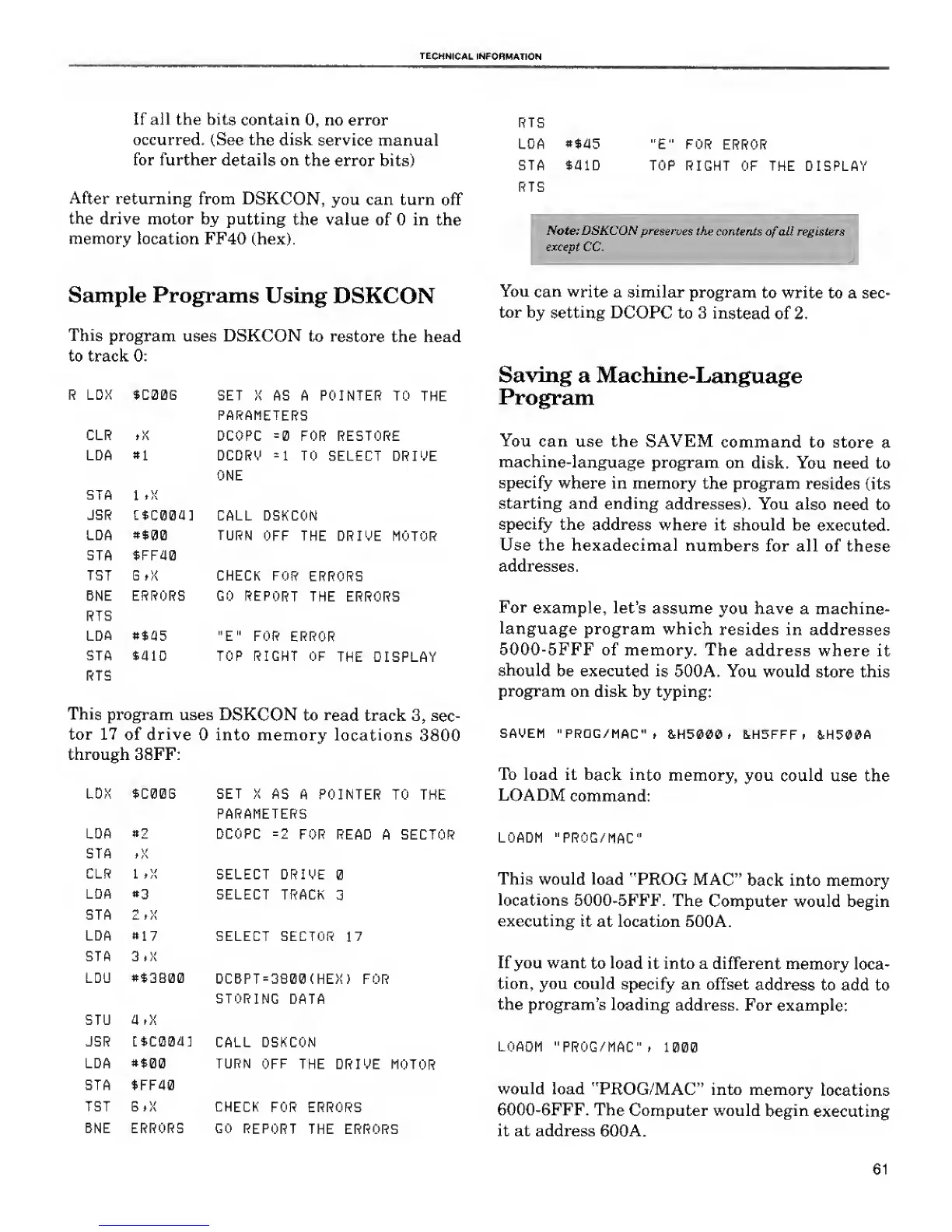
program uses DSKCON
to restore
the head
to track 0:
R LDX $C00G
SET X AS A POINTER TO
THE
PARAMETERS
CLR ,){
DCOPC
=0
FOR RESTORE
LDA
9\
DCDRO
=1
TO
SELECT DRIVE
ONE
STA
1
»x
JSR
ttcoaa]
CALL DSKCON
IDA
#$0Q
TURN OFF
THE DRIVE MOTOR
STA $FF40
TBT
G tX CHECK FOR
ERRORS
BNE ERRORS GO REPORT
THE ERRORS
RTS
LDA
*$i)5
"E" FOR
ERROR
STA
*41D TOP RIGHT OF
THE DISPLAY
RTS
This
program uses
DSKCON
to
read
track
3,
sec-
tor 17
of
drive
into memory
locations
3800
through 38FF:
LDX $C00B
LDA
*2
STA
,X
CLR 1 tX
LDA
«3
STA
2,X
LDA *17
STA 3.X
LDU **3B00
SET X
AS
A POINTER TO THE
PARAMETERS
DCOPC
=
2
FOR
READ A SECTOR
SELECT DRIVE
SELECT TRACK
3
SELECT SECTOR
17
DCBPT=3B00(HEX)
FOR
STORING
DATA
STU a,x
JSR [*C004]
CALL DSKCON
LDA
»$00
TURN OFF
THE
DRIVE MOTOR
STA SFF40
TST BtX CHECK
FOR ERRORS
BNE ERRORS GO
REPORT
THE ERRORS
RTS
LDA
**45
STA $aiD
RTS
"E" FOR
ERROR
TOP
RIGHT
OF THE DISPLAY
C
Note: DSKCON
preserves
the contents
of
all registers
except CC.
You
can write
a similar
program
to write to a sec-
tor by
setting
DCOPC to 3
instead
of 2.
Saving
a Machine-Language
Program
You
can use the SAVEM
command to store
a
machine-language
program
on
disk. You need to
specify
where
in memory the program
resides (its
starting and
ending
addresses). You
also need
to
specify the
address
where it should
be executed.
Use the hexadecimal
numbers
for all of
these
addresses.
For
example, let's
assume
you have a machine-
language
program which
resides in addresses
5000-5FFF of memory.
The
address where
it
should
be executed
is
500A. You would
store this
program
on disk by typing:
SAVEM "PROG/MAC"
> &H5000 , &H5FFF
,
1H500A
To load it
back into
memory, you
could
use the
LOADM
command:
LOADM "PROG/MAC"
This
would load
"PROG MAC"
back into memory
locations
5000-5FFF. The
Computer would begin
executing
it at location 500A.
If you want
to
load
it into a different
memory loca-
tion, you could
specify an offset
address
to add to
the program's
loading
address. For
example:
LOADM
"PROG/MAC" ,
1000
would load
"PROG/MAC"
into memory
locations
6000-6FFF. The
Computer would
begin
executing
it at address 600A.
61

Related product manuals