BlinkerBeam™ Radio Operation Guide
16
Note: Using the Reset Legacy command resets both the controller and
the radio.
Note: This must be done after switching Operation Mode. See Set the
Operation Mode.
Reboot All the Radios in the Network
If you need to restore communication across the entire network,
1. Select MAIN MENU > Legacy Control. See Figure 79.
2. Select LEGACY CONTROL> Network Control. See Figure 82.
3. Select NETWORK COMMANDS > Reset Controllers. See Figure 83.
Note: Using the Reset Controllers command resets all of the
controllers and the radios in the network.
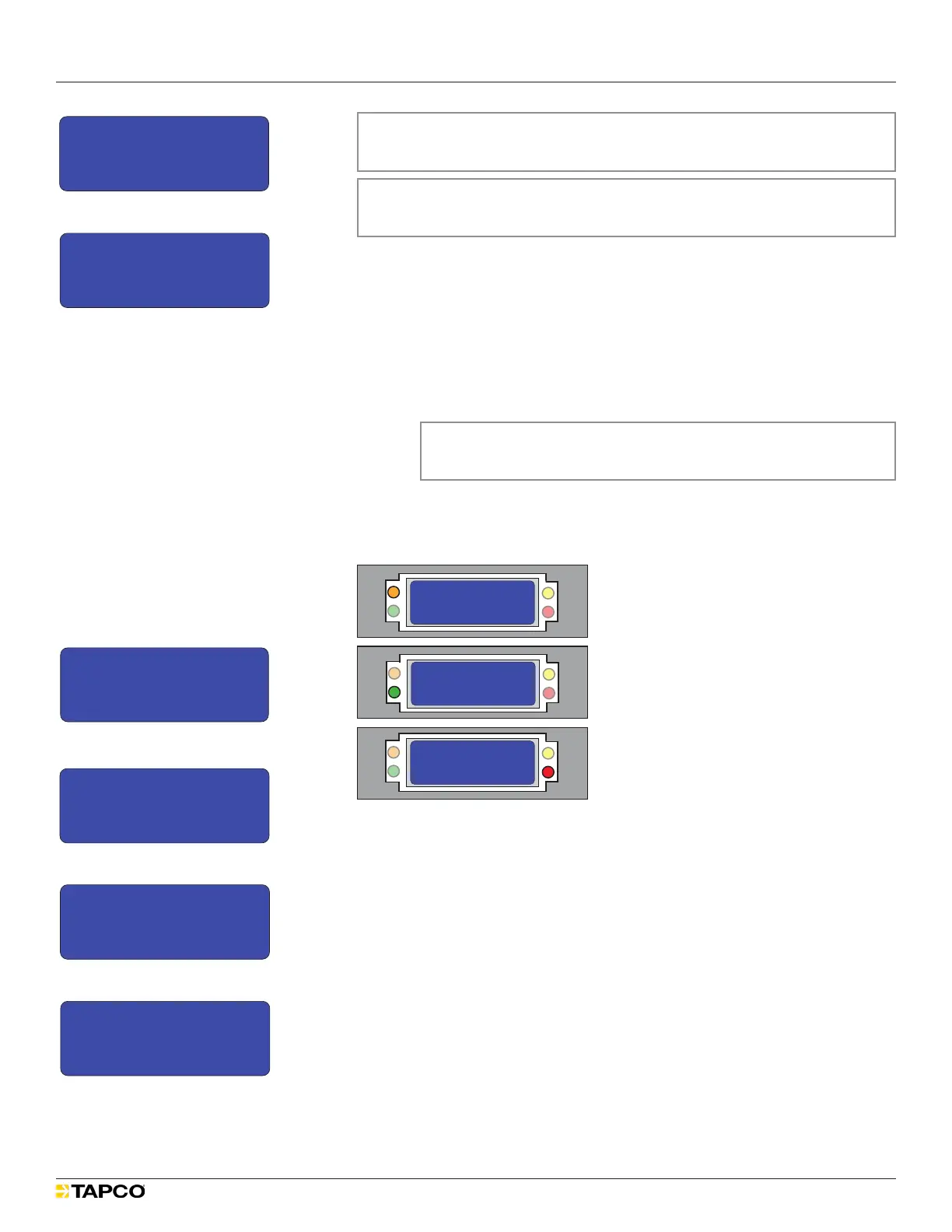
The LCD screen turns off for approximately eight seconds. The orange,
green and red LEDs all flash brightly in an alternating sequence.
See Figure 84.
Figure 84
MAIN MENU
1) Controller Status
2) Radio Status
3) Radio Setup
>
SS
Tx
JS
Rx
MAIN MENU
1) Controller Status
2) Radio Status
3) Radio Setup
>
SS
Tx
JS
Rx
MAIN MENU
1) Controller Status
2) Radio Status
3) Radio Setup
>
SS
Tx
JS
Rx
MAIN MENU
1) Controller Status
2) Radio Status
3) Radio Setup
>
SS
Tx
JS
Rx
MAIN MENU
1) Controller Status
2) Radio Status
3) Radio Setup
>
SS
Tx
JS
Rx
MAIN MENU
1) Controller Status
2) Radio Status
3) Radio Setup
>
SS
Tx
JS
Rx
MAIN MENU
1) Controller Status
2) Radio Status
3) Radio Setup
>
SS
Tx
JS
Rx
MAIN MENU
1) Controller Status
2) Radio Status
3) Radio Setup
>
SS
Tx
JS
Rx
MAIN MENU
1) Controller Status
2) Radio Status
3) Radio Setup
>
SS
Tx
JS
Rx
When the network reset is complete, the MAIN MENU reappears.
See Figure 79.
Change the Length of Time the LEDs Flash
1. Select MAIN MENU > Legacy Control. See Figure 85.
2. From the LEGACY CONTROL menu, select either option.
Local Control (this unit) See Figure 86.
Network Control (all units)
3. From the LOCAL COMMANDS or NETWORK COMMANDS menu, select
Set Button TO. See Figures 87 and 88.
The BUTTON TIMEOUT MENU appears.
MAIN MENU
3) Radio Setup
4) Legacy Control
5) Site Survey
>
LEGACY CONTROL
1) Local Control
2) Network Control
>
LEGACY CONTROL
1) Local Control
2) Network Control
>
LOCAL COMMANDS
1) LED1 10s ON
2) LED2 10s ON
3) Reset Legacy
4) Send Button TO
5) Set Button TO
6) Chevron Config
NETWORK COMMANDS
1) LED1 10s ON
2) LED2 10s ON
3) Reset Controllers
4) Send Button TO
5) Set Button TO
LOCAL COMMANDS
1) LED1 10s ON
2) LED2 10s ON
3) Reset Legacy
>
NETWORK COMMANDS
1) LED1 10s ON
2) LED2 10s ON
3) Reset Controllers
>
LOCAL COMMANDS
1) LED1 10s ON
2) LED2 10s ON
3) Reset Legacy
>
LOCAL COMMANDS
1) LED1 10s ON
2) LED2 10s ON
3) Reset Legacy
>
NETWORK COMMANDS
1) LED1 10s ON
2) LED2 10s ON
3) Reset Controllers
>
>
NETWORK COMMANDS
1) LED1 10s ON
2) LED2 10s ON
3) Reset Controllers
>
NETWORK COMMANDS
3) Reset Controllers
4) Send Button TO
5) Set Button TO
>
LOCAL COMMANDS
4) Send Button TO
5) Set Button TO
6) Chevron Config
>
NETWORK COMMANDS
3) Reset Controllers
4) Send Button TO
5) Set Button TO
>
LOCAL COMMANDS
4) Send Button TO
5) Set Button TO
6) Chevron Config
>
Button T/O SAVING
20 secs
>
BUTTON TIMEOUT MENU
15
20
25
--> X
< >
secs
Is this the clearest and simplest that it could be?
1
2
3
4
5
6
7
8
9
10
11
12
13
14
Figure 86
MAIN MENU
3) Radio Setup
4) Legacy Control
5) Site Survey
>
LEGACY CONTROL
1) Local Control
2) Network Control
>
LEGACY CONTROL
1) Local Control
2) Network Control
>
LOCAL COMMANDS
1) LED1 10s ON
2) LED2 10s ON
3) Reset Legacy
4) Send Button TO
5) Set Button TO
6) Chevron Config
NETWORK COMMANDS
1) LED1 10s ON
2) LED2 10s ON
3) Reset Controllers
4) Send Button TO
5) Set Button TO
LOCAL COMMANDS
1) LED1 10s ON
2) LED2 10s ON
3) Reset Legacy
>
NETWORK COMMANDS
1) LED1 10s ON
2) LED2 10s ON
3) Reset Controllers
>
LOCAL COMMANDS
1) LED1 10s ON
2) LED2 10s ON
3) Reset Legacy
>
LOCAL COMMANDS
1) LED1 10s ON
2) LED2 10s ON
3) Reset Legacy
>
NETWORK COMMANDS
1) LED1 10s ON
2) LED2 10s ON
3) Reset Controllers
>
>
NETWORK COMMANDS
1) LED1 10s ON
2) LED2 10s ON
3) Reset Controllers
>
NETWORK COMMANDS
3) Reset Controllers
4) Send Button TO
5) Set Button TO
>
LOCAL COMMANDS
4) Send Button TO
5) Set Button TO
6) Chevron Config
>
NETWORK COMMANDS
3) Reset Controllers
4) Send Button TO
5) Set Button TO
>
LOCAL COMMANDS
4) Send Button TO
5) Set Button TO
6) Chevron Config
>
Button T/O SAVING
20 secs
>
BUTTON TIMEOUT MENU
15
20
25
--> X
< >
secs
Is this the clearest and simplest that it could be?
1
2
3
4
5
6
7
8
9
10
11
12
13
14
Figure 87
MAIN MENU
3) Radio Setup
4) Legacy Control
5) Site Survey
>
LEGACY CONTROL
1) Local Control
2) Network Control
>
LEGACY CONTROL
1) Local Control
2) Network Control
>
LOCAL COMMANDS
1) LED1 10s ON
2) LED2 10s ON
3) Reset Legacy
4) Send Button TO
5) Set Button TO
6) Chevron Config
NETWORK COMMANDS
1) LED1 10s ON
2) LED2 10s ON
3) Reset Controllers
4) Send Button TO
5) Set Button TO
LOCAL COMMANDS
1) LED1 10s ON
2) LED2 10s ON
3) Reset Legacy
>
NETWORK COMMANDS
1) LED1 10s ON
2) LED2 10s ON
3) Reset Controllers
>
LOCAL COMMANDS
1) LED1 10s ON
2) LED2 10s ON
3) Reset Legacy
>
LOCAL COMMANDS
1) LED1 10s ON
2) LED2 10s ON
3) Reset Legacy
>
NETWORK COMMANDS
1) LED1 10s ON
2) LED2 10s ON
3) Reset Controllers
>
>
NETWORK COMMANDS
1) LED1 10s ON
2) LED2 10s ON
3) Reset Controllers
>
NETWORK COMMANDS
3) Reset Controllers
4) Send Button TO
5) Set Button TO
>
LOCAL COMMANDS
4) Send Button TO
5) Set Button TO
6) Chevron Config
>
NETWORK COMMANDS
3) Reset Controllers
4) Send Button TO
5) Set Button TO
>
LOCAL COMMANDS
4) Send Button TO
5) Set Button TO
6) Chevron Config
>
Button T/O SAVING
20 secs
>
BUTTON TIMEOUT MENU
15
20
25
--> X
< >
secs
Is this the clearest and simplest that it could be?
1
2
3
4
5
6
7
8
9
10
11
12
13
14
Figure 88
Figure 85
MAIN MENU
3) Radio Setup
4) Legacy Control
5) Site Survey
>
MAIN MENU
2) Radio Status
3) Radio Setup
4) Legacy Control>
MAIN MENU
1) Controller Status
2) Radio Status
3) Radio Setup
4) Legacy Control
5) Site Survey
MAIN MENU
1) Controller Status
2) Radio Status
3) Radio Setup
>
MAIN MENU
0) Quick Setup
1) Controller Status
2) Radio Status
3) Radio Setup
>
>
MAIN MENU
1) Controller Status
2) Radio Status
3) Radio Setup
LCD Screen Icons
Selected and Saved
Saved Value
Selected
>
*
->
1
2
3
4
5
6
MAIN MENU
3) Radio Setup
4) Legacy Control
5) Site Survey
>
LEGACY CONTROL
1) Local Control
2) Network Control
>
LEGACY CONTROL
1) Local Control
2) Network Control
>
LOCAL COMMANDS
1) LED1 10s ON
2) LED2 10s ON
3) Reset Legacy
4) Send Button TO
5) Set Button TO
6) Chevron Config
NETWORK COMMANDS
1) LED1 10s ON
2) LED2 10s ON
3) Reset Controllers
4) Send Button TO
5) Set Button TO
LOCAL COMMANDS
1) LED1 10s ON
2) LED2 10s ON
3) Reset Legacy
>
NETWORK COMMANDS
1) LED1 10s ON
2) LED2 10s ON
3) Reset Controllers
>
LOCAL COMMANDS
1) LED1 10s ON
2) LED2 10s ON
3) Reset Legacy
>
LOCAL COMMANDS
1) LED1 10s ON
2) LED2 10s ON
3) Reset Legacy
>
NETWORK COMMANDS
1) LED1 10s ON
2) LED2 10s ON
3) Reset Controllers
>
>
NETWORK COMMANDS
1) LED1 10s ON
2) LED2 10s ON
3) Reset Controllers
>
NETWORK COMMANDS
3) Reset Controllers
4) Send Button TO
5) Set Button TO
>
LOCAL COMMANDS
4) Send Button TO
5) Set Button TO
6) Chevron Config
>
NETWORK COMMANDS
3) Reset Controllers
4) Send Button TO
5) Set Button TO
>
LOCAL COMMANDS
4) Send Button TO
5) Set Button TO
6) Chevron Config
>
Button T/O SAVING
20 secs
>
BUTTON TIMEOUT MENU
15
20
25
--> X
< >
secs
Is this the clearest and simplest that it could be?
1
2
3
4
5
6
7
8
9
10
11
12
13
14
Figure 83
MAIN MENU
3) Radio Setup
4) Legacy Control
5) Site Survey
>
LEGACY CONTROL
1) Local Control
2) Network Control
>
LEGACY CONTROL
1) Local Control
2) Network Control
>
LOCAL COMMANDS
1) LED1 10s ON
2) LED2 10s ON
3) Reset Legacy
4) Send Button TO
5) Set Button TO
6) Chevron Config
NETWORK COMMANDS
1) LED1 10s ON
2) LED2 10s ON
3) Reset Controllers
4) Send Button TO
5) Set Button TO
LOCAL COMMANDS
1) LED1 10s ON
2) LED2 10s ON
3) Reset Legacy
>
NETWORK COMMANDS
1) LED1 10s ON
2) LED2 10s ON
3) Reset Controllers
>
LOCAL COMMANDS
1) LED1 10s ON
2) LED2 10s ON
3) Reset Legacy
>
LOCAL COMMANDS
1) LED1 10s ON
2) LED2 10s ON
3) Reset Legacy
>
NETWORK COMMANDS
1) LED1 10s ON
2) LED2 10s ON
3) Reset Controllers
>
>
NETWORK COMMANDS
1) LED1 10s ON
2) LED2 10s ON
3) Reset Controllers
>
NETWORK COMMANDS
3) Reset Controllers
4) Send Button TO
5) Set Button TO
>
LOCAL COMMANDS
4) Send Button TO
5) Set Button TO
6) Chevron Config
>
NETWORK COMMANDS
3) Reset Controllers
4) Send Button TO
5) Set Button TO
>
LOCAL COMMANDS
4) Send Button TO
5) Set Button TO
6) Chevron Config
>
Button T/O SAVING
20 secs
>
BUTTON TIMEOUT MENU
15
20
25
--> X
< >
secs
Is this the clearest and simplest that it could be?
1
2
3
4
5
6
7
8
9
10
11
12
13
14
Figure 82


 To Next Page
 Loading...