Targetmax® V.2.0 Attendance System Hardware Suite Guide
15
10.2.1 Registered User Menu
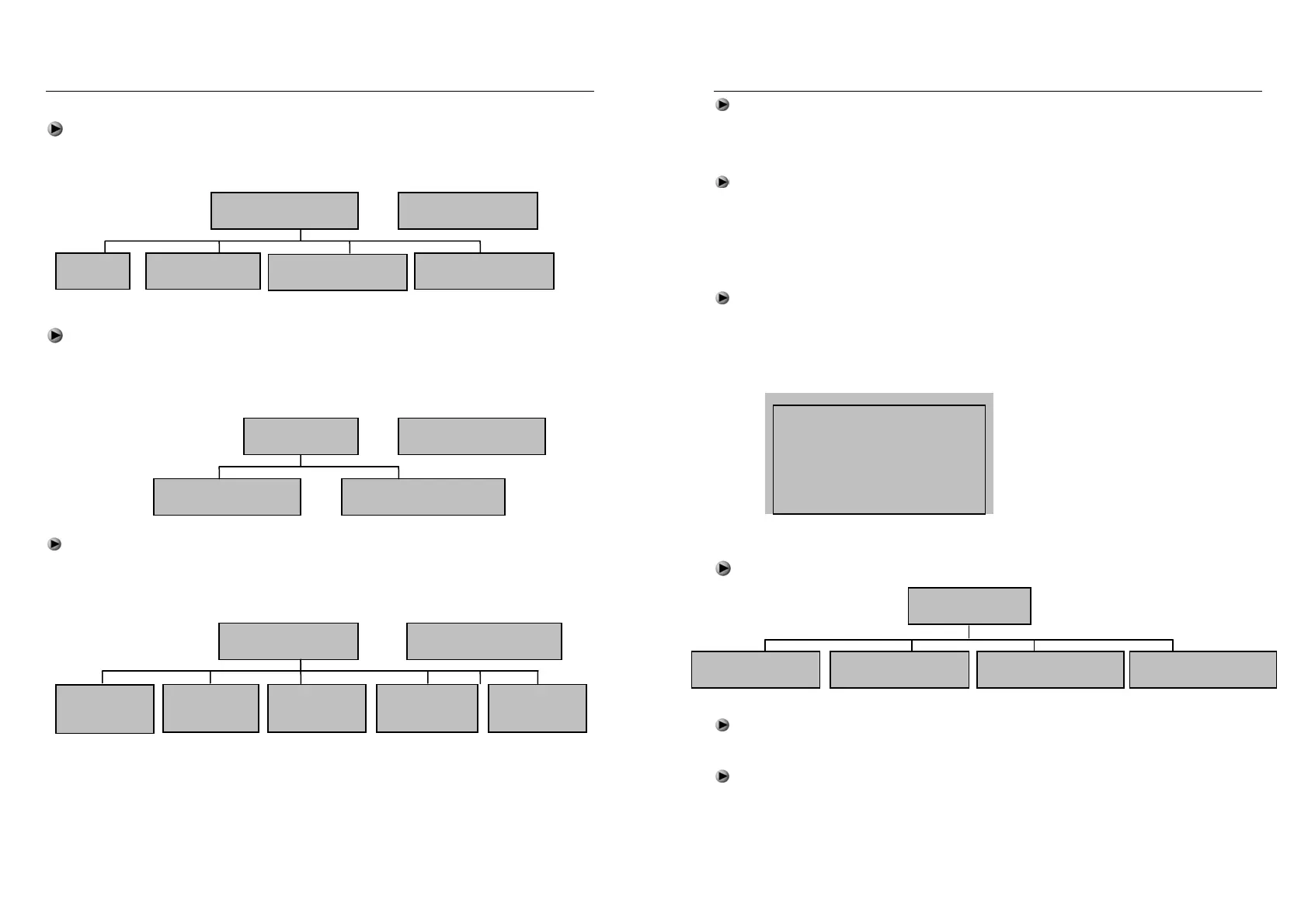
Select “Register User” in the level-1, there consist of 4 items, included
“User”, “Manager”, “Security Level” and “USB Upload”
Select the registration level of “User” or “Manager”, and press OK, which will
have 2 items as below. “New Register” for the registration of new users,
“Backup Register” for registers backup data.
Select “New Register” or “ Backup Register”, then the screen options will as
below, selected the corresponding mode and according to screen display, then
could completed Registered User.
(Remark: The function of register manager and register user, register ID card
depending on whch specific models. Backup registration means to be a
registered user to register his/her second & third fingerprint or password or ID
card )
1. New Register
1. Register
Fingerpri
Register Mode
2. Register
Password
3. Register
ID Card
4. Fingerprint
+ password
5. Fingerprint
+ ID Card
1. User
1. New Register 2. Backup Register
Register Mode
1. Register User
1. User 2. Manager
3. Security Level
4. USB Upload
Select Level
Targetmax® V.2.0 Attendance System Hardware Suite Guide
16
The item “Security Level” - 1:1 user settings level calibrator and 1:N
identification accuracy, the higher value of setup, the more precise identification
of the use of the process compared to.
USB upload
Backup data can be uploaded to the machine by those with USB interface
function.
10.2.2 Delete User Menu
Select “Delete User” in the level-1 and press OK key or directly press
numbers keys “2” to enter the delete user menu. Using number key or “▲”“▼”
key to input which Register number has to be deleted, press OK to confirm data
delete.
10.2.3 Data Download Menu
Select “Data download” in level-1, there consist of 4 items as below:
USB Download – can download the register data and attendance records.
(This function depends on specific models)
RS232 Download - used to set the communication speed between the
machine and computer. Can select the speed after connection.
Delete User
Register No:00000001
Exit -ESC Yes -OK
Data Download
USB Download RS232 Download RS485 Download Ethernet Download


 To Next Page